Key Takeaways
OrigineTV is the best overall fit because its plan page explicitly lists MAG access, publishes clear prices, and offers a useful trial. USA LIVE IPTV is strongest for US local channels and has the clearest MAG setup guide. Tellystudio is the easiest low-commitment choice, combining a free day with a $15 monthly plan and native portal instructions. Every recommendation still needs a trial on the exact box and home network.
A MAG box is not an Android streaming stick with a different badge. Most Linux-based Infomir models load a Stalker or Ministra portal, authenticate through the box MAC address, and rely on the provider to deliver the interface, channel list, EPG, and VOD catalogue. That makes portal support more important than an enormous advertised channel count.
I compared nine active services that currently show MAG or portal compatibility, checked their public plans on 27 August 2026, and measured them against Infomir documentation for older MAG 254/322 hardware and newer 4K models. This guide explains who supplies a real portal, what each plan costs, which claims require a trial, how to protect the device MAC, and what to fix when “Loading portal” never finishes.
Best IPTV for MAG Box Providers Ranked
Start with these 9 MAG Box picks and their standout points, then compare the table and full reviews for pricing, trial terms, and setup.
- OrigineTV: OrigineTV earns the first position because its official plan pages explicitly list “M3U – MAG,” rather than hiding MAG support inside a generic all-devices claim.
- USA LIVE IPTV: USA LIVE IPTV is the strongest US-focused option here and directly names MAG boxes on its device page.
- Tellystudio: Tellystudio publishes a MAG-specific installation route instead of steering Linux-box owners toward Android apps.
- StreamingNordic IPTV: StreamingNordic IPTV explicitly lists MAG 254, 322, 424, and 524 among supported boxes.
- IPTV Harmony: IPTV Harmony says its subscriptions run on MAG boxes through portals or M3U formats, and its tutorials distinguish device-specific setup from ordinary player apps.
- SofaIPTV: SofaIPTV includes MAG Box and Formuler in its device table and identifies the native-player setup as portal URL entry.
- iScreenHD IPTV: iScreenHD directly names MAG Box in its compatibility list and tells MAG customers to send the device MAC address before receiving a portal link.
- IPVision UK: IPVision UK focuses on British and European viewing, publishing more than 40,000 live channels, 150,000 VOD titles, 4K and HD streams, a full EPG, seven-day catch-up, UK-based servers, and one- to three-connection plans.
- FlashLine IPTV: FlashLine IPTV is a French-language choice that lists MAG compatibility across current subscription pages.
Top 9 Editor Picks for Best IPTV for MAG Box
| Provider | MAG evidence | Channels | Trial | Link |
|---|---|---|---|---|
| OrigineTV | Portal / MAG listed | 55,000+ | 24 hours | Visit |
| USA LIVE IPTV | Portal / MAG listed | 20,000+ | 30-day refund | Visit |
| Tellystudio | Portal / MAG listed | 30,000+ | 1 day free | Visit |
| StreamingNordic IPTV | Portal / MAG listed | 20,000+ | 24 hours | Visit |
| IPTV Harmony | Portal / MAG listed | 55,000+ | 24 hours | Visit |
| SofaIPTV | MAG or portal setup discussed | 45,000+ | 24 hours advertised | Visit |
| iScreenHD IPTV | MAG or portal setup discussed | 15,000+ | 36 hour advertised | Visit |
| IPVision UK | MAG or portal setup discussed | 40,000+ | 24 hour advertised | Visit |
| FlashLine IPTV | MAG or portal setup discussed | 40,000+ | 24 hour advertised | Visit |
Best IPTV for MAG Box Reviews
These nine active providers are ranked for MAG use specifically. Every block separates published facts from points that should be confirmed during a trial.
1) OrigineTV
OrigineTV earns the first position because its official plan pages explicitly list “M3U – MAG,” rather than hiding MAG support inside a generic all-devices claim. The service advertises 55,000-plus live channels, 270,000 on-demand titles, EPG, catch-up, backup servers, and streams up to 4K Ultra HD.
For a MAG owner, the useful advantage is portal readiness combined with a 24-hour trial and clearly published euro pricing. I ranked it first because the portal evidence, trial window, and one-connection terms are easier to verify before sending a device MAC address or buying a long plan.
Features
- MAG support: The official offer names MAG alongside M3U, providing stronger compatibility evidence than a vague claim that every streaming device works.
- Catalogue: The provider advertises more than 55,000 live channels and 270,000 VOD titles, with regional groups that reduce remote-control scrolling.
- Portal features: EPG, catch-up, weekly updates, and backup servers are included, although availability still depends on the selected channel and portal build.
- Picture quality: 4K and Ultra HD streams are listed, while older MAG models should use HD or HEVC groups their decoders can handle.
- Trial: A 24-hour test gives enough time to check first portal load, guide population, channel switching, and one busy evening before payment.
- Connections: Standard plans cover one simultaneous stream; two-connection packages cost more and should be confirmed when registering separate MAG devices.
- My take: This is the most balanced MAG choice because portal support, current prices, and a meaningful trial are all visible before checkout.
Pros
- MAG support stated on the official plan page.
- Large channel and VOD figures.
- EPG, catch-up, and backup servers included.
- Twenty-four-hour trial available.
- Clear one- and two-connection pricing.
Cons
- Catalogue totals are provider-reported.
- Standard package permits one stream.
- Lifetime plans carry long-term service risk.
Pricing
Checked against current public pages on 27 August 2026.
- Short Plans: €34.99 for three months and €48.99 for six months on one connection.
- Long Plans: €67.99 for twelve months or €99.99 for the advertised lifetime package.
- Trial & Refund Policy: Twenty-four-hour trial; confirm the current refund terms before checkout.
2) USA LIVE IPTV
USA LIVE IPTV is the strongest US-focused option here and directly names MAG boxes on its device page. A separate MAG tutorial explains the real workflow: send the box MAC address, enter the supplied Portal 1 URL under Servers, save it, and restart the portal after registration.
The service advertises 20,000-plus channels, 136,000-plus VOD titles, US local stations, EPG, catch-up, and 4K groups. I placed it second because its MAG instructions are unusually specific, though there is no headline free trial and the shortest public plan begins at three months.
Features
- Native setup: The official MAG guide covers MAC registration, Portal 1 naming, portal URL entry, time-server settings, and the final portal restart.
- US coverage: More than 2,700 advertised local and regional feeds make this particularly relevant for American news, sport, and network viewers.
- Guide tools: EPG and catch-up are included, giving the portal a cable-like schedule and replay options where individual channels support them.
- Connection policy: Base pricing covers one stream, while separate multi-device plans support additional simultaneous connections without advertised IP locking.
- Buyer protection: A 30-day money-back guarantee replaces a public free trial, so customers should read eligibility details before relying on it.
- Long terms: One- and two-year offers reduce the monthly cost, but a three-month plan is safer for a first MAG portal evaluation.
- My take: Choose this for US locals and documented setup help, but start with the shortest term because the guarantee has more conditions than a trial.
Pros
- Dedicated MAG setup tutorial.
- Strong US local-channel focus.
- EPG and catch-up included.
- Multi-connection packages available.
- Thirty-day money-back guarantee advertised.
Cons
- No prominent free trial.
- Public entry term is three months.
- Large totals are self-reported.
Pricing
Checked against current public pages on 27 August 2026.
- Quarterly Plan: $49.96 billed for three months on one connection.
- Long Plans: $95.98 for one year or $139.98 for two years at current promotional pricing.
- Trial & Refund Policy: No public free trial; a 30-day money-back guarantee is advertised.
3) Tellystudio
Tellystudio publishes a MAG-specific installation route instead of steering Linux-box owners toward Android apps. Its guide recommends Ethernet, then directs users through Settings, System Settings, Servers, and Portals before entering the unique portal URL delivered in the activation email and rebooting the device for reliable activation.
The service advertises more than 30,000 live channels, 157,000 VOD titles, EPG, and quality tiers through 4K and 8K. I ranked it third because the free one-day access and $15 monthly plan make compatibility cheaper to verify than providers demanding a quarterly commitment.
Features
- Installation guide: Official instructions cover the full MAG portal path and explicitly recommend wired Ethernet before registration, reducing common first-boot confusion.
- Free access: A one-day, one-connection trial is listed at zero cost and provides the complete catalogue rather than a limited demonstration lineup.
- Short commitment: Monthly billing is available, which lowers the risk when testing an older MAG 254, 256, or 322 with uncertain firmware compatibility.
- Guide data: An electronic programme guide is included, but users should verify local channel mapping and time-zone alignment during the trial.
- Catalogue: Published figures list 30,000-plus channels and 157,000 VOD items across SD, HD, Full HD, and higher-resolution groups.
- Support: Twenty-four-hour assistance is advertised for setup, billing, and technical issues, useful when a MAC must be provisioned on the provider side.
- My take: The combination of a real MAG walkthrough, free day, and monthly plan makes this the easiest low-commitment place to begin.
Pros
- MAG portal steps published.
- Free one-day trial.
- Monthly plan available.
- EPG and broad quality tiers.
- Twenty-four-hour setup assistance advertised.
Cons
- Activation may take one to two hours.
- 8K claims exceed most MAG hardware.
- Catalogue figures are not independently audited.
Pricing
Checked against current public pages on 27 August 2026.
- Monthly Plan: $15 for thirty days on one connection.
- Long Plans: $35 for ninety days, $65 for 180 days, and $95 yearly.
- Trial & Refund Policy: One-day free trial; confirm refund eligibility before purchasing.
4) StreamingNordic IPTV
StreamingNordic IPTV explicitly lists MAG 254, 322, 424, and 524 among supported boxes. The current site advertises more than 20,000 channels, 62,000 movies, 8,500 series, EPG, catch-up, and packages aimed at households needing two, four, or six simultaneous connections.
That model is useful when the MAG box is one screen in a larger home, but each physical portal still needs correct provisioning. I placed it fourth because the free 24-hour trial and multi-connection terms are strong, while the public pricing interface does not show every duration equally clearly.
Features
- Model list: MAG 254, 322, 424, and 524 are named directly, covering popular legacy, HD, and 4K generations rather than only current hardware.
- Nordic focus: Scandinavian channels sit alongside international content, making the service more relevant for Nordic households than a generic worldwide catalogue.
- Household plans: Packages advertise two, four, or six simultaneous connections, though every MAG MAC address should be registered and tested separately.
- Portal extras: EPG and catch-up are included, with actual replay duration and channel coverage best confirmed during the free access period.
- Trial: Twenty-four hours of full access requires no advertised credit card, enough to test guide accuracy and peak-hour sports on the target box.
- Entry price: Public copy says plans start at $15 monthly, while visible multi-screen offers vary by duration and number of active connections.
- My take: This fits multi-screen or Nordic homes best, provided support confirms that every intended MAG can receive its own portal activation.
Pros
- Specific MAG models listed.
- Free 24-hour trial.
- Nordic and worldwide coverage.
- Multi-connection plans available.
- EPG and catch-up included.
Cons
- Pricing interface is inconsistent.
- Most plans emphasize multiple devices.
- Library totals remain provider claims.
Pricing
Checked against current public pages on 27 August 2026.
- Entry Plan: The official site states pricing starts at $15 per month.
- Multi-Screen Plan: Two devices cost $40 for three months; larger bundles are also listed.
- Trial & Refund Policy: Free 24-hour trial; confirm refund terms and MAG provisioning before payment.
5) IPTV Harmony
IPTV Harmony says its subscriptions run on MAG boxes through portals or M3U formats, and its tutorials distinguish device-specific setup from ordinary player apps. Current plan pages advertise 55,000 live channels, 250,000 on-demand titles, EPG, weekly updates, VPN support, and installation assistance.
The 24-hour free trial is the right place to confirm that support issues a true Stalker or Ministra portal rather than only generic credentials. I ranked it fifth because pricing is clear and MAG compatibility is documented, while the service is less specifically focused on English-speaking regions than the leaders.
Features
- Portal evidence: Tutorials state that subscriptions run on MAG boxes through portal access, giving buyers a concrete format to request before checkout.
- Free trial: A 24-hour option costs nothing, while a seven-day extended test is available for buyers needing more than one peak evening.
- EPG support: Programme-guide data and weekly updates are included, but local mapping and daylight-saving offsets should be checked on the actual portal.
- Device switching: The service permits switching between compatible devices, although one account still represents one simultaneous stream unless upgraded.
- Assisted setup: Free installation help is advertised, which matters because a MAG portal requires server-side MAC registration before the box can authenticate.
- Catalogue: Published totals reach 55,000 live channels and 250,000 VOD items, with quality groups ranging from HD to 4K.
- My take: Clear terms and a longer paid test make this sensible for cautious buyers who want support available during portal setup.
Pros
- MAG portal compatibility documented.
- Free 24-hour trial.
- Seven-day extended trial available.
- Clear euro pricing.
- Installation assistance included.
Cons
- One account means one stream.
- Regional focus is less explicit.
- Headline totals are self-reported.
Pricing
Checked against current public pages on 27 August 2026.
- Short Plans: €34.99 for three months and €48.99 for six months.
- Annual Plan: €64.99 for twelve months on one account.
- Trial & Refund Policy: Twenty-four hours free or seven days for €9.99; confirm refund terms.
6) SofaIPTV
SofaIPTV includes MAG Box and Formuler in its device table and identifies the native-player setup as portal URL entry. It advertises 45,000-plus international channels, more than 400,000 movies and shows, 4K quality, EPG, catch-up, and one- to four-device package options.
The trial page mixes “free” wording with a note about a small upfront fee, so buyers should confirm the actual charge before starting. I placed SofaIPTV sixth because its MAG route is visible and annual pricing is competitive, but the trial language and catalogue totals need cautious reading.
Features
- MAG route: The device table tells MAG and Formuler owners to use the native player and enter a portal URL, not install Android software.
- Plan choice: Packages can cover one through four devices, but buyers must confirm whether additional MAG portals are provisioned under the same order.
- EPG and catch-up: Both features appear across plans, making the service more useful than a bare channel list when the provider maps data correctly.
- Trial wording: Access lasts 24 hours, yet the current page mentions an upfront trial fee despite repeatedly using free-trial language elsewhere.
- Picture tiers: 4K, UHD, and HD groups are advertised, while MAG 322-class hardware should stay with compatible HD or HEVC streams.
- Annual value: Twelve months costs substantially less per month than shorter terms, but a brief test should come before any annual commitment.
- My take: The native MAG pathway is promising, though the inconsistent trial wording should be resolved with support before sharing payment details.
Pros
- MAG native-player route listed.
- EPG and catch-up included.
- Several device-count options.
- Competitive annual pricing.
- Large international catalogue advertised.
Cons
- Trial may require a fee.
- Catalogue figures look unusually large.
- Portal limits need confirmation.
Pricing
Checked against current public pages on 27 August 2026.
- Short Plans: $29 for three months and $44 for six months on one device.
- Annual Plan: $65 for twelve months at the current advertised offer.
- Trial & Refund Policy: A 24-hour trial is marketed; confirm its fee and refund rules first.
7) iScreenHD IPTV
iScreenHD directly names MAG Box in its compatibility list and tells MAG customers to send the device MAC address before receiving a portal link. Its current pricing page lists 15,000-plus channels, premium VOD, 4K, Full HD, EPG, multi-device packages, and a 36-hour free trial.
A valuable warning is that channel totals vary across the site, with the homepage showing higher figures than the plans. I ranked it seventh because the trial and portal instructions are useful, but buyers should judge the received lineup rather than relying on inconsistent headline numbers.
Features
- Activation method: The tutorial requires customers to send the MAG MAC address, then enter the portal link supplied after activation and payment.
- Long trial: Thirty-six hours provides more useful testing time than a one-day window, especially for evening sport and next-day EPG checks.
- Multi-device tiers: Pricing covers one to five simultaneous devices, although separate MAG portals and MAC registrations should be confirmed before purchase.
- EPG: The guide is included and the company claims ongoing updates, so users should verify local programme times, gaps, and channel logos.
- Pricing clarity: Monthly through two-year prices are visible by device count, making the cost of additional household screens easier to compare.
- Claim mismatch: Different pages display different channel totals, which is exactly why the trial lineup should take priority over marketing figures.
- My take: Use the generous trial to audit the real portal, because the setup is credible but the changing catalogue count deserves caution.
Pros
- MAG activation steps published.
- Free 36-hour trial.
- One- to five-device pricing.
- EPG and 4K tiers included.
- Multiple payment methods listed.
Cons
- Channel totals conflict across pages.
- Separate MAC provisioning may be required.
- Refund window varies by term.
Pricing
Checked against current public pages on 27 August 2026.
- Short Plans: $14.99 monthly, $29.99 for three months, and $49.99 for six months.
- Long Plans: $89.99 yearly or $159.99 for two years on one device.
- Trial & Refund Policy: Free 36-hour trial; refund windows vary by plan length.
8) IPVision UK
IPVision UK focuses on British and European viewing, publishing more than 40,000 live channels, 150,000 VOD titles, 4K and HD streams, a full EPG, seven-day catch-up, UK-based servers, and one- to three-connection plans. MAG support appears in current compatibility coverage for the service.
The free 24-hour trial and monthly £14.99 option make it possible to verify portal delivery without taking an annual risk. I placed it eighth because its public setup material emphasises app devices more than MAG-specific steps, so support confirmation should precede any order for a Linux box.
Features
- UK content: British sport, free-to-air channels, and European groups are the main draw for households prioritising a UK rather than worldwide lineup.
- Trial: A free 24-hour test needs no advertised payment details and should be requested specifically as MAG portal access, not ordinary Xtream credentials.
- Catch-up: Seven-day replay is advertised across major UK channels, though portal implementation and rights can vary by individual feed and programme.
- Flexible screens: Packages support one, two, or three connections, with clear pricing by term and household size rather than hidden upgrade charges.
- Refund period: A 30-day money-back guarantee is advertised, but trial performance remains the safer buying signal than relying on a later claim.
- Server location: UK-based infrastructure may help British viewers, while customers farther away should test latency and channel switching from their own network.
- My take: This is a practical UK-focused option when support confirms a genuine portal URL and registers the MAG before the trial begins.
Pros
- Strong UK and Europe focus.
- Free 24-hour trial.
- Monthly plan available.
- One to three connections.
- Thirty-day guarantee advertised.
Cons
- Few MAG-specific public instructions.
- Best fit is UK-centric.
- Catalogue totals are provider claims.
Pricing
Checked against current public pages on 27 August 2026.
- Short Plans: £14.99 monthly, £24.99 for three months, and £34.99 for six months.
- Annual Plan: £54.99 yearly on one connection; larger packages cost more.
- Trial & Refund Policy: Free 24-hour trial and an advertised 30-day money-back guarantee.
9) FlashLine IPTV
FlashLine IPTV is a French-language choice that lists MAG compatibility across current subscription pages. The service advertises more than 40,000 live channels, 55,000 VOD titles, several SD-to-4K quality tiers, EPG on higher plans, seven-day support, immediate activation, and a free 24-hour test.
Its tier system matters on MAG because the cheapest Basic package omits EPG, while Ultraflash and higher plans include the guide. I ranked it ninth because the service can fit Francophone homes, but buyers must compare features carefully instead of assuming every tier delivers the same portal experience.
Features
- MAG compatibility: Current plan pages name MAG among supported devices, but customers should still request portal credentials explicitly before completing an order.
- Tier differences: Basic omits EPG, while Ultraflash, Ultraluxe, and Superflash add guide data and progressively more playback or privacy features.
- Free test: A 24-hour trial provides the full service for evaluation and may take up to two hours to activate after the request.
- Francophone focus: French, Belgian, Swiss, and international channel groups make this more relevant to Francophone viewers than a US-heavy service.
- Picture formats: HEVC appears on lower plans, while 4K UHD is reserved for the top package and still requires compatible MAG hardware.
- Refund promise: Seven days is advertised for paid plans, with card and PayPal options listed and support available throughout the week.
- My take: The Ultraflash tier is the practical starting point because a MAG portal without EPG loses much of its television-like advantage.
Pros
- MAG compatibility stated.
- Free 24-hour test.
- Francophone channel focus.
- Multiple quality and feature tiers.
- Seven-day refund advertised.
Cons
- Basic package lacks EPG.
- Pricing structure is complicated.
- 4K requires the highest tier.
Pricing
Checked against current public pages on 27 August 2026.
- Short Plans: Three-month packages start around €33, depending on the selected feature tier.
- Annual Plans: Current twelve-month tiers range from €52 to €113.
- Trial & Refund Policy: Free 24-hour test and an advertised seven-day refund window.
How MAG Portal Access Changes the Buying Decision
A native MAG subscription is not simply an M3U playlist with a shorter login. The provider registers the set-top box MAC address, serves a Stalker or Ministra portal, and controls much of the guide and interface. Confirm the exact delivery format before paying, because generic credentials may not load in the built-in portal.
- Ask for portal access: Request a Stalker, Ministra, or MAG portal URL and state the exact model before ordering.
- Confirm the MAC limit: One connection does not automatically mean the provider will activate multiple physical MAG addresses.
- Check Portal 1 and 2: Many models store two portal URLs, but each service must separately register the device.
- Expect provider-controlled EPG: Unlike flexible app players, a native portal often leaves little control over guide sources and channel grouping.
Portal proof should appear before payment; “works on all devices” is not enough for a Linux MAG box.
How We Evaluated IPTV for MAG Box
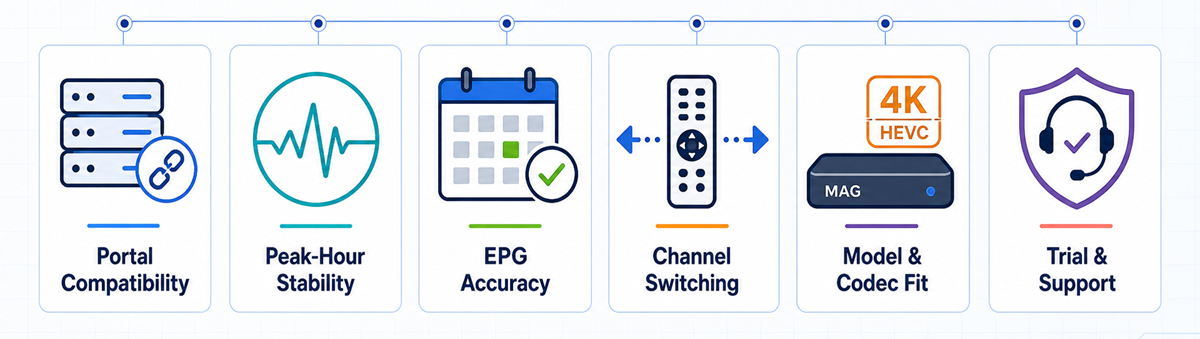
The ranking uses evidence that matters on a portal-based set-top box: provider documentation, current checkout prices, trial terms, and compatibility with Infomir’s published hardware capabilities. Advertised catalogue and uptime numbers are treated as claims, not laboratory results. Each service was scored using the same six checks below.
- Portal compatibility: A MAG, Stalker, Ministra, or server-side MAC activation page had to be visible in current provider material.
- Peak-hour stability: Trial length, backup-server claims, and refund terms were weighed as ways for buyers to verify busy-evening playback.
- EPG accuracy: The guide, catch-up support, time-zone handling, and the risk of missing programme data received separate attention.
- Channel switching: Portal organisation, remote-friendly navigation, and realistic catalogue groups mattered more than inflated headline totals.
- Model and codec fit: Service quality tiers were compared with official MAG output, HEVC, Ethernet, and Wi-Fi capabilities.
- Trial and support: Free access, monthly terms, setup help, refunds, and transparent device limits improved a provider’s position.
Some links are sponsored, so the site may earn a commission without increasing your price. Rankings still prioritise verifiable MAG compatibility and buyer protection.
Which MAG Models Can Handle HD, HEVC and 4K
Infomir’s specifications show why the same subscription behaves differently across generations. MAG 322-class boxes have modest memory and target HD playback, although HEVC support reduces bandwidth. MAG 524 and newer Linux models add 2160p output, stronger processors, and modern codec support. A provider cannot turn old hardware into a 4K decoder.
- MAG 250/254/256: Treat these as legacy boxes and test standard-definition or HD groups before considering a long subscription.
- MAG 322/324: HEVC support helps bandwidth, but large portals and demanding interfaces can still feel slow on limited memory.
- MAG 420/424: These models suit newer portals and higher resolutions, provided firmware and middleware versions remain compatible.
- MAG 524/540/544: Current 4K-capable Linux boxes are the safer match for HEVC, HDR, and high-resolution sports streams.
For broader hardware trade-offs, compare the site’s guide to IPTV boxes before replacing a working MAG.
MAG Box Setup: Portal URL and MAC Registration
The official Infomir route is consistent across many Linux models: open the Embedded Portal settings, choose System Settings, then Servers and Portals. The provider must register the MAC before the external portal can authenticate. Do not assume a copied M3U or Xtream Codes login belongs in the Portal 1 URL field.
- Record the box details: Note the exact MAG model, firmware version, and wired-network MAC shown in System Information.
- Request activation: Send the MAC privately to the chosen provider and ask for the complete MAG portal URL.
- Open Portals: Navigate to Settings → System Settings → Servers → Portals using the Setup button on the remote.
- Enter Portal 1: Add a short name and type the supplied URL exactly, preserving its protocol, port, path, and trailing characters.
- Save and restart: Confirm the values, exit settings, choose Restart Portal, and allow the first EPG load to finish.
- Run a real trial: Test favourite channels, VOD, subtitles, catch-up, and peak-hour sport before buying a longer term.
Never publish the MAC address in a forum or screenshot; it functions as an account identifier in many portal systems.
Why MAG IPTV Buffers and What to Fix First
Buffering is not automatically a provider failure, and a speed-test headline does not prove consistent streaming. Start with the local link, then the portal, then the channel source. Changing several settings at once hides the cause. The sequence below isolates the most common MAG-specific problems without factory-resetting a working box unnecessarily.
- Use Ethernet first: A wired cable removes Wi-Fi loss and is the cleanest baseline for portal loading and live sport.
- Recheck the portal URL: One missing character, space, wrong port, or expired server address can leave the loader spinning indefinitely.
- Confirm MAC registration: Ask support to read back the registered address instead of repeatedly entering the same URL.
- Match the stream group: Older boxes may stutter on unsupported 4K, high-frame-rate, or codec variants despite adequate broadband.
- Test another channel: One broken feed points to the source; widespread failures suggest the portal, account, or network path.
Escalate with the model, firmware, channel name, time, and error message so support receives evidence rather than “it buffers.”
Privacy, Licensing and Safer MAG Box Sign-Up
IPTV is a delivery technology, but a provider still needs rights to distribute the channels it sells. Enormous catalogues, premium networks, and lifetime access at implausibly low prices deserve scrutiny. MAG activation adds another consideration: the hardware MAC becomes part of the account, so it should be shared only through the provider’s verified support channel.
- Verify the operator: Check company identity, contact details, terms, payment descriptor, and content-licensing claims before sending money or device information.
- Start short: A free trial or monthly plan limits exposure if the portal disappears, becomes overloaded, or loses important channels.
- Protect the MAC: Avoid public screenshots, marketplace comments, and unencrypted group chats containing the full device identifier.
- Read refund conditions: “Money back” may exclude activated accounts, temporary channel failures, or customers who did not complete troubleshooting.
A reliable setup begins with authorised content, transparent terms, and a test—not with the biggest number on a sales page.
Final Verdict
The best IPTV for a MAG box is the service that proves it can issue a real portal, register the correct MAC, populate an accurate guide, and stay usable on the exact model you own. Portal compatibility comes before channel count, while a trial matters more than an uptime promise. Check the box generation, connect by Ethernet, test the busiest viewing period, and refuse to prepay for a long term until the EPG, VOD, subtitles, catch-up, and favourite channels work. The strongest options above make those checks easier through documented MAG support, visible pricing, and practical buyer protection.
Top 3 Recommended IPTV Services for MAG Box
- OrigineTV: Best overall balance of portal proof, transparent pricing, and trial access.
- USA LIVE IPTV: Best for US locals with a detailed native MAG setup guide.
- Tellystudio: Best low-commitment option with free access and monthly billing.
FAQs
What is the best IPTV for MAG Box?
OrigineTV ranks first because its plans explicitly mention MAG access, pricing is visible, and a 24-hour trial is available. USA LIVE IPTV is stronger for US local channels, while Tellystudio offers an easy monthly entry. Always test the exact MAG model before buying long term.
Does a MAG box use M3U or a portal URL?
Linux MAG boxes primarily use a Stalker or Ministra portal URL tied to the device MAC address. Some models can open M3U playlists through Home Media, but M3U and portal credentials are not interchangeable. Ask the provider specifically for MAG portal activation.
Can I install TiviMate or IPTV Smarters on a MAG box?
Usually not on Linux-based MAG models because they do not run Android or provide the Google Play Store. Android MAG variants are different. If installing apps matters, compare current IPTV apps and consider an Android TV device rather than forcing Android instructions onto Linux firmware.
Which MAG boxes support 4K IPTV?
MAG 349, 351, 410, 420, 424, 520-series, 524, 540, and 544 families include 4K-capable variants, but output and codec support vary. Infomir lists MAG 524 at up to 2160p and 60 fps for supported HEVC content. Verify the exact model specification.
How do I add an IPTV portal to a MAG box?
Open Settings or press Setup, choose System Settings, then Servers and Portals. Enter the name and complete URL under Portal 1, save, and restart the portal. The provider must register the device MAC first. Menu wording can differ by model, firmware, or an operator-customised image.
Why does my MAG box say portal not available?
Common causes are an incorrect or unregistered MAC, mistyped URL, expired account, offline portal, network failure, or incompatible firmware. Use Ethernet, compare every URL character, ask support to confirm the MAC, and test other network services before resetting the box.
Can one IPTV subscription work on two MAG boxes?
Only if the provider sells two simultaneous connections and provisions both MAC addresses. Installing credentials on several devices is not the same as watching concurrently. Ask how many MAG portals the plan includes and whether switching a registered MAC requires support or a fee.
How fast should my internet be for MAG IPTV?
A stable 10 Mbps connection is a practical HD baseline, while 25 Mbps or more leaves headroom for 4K. Consistency matters more than peak speed. Ethernet, low packet loss, and a nearby server can improve playback more than faster service over weak Wi-Fi.
Is IPTV on a MAG box legal?
The device and IPTV technology are legal. Legality depends on whether the service may distribute its channels and on local law. A MAG box does not make an unauthorised stream lawful. Prefer transparent, licensed services and avoid premium packages without credible rights information.