Key Takeaways
For most 4K buyers, three services led this comparison. OrigineTV pairs the largest published catalog with 4K streaming and a built-in VPN. Stream IPTV 4K stands out for genuine UHD focus, five simultaneous connections, and a browser web player. iScreenHD IPTV adds up to 4K across a deep 133,000+-title VOD library with a low lifetime price. All three publish clear pricing and support the devices most households already use for Ultra HD.
Shopping for a 4K IPTV service is trickier than it sounds. Almost every provider slaps “4K” and “UHD” on the homepage, yet the number of channels that genuinely stream in 2160p — and hold that quality during a busy evening — varies enormously. This guide is for buyers who own a 4K TV or streaming stick and want real Ultra HD picture, not an upscaled 1080p feed dressed up as 4K.
I compared the strongest active providers on the details that actually decide 4K quality: how much of the lineup is true UHD, the bitrate and anti-freeze handling behind it, device support for 4K playback, trial terms, and price. Below you will find a quick verdict, a comparison table, full reviews of five sponsored services plus three trusted free player apps, and answers to the questions buyers ask before paying.
Best 4K IPTV Services Ranked
Start with these 8 4K picks and their standout points, then compare the table and full reviews for pricing, trial terms, and setup.
- OrigineTV: OrigineTV is a Europe-focused provider built around a very large catalog, and it carries that scale into 4K.
- Stream IPTV 4K: Stream IPTV 4K leads with resolution in its very name, advertising more than 20,000 worldwide channels in 4K alongside a large on-demand library and country-by-country channel lists.
- USA LIVE IPTV: USA LIVE IPTV is built for American viewers, pairing more than 20,000 local and international channels with over 2,700 US local and regional feeds.
- Tellystudio: Tellystudio blends live TV and a large on-demand library, advertising more than 30,000 channels and around 157,000 VOD titles in HD and 4K.
- iScreenHD IPTV: iScreenHD IPTV is a practical match for large-screen viewers who care about real high-resolution feeds.
- TiviMate: TiviMate is not an IPTV service but the player many 4K subscribers pair with one, and it is widely regarded as the most polished IPTV app on Android TV and Fire TV.
- Kodi: Kodi is a free, open-source media centre that doubles as a capable IPTV front end through its PVR IPTV Simple Client add-on.
- VLC Media Player: VLC is the universal free media player, and it doubles as a no-frills way to open an IPTV M3U playlist on practically any device.
Top 8 Picks for the Best 4K IPTV Service
| Name | No. of Channels | VOD | Free Trial | Link |
|---|---|---|---|---|
| OrigineTV | 55,000+ | 270,000+ | 24-hour, free | Visit |
| Stream IPTV 4K | 20,000+ | 80,000+ | 36-hour, free | Visit |
| USA LIVE IPTV | 20,000+ | 136,000+ | 30-day refund | Visit |
| Tellystudio | 30,000+ | 157,000+ | 1-day, free | Visit |
| iScreenHD IPTV | 35,000+ | 158,000+ | 30-day, free | Visit |
| TiviMate | Separate IPTV service required | Provider library required | App tier or licence applies | Visit |
| Kodi | Separate IPTV service required | Provider library required | Free app; no trial needed | Visit |
| VLC Media Player | Separate IPTV service required | Provider library required | Free app; no trial needed | Visit |
How I Tested These 4K IPTV Services
Resolution badges should not be taken at face value, because almost every provider now labels itself 4K whether or not its streams truly reach that quality. For each service I opened the live website, recorded the exact Ultra HD tiers and figures it publishes, and weighed those claims against the practical factors that decide whether a 4K stream stays watchable through a busy evening. The criteria below stayed identical for every entry, keeping this comparison fair.
- UHD share: How much of each lineup genuinely runs in true 4K or UHD rather than only SD and HD, since a token Ultra HD channel means little.
- Bitrate stability: The anti-freeze handling and stated bitrate, since a 4K stream is the first thing to collapse when a shared server becomes overloaded at peak times.
- Device support: Genuine 4K playback across Smart TVs, Fire TV sticks, and set-top boxes, since even the best stream stutters on hardware that cannot decode Ultra HD.
- Risk terms: Every free trial or money-back window, because testing true 4K quality on your own connection at low risk beats any confident marketing promise every time.
Disclaimer: This article contains sponsored and affiliate links, meaning we may earn a commission if you subscribe, at no extra cost to you. We do not host or distribute content. Always confirm a provider’s licensing and legality in your country before subscribing. Features, pricing, and availability can change at any time.
Best 4K IPTV Services Reviewed
1) OrigineTV
OrigineTV is a Europe-focused provider built around a very large catalog, and it carries that scale into 4K. It lists more than 55,000 live channels and over 270,000 on-demand titles in up to Ultra HD, with sports, movies, and international content in one package.
Setup runs through emailed credentials, and a bundled VPN adds privacy for UHD streaming on any network. I found the pricing clearly listed, though a single subscription plays on one screen at a time, which matters if several 4K TVs share the house.
Features
- Huge 4K catalog: More than 55,000 live channels plus 270,000 on-demand titles are advertised in up to 4K, giving Ultra HD households one of the deepest libraries here.
- Stable UHD bitrate: The 4K streams use a stable-bitrate setup designed to hold quality on fast wired connections without collapsing mid-stream during peak evening viewing hours.
- Built-in VPN: A VPN is bundled with every subscription, adding privacy and bypassing local network blocks on 4K feeds without paying extra for a separate third-party service.
- Broad 4K devices: Windows, macOS, iOS, Android, Apple TV, Samsung Smart TVs, Fire Stick, and Chromecast are supported, covering nearly every UHD-capable device a home already owns.
- EPG and catch-up: A built-in electronic guide and catch-up window make it easier to plan Ultra HD viewing and rewatch shows you missed earlier in the week.
- Flexible terms: Plans run from three months up to a lifetime option with no auto-renewal on file, which lowers commitment while I test 4K stability over time.
- International UHD: Broad multi-region coverage suits buyers who want Ultra HD sports and entertainment from several countries at once rather than a single local lineup padded with filler.
Pros
- Largest published channel and VOD catalog in this 4K roundup.
- Free 24-hour trial with no payment details required.
- Built-in VPN not found on every rival.
- Broad UHD device and player support.
- Clear no-contract pricing with a lifetime option.
Cons
- One subscription plays on a single screen at a time.
- Refund terms sit on a separate policy page.
- Catalog size is self-reported and unverified.
Pricing
OrigineTV publishes euro pricing across short and long terms.
- 3 Months: €34.99
- 12 Months: €67.99
- Lifetime: €99.99 | Trial: 24-hour free (WhatsApp) | Refund: check official site
2) Stream IPTV 4K
Stream IPTV 4K leads with resolution in its very name, advertising more than 20,000 worldwide channels in 4K alongside a large on-demand library and country-by-country channel lists. It supports up to five simultaneous connections, which makes it a natural fit for a household running several UHD screens at once.
A browser-based web player means you can test a 4K stream without installing anything, and setup guides cover Firestick, Android TV, and mobile. In checking the plans, I noted the VOD figure varies across the site, so confirm the catalog size with support before committing.
Features
- 4K channel range: More than 20,000 worldwide live channels are streamed in 4K, with country lists for the USA, UK, Canada, Europe, and more selectable at checkout time.
- Five connections: Up to five simultaneous streams per account let a household run several 4K TVs at once without buying separate plans for every single room.
- Web player: A browser-based player streams live TV in HD on any device with no app install, which is handy for a quick 4K test before I commit.
- Anti-freeze tech: Anti-freeze technology and a stated 99% uptime target holding Ultra HD sports steady through kickoff, when shared servers most often begin to slow down.
- PPV and sports: More than 5,000 sports channels plus pay-per-view events are advertised, a strong draw for Ultra HD fight nights and big seasonal fixtures across the year.
- Wide devices: Android, iOS, Firestick, Smart TV, Windows, Chromecast, gaming consoles, and Mac are all supported, covering most 4K playback hardware a household already has at home.
- Short trial: A 36-hour free trial via WhatsApp and a three-day money-back window give a brief but genuine chance to judge real 4K stability first.
Pros
- Explicit 4K focus with five simultaneous connections.
- 36-hour free trial before any payment.
- Browser web player needs no app install.
- Country-based channel lists chosen at checkout.
- Low monthly entry price.
Cons
- VOD totals are inconsistent across the site.
- Money-back window is only three days.
- Channel and VOD totals are self-reported.
Pricing
Stream IPTV 4K lists flat US-dollar pricing with no auto-renewal.
- 1 Month: $14.99
- 3 Months: $39.99
- 6 Months: $59.99 | 12 Months: $119.99 | Trial: 36-hour free | Refund: 3-day money-back
3) USA LIVE IPTV
USA LIVE IPTV is built for American viewers, pairing more than 20,000 local and international channels with over 2,700 US local and regional feeds. It advertises 136,000-plus movies and series and includes free 4K channels, with a heavy focus on US sports and PPV across every major league.
There is no IP locking, so a login travels with you across devices and networks. Rather than a short trial, the provider leans on a 30-day money-back guarantee, and I found the plans clearly billed with promotional multi-year pricing that locks in at renewal.
Features
- US-focused 4K: More than 20,000 channels including 2,700 US local and regional feeds come with free 4K channels for the sharpest possible picture on a UHD panel.
- Deep VOD: Over 136,000 movies, series, and shows on demand, refreshed regularly, give a Netflix-style Ultra HD library to fall back on any quiet evening at home.
- AntiFreeze 10.0: The provider’s anti-freeze system targets steady playback on 4K sports feeds during peak hours, when many rival services begin to buffer and drop streams.
- No IP lock: A single login works across locations and networks, useful for travellers who still want their crisp US 4K feed while away from home.
- Every device: Smart TVs, Firestick, MAG, Apple TV, Chromecast, Nvidia Shield, Formuler, Roku, and mobile are all supported, covering essentially every common UHD-capable device today.
- Guide and catch-up: A 24/7 electronic guide, catch-up TV, and closed captioning are included, which helps for planning Ultra HD viewing across a busy US sports week.
- Long safety net: A 30-day money-back guarantee replaces a short trial, giving plenty of time to judge real 4K stability on my own connection before keeping it.
Pros
- Strong US local and regional 4K coverage.
- 30-day money-back guarantee.
- No IP lock for use across locations.
- Multi-year pricing that locks in at renewal.
- Very broad device support.
Cons
- No short free trial before purchase.
- Focus is US content, less suited to other regions.
- Channel and VOD totals are self-reported.
Pricing
USA LIVE IPTV lists promotional US-dollar pricing across longer terms.
- 3 Months: $49.96 ($16.65/mo)
- 1 Year: $95.98 ($7.99/mo, +1 month)
- 2 Years: $139.98 ($5.83/mo, +3 months) | Refund: 30-day money-back
4) Tellystudio
Tellystudio blends live TV and a large on-demand library, advertising more than 30,000 channels and around 157,000 VOD titles in HD and 4K. It emphasises zero-buffering delivery with an anti-freeze system and adaptive bitrate, which is exactly what a 4K stream needs to stay sharp during a busy evening.
Setup is app-based and works with Firestick, Smart TVs, and IPTV Smarters Pro, with 24/7 live support on hand. A one-day free trial lets you sample the service, and in reviewing the plans I found the tiered pricing clear, from monthly up to a long-term three-year option.
Features
- Large 4K lineup: More than 30,000 live channels in HD and 4K span USA and UK sports plus international favourites, making for a genuinely well-rounded Ultra HD lineup.
- Deep VOD: Around 157,000 movies and series on demand give a substantial Ultra HD library that keeps mixed-interest households entertained for months without repeating the same titles.
- Adaptive bitrate: Zero-buffering technology, an anti-freeze system, and adaptive bitrate aim to hold 4K quality smoothly even when a home connection dips during the evening.
- Smarters ready: It works with Firestick, Smart TVs, and IPTV Smarters Pro out of the box, so most existing 4K setups run without switching to another player.
- EPG and 18+: An electronic program guide is included, and an optional adult tier can be added or left off, keeping the base lineup family-friendly by default.
- Reliable support: A stated 99.9% uptime and 24/7 live assistance mean a midnight 4K glitch can be sorted quickly rather than waiting overnight for an email reply.
- Free trial: A one-day free trial lets me sample true 4K content on your own devices before paying, backed by the provider’s hassle-free refund promise here.
Pros
- Large 4K catalog with 157K-plus VOD.
- One-day free trial before paying.
- Adaptive-bitrate anti-freeze delivery.
- Works with IPTV Smarters Pro and Firestick.
- 24/7 live customer support.
Cons
- A single connection per standard plan.
- Refund terms are stated only as hassle-free.
- Channel and VOD totals are self-reported.
Pricing
Tellystudio lists tiered US-dollar pricing from monthly to multi-year.
- 1 Month: $15
- 3 Months: $35
- 6 Months: $65 | 1 Year: $95 | Trial: 1-day free | Refund: hassle-free guarantee
5) iScreenHD IPTV
iScreenHD IPTV is a practical match for large-screen viewers who care about real high-resolution feeds. Its published catalogue covers 35,000+ live channels and 158,000+ on-demand titles; published picture options include 4K and FHD delivery.
For large-screen 4K, what stands out to me is EPG and catch-up support. I would compare the same premium channel in 4K and FHD during peak hours rather than trusting the resolution label, then rely on a 30-day free trial with no card for the first hands-on check. I would also confirm whether higher device counts raise the monthly charge during large-screen 4K.
Features
- Live channels: A published total of 35,000+ live channels creates useful breadth for large-screen viewers who care about real high-resolution feeds, but I would judge the lineup by must-have feeds, sensible grouping and multi-device plans.
- On-demand library: With 158,000+ VOD titles listed, the on-demand side looks substantial for large-screen 4K. For this 158,000+-title library, I would test recent additions, subtitles and seeking instead of relying on the total alone.
- Picture quality: Picture options for large-screen 4K include 4K and FHD delivery. For large-screen 4K, I would test them against consistent 4K availability, sensible fallback streams and enough bandwidth headroom.
- Device support: Compatible setups for large-screen 4K include its official application, a browser player, IPTV Smarters Pro and Smart Player, giving large-screen viewers who care about real high-resolution feeds more than one sensible playback route.
- Trial check: A 30-day free trial with no card provides a sensible first check for large-screen 4K.
- Useful extra: For large-screen 4K, the inclusion of EPG and catch-up support adds useful depth beyond the catalogue totals.
- My take: I would compare the same premium channel in 4K and FHD during peak hours rather than trusting the resolution label; multi-device plans would help decide whether I kept the service.
Pros
- 30-day no-card trial supports consistent 4K availability, sensible fallback streams and enough bandwidth headroom
- Official app for large-screen 4K
- Browser player
- Multi-screen plans
- EPG and catch-up
Cons
- Extra screens raise the price needs checking for large-screen 4K
- North American focus for large-screen 4K
- Catalogue totals are provider-reported
Pricing
I checked the published $14.99 monthly for one device entry price for large-screen 4K on 27 August 2026.
- Entry option: $14.99 monthly for large-screen 4K
- Alternative: $24.99 for two devices for large-screen 4K
- Longer term: $29.99 for three devices
6) TiviMate
TiviMate is not an IPTV service but the player many 4K subscribers pair with one, and it is widely regarded as the most polished IPTV app on Android TV and Fire TV. It turns a plain M3U playlist into a slick, cable-style interface with a proper program guide.
For a 4K setup it matters because a good player handles high-bitrate streams smoothly and makes navigation painless. The free version covers the basics, while a low-cost Premium unlock adds recording, multiple playlists, and catch-up for serious UHD viewers.
Features
- Polished EPG: A clean, cable-style program guide makes browsing a large 4K lineup far easier than scrolling through a plain, unsorted channel list on screen.
- Smooth playback: Efficient handling of high-bitrate streams helps 4K channels play back smoothly on capable Android TV and Fire TV hardware without stutter or lag.
- Multiple playlists: The Premium tier supports several playlists at once, handy if you run a main 4K service alongside a backup provider on the same device.
- Recording and catch-up: Premium adds recording plus catch-up, letting you save Ultra HD sport for later or rewatch the shows well after they have already aired.
- Customisable layout: Favourites, channel groups, and interface tweaks let me tailor the whole layout around your most-watched 4K channels for faster daily access every time.
- Wide compatibility: It works with almost any M3U service, so you can pair it with any of the sponsored 4K providers listed above in this guide.
Pros
- The most polished IPTV player interface available.
- Free tier covers everyday 4K playback.
- Excellent EPG and channel management.
- Works with almost any M3U service.
Cons
- Android TV and Fire TV only, no iOS.
- Best features need the paid Premium unlock.
Pricing
TiviMate is free, with an optional Premium upgrade.
Link: tivimate.com
7) Kodi
Kodi is a free, open-source media centre that doubles as a capable IPTV front end through its PVR IPTV Simple Client add-on. It runs almost everywhere, from Android and Fire TV to Windows, macOS, and Linux, and handles 4K playback on hardware that supports it.
It takes a little more setup than a dedicated player, but it rewards you with deep customisation, add-ons, and a single hub for live TV, local media, and VOD. For tinkerers building a 4K living-room setup, Kodi is a long-standing free option worth knowing.
Features
- Free and open-source: Completely free with no tiers, Kodi is backed by a large community and frequent updates across every major platform you might use.
- PVR IPTV client: The PVR IPTV Simple Client add-on turns any M3U playlist and EPG into a full live-TV experience inside Kodi on your device.
- 4K playback: Hardware-accelerated playback handles 4K files and live streams smoothly on capable boxes like the Nvidia Shield or a reasonably modern home computer without noticeable stutter.
- Cross-platform: It runs on Android, Fire TV, Windows, macOS, Linux, and more, so the same familiar interface follows you across every device in the whole house.
- Highly extensible: Skins and add-ons let me combine live IPTV, local media, and video on demand into a single, heavily customised 4K entertainment hub on your box.
- Active community: A long-running project with frequent releases means bugs get fixed and new device support arrives without any subscription or licence cost involved at all.
Pros
- Completely free and open-source.
- Runs on nearly every platform.
- Powerful customisation and add-ons.
- Combines IPTV with local media playback.
Cons
- Steeper setup than a dedicated player.
- No official support; community-driven only.
Pricing
Kodi is free and open-source.
Link: kodi.tv
8) VLC Media Player
VLC is the universal free media player, and it doubles as a no-frills way to open an IPTV M3U playlist on practically any device. It will not give you a program guide, but it plays almost any stream or file format thrown at it, including 4K.
For a 4K IPTV setup, VLC is the reliable fallback: when a fancier player struggles with a stream, VLC usually just plays it. It is a sensible tool to keep installed for testing a new service or checking whether a channel is truly streaming in UHD.
Features
- Plays anything: VLC opens almost any stream or file format, including 4K, which makes it a dependable fallback for quickly testing an unfamiliar IPTV feed.
- M3U support: You can load an IPTV playlist directly to check channels quickly, with no account, licence, or extra add-on required to get started at all.
- Every platform: It is free on Windows, macOS, Linux, Android, and iOS, so it runs on essentially any device I already own without any cost.
- Stream diagnostics: Built-in codec and resolution information let you confirm whether a channel is genuinely 4K rather than a lower-resolution feed upscaled to fill the screen.
- Lightweight install: A small, ad-free install that starts fast and does not bundle extra software or tracking, unlike some free players you will find online.
- Reliable fallback: When a fancier player struggles with an awkward stream, VLC usually just plays it, which is why it is worth keeping installed alongside others.
Pros
- Completely free with no ads.
- Plays virtually any format, including 4K.
- Available on every major platform.
- Great for verifying real stream resolution.
Cons
- No EPG or channel-management features.
- Basic IPTV experience versus dedicated players.
Pricing
VLC is free and open-source.
Link: videolan.org
What Makes an IPTV Service Truly 4K
A genuine 4K stream carries a 3840 by 2160 picture at a bitrate high enough to stay sharp during fast motion. Plenty of services label a handful of channels 4K while the rest quietly tops out at 1080p or lower, so the badge alone tells you almost nothing. Before spending money, it helps to understand what real Ultra HD delivery looks like, and which technical signs separate a true feed from a marketing label.
- Stated UHD tiers: Look for a clear 4K or UHD tier attached to specific named channels, rather than a vague badge slapped across the homepage to catch a buyer’s eye.
- High bitrate: A high bitrate keeps fast motion in live sport clean and detailed, so a real 4K feed should never smear, blur, or fall apart during quick camera movement.
- HEVC encoding: Most reliable 4K feeds lean on HEVC, also called H.265, to compress that huge Ultra HD picture efficiently without swallowing an unreasonable share of your household internet bandwidth.
- Anti-freeze handling: Because Ultra HD is the first thing to break under heavy load, bufferless or anti-freeze delivery is essential if you want 4K channels to hold steady through primetime.
Internet Speed You Need for Smooth 4K Streaming
Bandwidth is the single biggest reason a 4K IPTV stream stutters or buffers, and it catches many buyers out. Ultra HD carries far more data every second than HD, so a connection that handles 1080p perfectly well can still stumble at 2160p, especially once several other devices share the same line during a busy evening. Knowing the realistic speed each 4K stream needs, and how to test it, saves real frustration later.
- Minimum speed: Aim for at least 25 Mbps of steady, sustained throughput for every active 4K stream, and comfortably more again if that connection is ever shared during peak hours.
- Wired first: Use a wired Ethernet connection wherever you can, because Wi-Fi drops and interference hurt heavy Ultra HD streams far more than they affect ordinary HD or SD playback.
- Shared load: Remember that several 4K streams running at once multiply the total requirement quickly, so budget generously for bandwidth if more than one screen watches Ultra HD simultaneously.
- Peak testing: Always test your real speed during busy evening hours rather than quiet late nights, because that is when contention on your line and the provider’s servers bites hardest.
Real 4K vs Upscaled Streams: How to Spot the Difference
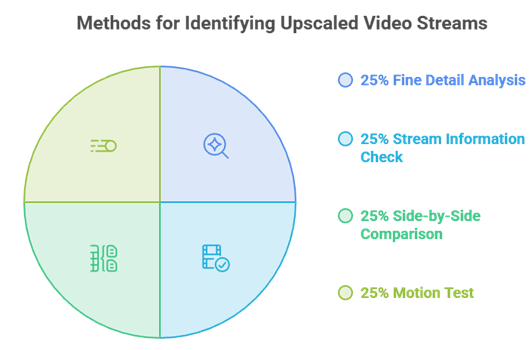
Some providers quietly upscale an ordinary 1080p feed and present it to buyers as genuine 4K. The picture technically fills an Ultra HD screen, but it never carries the true detail native 2160p delivers, so you pay for quality you do not actually receive. A few quick checks during a free trial reveal exactly what you are getting before any money changes hands, and they take only a couple of minutes on your own television.
- Fine detail: Look closely at crowd shots, grass, or hair, because an upscaled feed looks soft and mushy up close, while a genuine 4K stream stays crisp and clearly defined.
- Stream info: Check the real reported resolution inside a player such as VLC or TiviMate, which shows the actual stream properties rather than the resolution a provider claims to offer.
- Side by side: Compare a known native 4K source on the very same television, because judging sharpness against a trusted reference exposes upscaling far faster than watching the feed alone.
- Motion test: Watch a passage of fast-moving sport, since upscaling and a stingy bitrate both show up most obviously during rapid movement, quick camera pans, and busy on-screen action.
Best Devices for Watching 4K IPTV
Your hardware has to decode Ultra HD as capably as the service can send it, or the picture stutters no matter how good the stream is. A weak or ageing stick will choke on a demanding 4K feed, so pairing the right device with the right plan matters. If you are setting up on a stick, our guide on install on Firestick walks through the whole process step by step.
- Fire TV Stick 4K: The 4K or 4K Max stick is an affordable, widely supported option that handles Ultra HD comfortably and runs every IPTV app you will want.
- NVIDIA Shield: A Shield, or another strong Android TV box, delivers the smoothest 4K decoding available, making it the natural choice for anyone chasing the most reliable Ultra HD playback.
- Smart TV app: A modern Samsung or LG set with a native IPTV player installed streams 4K directly, with no extra box cluttering the shelf or drawing another power socket.
- Set-top boxes: Formuler and MAG boxes, which several providers in this guide support directly, remain a dependable route for stable Ultra HD playback on a dedicated living-room device.
Mistakes That Ruin 4K IPTV Playback
Most disappointment with 4K IPTV comes down to a small handful of avoidable mistakes rather than any real fault with the service. A little caution before you pay, and a little care once the subscription is live, saves money and a great deal of evening frustration in front of a stuttering television. The common errors below trip up first-time buyers again and again, and every one is genuinely simple to sidestep with a moment of thought.
- Paying too early: Paying for a full year upfront before you have tested a 4K stream on your own television and connection is the most expensive mistake first-time buyers make.
- Trusting the badge: Trusting a 4K label blindly without checking which specific channels actually run at Ultra HD leaves plenty of buyers paying a premium for a mostly 1080p lineup.
- Using Wi-Fi: Relying on Wi-Fi for a demanding 4K stream when a wired Ethernet connection would hold far steadier is a frequent, easily fixed cause of constant buffering and dropouts.
- Weak hardware: Running an underpowered stick or box that cannot decode Ultra HD smoothly guarantees stutter, and ignoring the refund window leaves you stuck with a service that never worked.
Final Verdict
iScreenHD IPTV is the relevant replacement in this 4k iptv comparison because its Benelux catalogue and tiered 4K-to-SD playback suit a picture-quality comparison. No advertised free trial is the clearest opportunity to confirm performance before choosing a longer term.
Top 3 Recommended 4K IPTV Services
- OrigineTV: Largest 4K catalog with a built-in VPN.
- Stream IPTV 4K: Genuine UHD focus with five connections.
- iScreenHD IPTV: Best matched here for its Benelux catalogue and tiered 4K-to-SD playback suit a picture-quality comparison.
FAQs
What is a 4K IPTV service?
A 4K IPTV service streams live channels and on-demand video at Ultra HD resolution, 3840 x 2160, over the internet instead of cable or satellite. You pay a subscription, receive login details, and watch through an app on a 4K TV, stick, or box. Only some channels usually run at true 4K.
How much internet speed do I need for 4K IPTV?
Plan for at least 25 Mbps of steady speed per 4K stream, and more if several devices share the connection at once. A wired Ethernet link holds Ultra HD far better than Wi-Fi. Test your speed during busy evening hours rather than late at night to see realistic performance.
Do these services really stream in 4K?
Some channels do, but many providers label a feed 4K when it is upscaled 1080p. The published tier is a guide, not a guarantee. The reliable way to check is a trial: watch fast sports motion and fine detail, or read the resolution in a player like VLC or TiviMate before you commit.
What is the best device for 4K IPTV?
A Fire TV Stick 4K Max, an NVIDIA Shield, a strong Android TV box, or a modern Samsung or LG Smart TV all handle Ultra HD well. Formuler and MAG boxes are supported by several providers here too. The key is a device that can decode 4K without stuttering under load.
Do I need a 4K TV to use a 4K IPTV service?
You need a 4K TV to actually see Ultra HD detail. On a 1080p screen a 4K plan still works, but the picture is downscaled to the panel’s resolution, so you gain nothing visible. If UHD is the goal, pair the plan with both a 4K TV and a capable streaming device.
Is 4K IPTV legal?
IPTV as a technology is legal; the risk comes from services streaming channels they are not licensed to carry, which varies by country. Resolution does not change that. For a fuller picture, see our guide on IPTV legality before subscribing.
Why does my 4K IPTV stream keep buffering?
Ultra HD is the first thing to break when bandwidth or a server is stretched. A slow or wireless connection, an overloaded server at peak time, or an underpowered device are the usual causes. Try a wired connection, restart the device, and test during a busy evening before paying for a long plan.
Can I get a free trial for a 4K IPTV service?
Most providers here offer a short free trial, from 24 to 36 hours, and a few rely on a money-back guarantee of 3 to 30 days instead. Either way, use that window to watch true 4K content on your own TV and connection, since a trial is the only honest test of Ultra HD stability.