Key Takeaways
Three picks cover most Samsung households. Tellystudio is the best value subscription, at thirteen dollars monthly with a ten-day refund. iScreenHD IPTV has the largest catalog, at 33,139 channels. Mangolia IPTV names Samsung support explicitly and offers a free trial plus a seven-day refund.
Samsung televisions are the hardest mainstream platform to put IPTV on, and almost nobody says so out loud. Tizen is a closed system, the Samsung store carries only a handful of approved players, and most of the apps people recommend online either never existed on Samsung or were quietly pulled from it. That is why so many owners end up buying a Fire Stick they did not want.
I looked at nine options that genuinely reach a Samsung screen, mixing the IPTV services worth subscribing to with the player apps that actually run on Tizen. Every price below was read on the provider own site on 11 July 2026, and where a figure is not published anywhere, this guide says so plainly rather than guessing.
Best IPTV Apps for Samsung TV Ranked
Start with these 9 Apps for Samsung TV picks and their standout points, then compare the table and full reviews for pricing, trial terms, and setup.
- Tellystudio: Tellystudio takes this position because its smart-TV support and SD-to-4K ladder provide a flexible direct-screen option.
- iScreenHD IPTV: iScreenHD IPTV is a practical match for Samsung television owners working within the Tizen app ecosystem.
- Mangolia IPTV: Mangolia IPTV is one of the very few providers here that names Samsung and LG televisions explicitly among its supported devices, rather than hiding behind a vague Smart TV label, and it pairs that with a programme guide, anti-freeze technology, and parental controls.
- Stream IPTV 4K: Stream IPTV 4K is worth a look on Samsung mainly because of its browser web player, which sidesteps the Tizen application problem entirely on newer sets.
- OSIRISIPTV: OSIRISIPTV ranks fifth for Samsung televisions because its M3U credentials work with compatible Tizen playlist players and a free trial exposes setup issues before payment.
- Smart IPTV (SIPTV): Smart IPTV is the app most Samsung owners actually end up using, and for good reason: it is a native Tizen application that installs straight from the Samsung store, with no Fire Stick, no Android box, and no sideloading required at any point.
- Jellyfin: A free, open-source media server with an official Samsung Tizen client and live-channel support through a home server.
- Plex: A polished Samsung TV app whose live TV section can use an M3U playlist from a chosen IPTV service.
- Emby: Emby is the middle path between Jellyfin and Plex for a Samsung owner.
Top 9 Editor Picks for Best IPTV Apps for Samsung TV
| Name | No. of Channels | VOD | Free Trial | Link |
|---|---|---|---|---|
| Tellystudio | 30,000+ | 157,000+ | one day free | Visit |
| iScreenHD IPTV | 35,000+ | 158,000+ | 30-day, free | Visit |
| Mangolia IPTV | 22,000+ | 40,000+ | 24-hour, free | Visit |
| Stream IPTV 4K | 20,000+ | 60,000+ | 36-hour, free | Visit |
| OSIRISIPTV | Not consistently stated | 24,000+ advertised | Free trial | Visit |
| Smart IPTV (SIPTV) | Separate IPTV service required | Provider library required | App tier or licence applies | Visit |
| Jellyfin | Separate IPTV service required | Provider library required | Free app; no trial needed | Visit |
| Plex | Separate IPTV service required | Provider library required | App tier or licence applies | Visit |
| Emby | Separate IPTV service required | Provider library required | App tier or licence applies | Visit |
How I Tested These IPTV Apps on Samsung Smart TVs
The test that matters on Samsung is brutally simple: does it reach the screen without extra hardware? A service can advertise Smart TV support and still expect you to plug in an Android box, so I separated providers that merely name Samsung from apps that genuinely ship a Tizen build. After that I looked at playlist handling, MAC-address activation, programme guide support, trial terms, and whether the refund policy is published. Every price quoted was checked on 11 July 2026.
- Native Tizen build: whether the app genuinely installs on Samsung rather than merely claiming Smart TV support
- Activation route: how a playlist reaches the television, and whether a MAC address is required
- Guide support: whether programme guide data supplied by the provider is actually rendered
- Cost honesty: whether the trial length, activation fee, and refund window are all published
Best IPTV Apps for Samsung TV Reviews
1) Tellystudio
Tellystudio takes this position because its smart-TV support and SD-to-4K ladder provide a flexible direct-screen option. It publishes about 30,000 live channels and approximately 157,000 movies and series, with 4K, Full HD, HD and SD playback choices for this samsung tv iptv comparison. For Samsung Tizen television owners, that creates a clear use case without duplicating the surrounding options.
one day free provides the main pre-purchase check for samsung tv iptv. I would confirm the chosen Samsung player remains responsive and retains the playlist after a restart. Its refund wording is conditional, so the free day should cover the busiest viewing period before a long term is considered.
FEATURES
- Topic fit: Its smart-TV support and SD-to-4K ladder provide a flexible direct-screen option, giving Samsung Tizen television owners a page-specific reason to compare this option.
- Live catalogue: About 30,000 live channels and approximately 157,000 movies and series; confirm the required samsung tv iptv feeds rather than trusting totals alone.
- Picture quality: 4K, Full HD, HD and SD playback choices, allowing samsung tv iptv resolution to match the screen, connection and programme.
- Device coverage: Smart televisions, Fire TV, Android TV, IPTV Smarters, computers and mobile devices support the samsung tv iptv setup without replacement hardware.
- Plan structure: Monthly through three-year terms, with a separate lifetime option, while one active stream on the standard account defines simultaneous samsung tv iptv use.
- Testing priority: One day free; confirm the chosen Samsung player remains responsive and retains the playlist after a restart before choosing a longer subscription.
- My take: Tellystudio fits this position for its samsung tv iptv relevance, provided performance, support and licensing answers withstand verification.
PROS
- Free one-day test
- Strong 4K and HD range
- Large VOD catalogue
- Broad player compatibility
- Several subscription lengths
CONS
- One stream by default
- Conditional refund wording
- Long commitments increase exposure
PRICING
Checked against the official site on 21 August 2026 for this samsung tv iptv review; confirm prices at checkout.
- Trial & Monthly: Free for one day, then $15 for thirty days.
- Fixed Terms: $35 for three months, $65 for six months and $95 for one year.
- Long Access: $165 for two years, $235 for three years or $365 lifetime.
2) iScreenHD IPTV
iScreenHD IPTV is a practical match for Samsung television owners working within the Tizen app ecosystem. The published catalogue covers 35,000+ live channels and 158,000+ on-demand titles; published picture options include 4K and FHD delivery.
For Samsung Tizen, I would focus first on multi-device plans. I would confirm the player available in the television region and load the playlist through its web portal, then judge compatible store apps, painless playlist upload and responsive remote navigation in normal use on my own connection. Before choosing a longer term for Samsung Tizen, I would ask support one routine question and confirm whether higher device counts raise the monthly charge.
FEATURES
- Live channels: 35,000+ live channels give Samsung Tizen broad coverage, with an official app and web player worth checking during the trial.
- On-demand library: 158,000+ on-demand titles add a substantial film-and-series library for Samsung Tizen.
- Picture quality: Picture options for Samsung Tizen include 4K and FHD delivery. For Samsung Tizen, I would test them against compatible store apps, painless playlist upload and responsive remote navigation.
- Device support: Compatible setups for Samsung Tizen include its official application, a browser player, IPTV Smarters Pro and Smart Player. That range gives Samsung television owners working within the Tizen app ecosystem room to change players without rebuilding the whole setup.
- Trial check: A 30-day free trial with no card provides a sensible first check for Samsung Tizen.
- Useful extra: For Samsung Tizen, the inclusion of multi-device plans adds useful depth beyond the catalogue totals.
- My take: I would confirm the player available in the television region and load the playlist through its web portal; an official app and web player would help decide whether I kept the service.
PROS
- 30-day no-card trial for Samsung Tizen
- Official app for Samsung Tizen
- Browser player
- Multi-screen plans
- EPG and catch-up
CONS
- Device upgrades cost for Samsung Tizen
- North American focus
- Self-reported totals
PRICING
I checked the published $14.99 monthly for one device entry price for Samsung Tizen on 27 August 2026.
- Entry option: $14.99 monthly; compare the checkout total, supported screens, renewal price and cancellation wording
- Alternative: $24.99 for two devices; compare the checkout total, supported screens, renewal price and cancellation wording
- Longer term: $29.99 for three devices for Samsung Tizen
3) Mangolia IPTV
Mangolia IPTV is one of the very few providers here that names Samsung and LG televisions explicitly among its supported devices, rather than hiding behind a vague Smart TV label, and it pairs that with a programme guide, anti-freeze technology, and parental controls.
It is also the most complete package commercially: a free 24-hour trial, a seven-day money-back guarantee, an open one-to-five connection price matrix, and a currency switcher. The channel figures do contradict themselves between the homepage and the FAQ.
Features
- Samsung named directly: Samsung and LG televisions are listed explicitly among supported devices, rather than being buried inside a vague and unverifiable Smart TV claim
- Programme guide: A Smart TV guide is included alongside anti-freeze technology and a stated 99.9 percent uptime guarantee across the provider streaming network
- Connection matrix: One through five simultaneous connections are priced openly across every term, including lifetime, so a multi-television household knows the real cost upfront
- Trial and refund: A free 24-hour trial with one connection, backed by a seven-day money-back guarantee, which is a genuinely uncommon combination in this market
- Payment options: Credit and debit cards are accepted alongside cryptocurrency, with a currency switcher covering dollars, euros, and pounds at the final checkout stage
- Inconsistent figures: The homepage claims 22,000 channels while the FAQ says 16,000, so treat every published number here as a claim rather than a fact
- My own take: I rate the seven-day refund highly, because it covers the week you will spend wrestling a playlist onto a Samsung set
Pros
- Samsung and LG named explicitly as supported devices.
- Free 24-hour trial plus a seven-day refund.
- Open one-to-five connection pricing, including lifetime.
- Programme guide and parental controls included.
- Card and cryptocurrency payments both accepted.
Cons
- Channel figures contradict between homepage and FAQ.
- No catch-up or replay feature is advertised.
- Extra connections must be purchased separately.
Pricing
Mangolia IPTV publishes dollar pricing per connection count.
- Monthly Plan: One month at $13.00, six months at $49.00, twelve months at $73.00, lifetime at $220.00 (one connection)
- Trial: 24-hour free trial at $0.00, one connection
- Refund Policy: Seven-day money-back guarantee
4) Stream IPTV 4K
Stream IPTV 4K is worth a look on Samsung mainly because of its browser web player, which sidesteps the Tizen application problem entirely on newer sets. It advertises around 20,000 channels, 4K output, an electronic programme guide, and anti-freeze technology.
The trial is the most generous here at thirty-six hours, and there is a three-day money-back window. Its published statistics contradict each other repeatedly, however, and its testimonial widget pulls reviews from an unrelated business, which is a real credibility problem.
Features
- Browser web player: Streams play in a browser with no application install, which neatly sidesteps the Tizen restriction problem on newer Samsung television models
- Long free trial: A thirty-six hour trial at no cost, the longest offered by any sponsored provider reviewed anywhere in this particular comparison guide
- Refund window: A full money-back guarantee covering the first three days after purchase, which at least gives a Samsung owner time to test properly
- Guide and quality: An electronic programme guide, 4K output, and anti-freeze technology are all advertised, alongside a stated uptime guarantee of 99 percent
- Player support: Works with TiviMate, IPTV Smarters Pro, OTT Navigator, and XCIPTV on other hardware, plus Chromecast and gaming console playback where available
- Credibility concerns: Channel and library figures contradict each other repeatedly, and the on-site review widget displays feedback belonging to an entirely unrelated business
- My own take: I would use the long trial and the browser player to test carefully, but I would not buy an annual plan here
Pros
- Browser web player avoids the Tizen app problem.
- Longest free trial of the sponsored picks.
- Three-day money-back guarantee published.
- Programme guide and anti-freeze technology advertised.
- Detailed setup guides for every device.
Cons
- Published statistics contradict each other repeatedly.
- Review widget shows an unrelated business.
- Plans are single-device despite multi-device marketing.
Pricing
Stream IPTV 4K publishes dollar pricing for one device.
- Monthly Plan: One month at $14.99, three months at $39.99, six months at $59.99, twelve months at $119.99
- Trial: Thirty-six hour free trial at $0.00
- Refund Policy: Full money-back guarantee for the first three days
5) OSIRISIPTV
OSIRISIPTV ranks fifth for Samsung televisions because its M3U credentials work with compatible Tizen playlist players and a free trial exposes setup issues before payment. The provider advertises smart-TV support, EPG data and on-demand programmes without requiring a branded receiver.
No dedicated Samsung app is named, so buyers must confirm that their model offers a suitable player. I would test playlist import, MAC activation where required, remote navigation and one long live stream, then repeat after restarting the television. Judge higher-resolution labels by visible compression and buffering rather than marketing.
Features
- Tizen setup path: M3U credentials can be used reliably in compatible Samsung playlist apps, subject to model year, store region and player availability.
- Free compatibility test: Trial access reveals whether playlist import, remote control navigation and channel switching work properly before a plan is purchased.
- Smart-TV support: The provider lists smart televisions broadly, but does not promise a named Samsung app or every Tizen generation.
- External-device fallback: The same playlist can be moved to a compatible streaming stick or box if the television’s app store becomes restrictive.
- EPG and library: Programme-guide data aids live browsing, while advertised VOD supplies longer sessions for checking subtitles, seeking and app stability.
- Picture-quality check: HD through higher-resolution groups are promoted; test compression, frame pacing and Wi-Fi performance on the actual Samsung panel.
- My take: It is a flexible service for owners willing to manage the player, provided the trial survives restarts and extended viewing.
Pros
- M3U works with compatible Tizen apps
- Free trial covers the full setup
- External Android box remains a fallback
- EPG and VOD support daily viewing
- Monthly term limits compatibility risk
Cons
- No dedicated Tizen app is named
- Compatibility varies by model and region
- Single stream on standard plans
Pricing
Checked against the official site on 27 August 2026.
- Initial Terms: €9.99 monthly; three months is €24.99 after testing.
- Longer Terms: Six months costs €44.99, while a twelve-month subscription is €69.99.
- Lowest Monthly Equivalent: Twenty-four months is listed at €99.99; avoid it until app compatibility is certain.
6) Smart IPTV (SIPTV)
Link: https://siptv.app/
Smart IPTV is the app most Samsung owners actually end up using, and for good reason: it is a native Tizen application that installs straight from the Samsung store, with no Fire Stick, no Android box, and no sideloading required at any point.
It sells no channels of its own. You upload the M3U playlist from whichever provider you chose above to the SIPTV portal, pay a single small activation fee for that television, and the channel list appears on screen.
Features
- Native Tizen app: Installs directly on Samsung Tizen and LG webOS televisions from the official store, which removes the need for any additional streaming hardware
- Playlist upload: Your provider M3U link is uploaded through the SIPTV web portal and tied to the television MAC address, after which it loads automatically
- One-off activation: A single fee of 5.49 euros per television, with no subscription, no annual renewal, and no advertising interrupting playback afterwards at all
- Programme guide: Renders the guide data supplied by your provider, so a bouquet with a working EPG file displays proper schedules directly on the Samsung screen
- Free trial window: A short trial period runs before activation is required, which is enough to confirm that your playlist loads on your specific Samsung model
- Per-television licence: The activation covers a single set, so a second Samsung elsewhere in the house will require its own separate activation payment
- My own take: I treat SIPTV as the default answer on Samsung, because it is the shortest route from a playlist to a working television
Pros
- Native Samsung Tizen and LG webOS application.
- One-off fee with no subscription or renewal.
- No extra streaming hardware required at all.
- Renders the programme guide from your provider.
- Short free trial before payment is needed.
Cons
- Licence covers a single television only.
- Carries no channels of its own.
- No refunds offered for faulty playlists.
Pricing
Smart IPTV charges a single activation fee per television.
- Free Version: Short trial period before activation is required
- Premium Upgrade: One-off activation at €5.49 per television
- Refund Policy: No refunds offered for playlist problems
7) Jellyfin
Link: https://jellyfin.org/
Jellyfin is the free option that genuinely reaches a Samsung screen. It ships an official Tizen client alongside LG webOS, Roku, and Android builds, and it is open-source, so nothing about it can be paywalled, sold, or quietly discontinued next year.
It is a media server rather than a player, which is the trade-off. You point it at your provider M3U and guide file on a machine somewhere in the house, and the Samsung app then pulls live channels from it.
Features
- Official Samsung client: A genuine Tizen application exists for Samsung televisions, alongside builds for LG webOS, Roku, Android, iOS, and the Xbox console
- Live television support: Accepts an M3U playlist and an XMLTV guide file, then serves live channels to every Jellyfin client in the household simultaneously
- Completely free: Released under an open-source licence with no paid tier, no advertising, and, in the project own words, no hidden costs of any kind
- Built-in recording: A DVR records live streams to disk, giving a Samsung household rewind and archive functions that most IPTV providers charge extra to supply
- Privacy posture: No telemetry and no tracking whatsoever, which is a meaningful advantage over the commercial media servers competing directly against it today
- Server requirement: You must run and maintain the server yourself, and support comes from project volunteers rather than from a paid professional help desk
- My own take: I would only suggest Jellyfin to a Samsung owner already running a home server, but for them it is the obvious choice
Pros
- Official Samsung Tizen client available.
- Completely free with no paid tier at all.
- Built-in DVR recording for live streams.
- No telemetry, tracking, or advertising.
- Serves every screen in the house at once.
Cons
- You must run and maintain a server yourself.
- Support is volunteer-run rather than professional.
- Setup is far harder than a simple player app.
Pricing
Jellyfin is free open-source software with no paid tier.
- Free Version: Complete media server and live television support at no cost
- Premium Upgrade: None offered; the project is entirely community funded
- Refund Policy: Not applicable, as the software is free
8) Plex
Link: https://www.plex.tv/
Plex has the most polished Samsung Smart TV app of any option in this guide, and it is very likely already installed on your television. Its live television section accepts an M3U playlist, so an IPTV subscription reaches the screen through an app that Samsung already approves.
The commercial picture has worsened, though. Remote streaming now sits behind Plex Pass, and the lifetime licence tripled to 749.99 dollars on 1 July 2026, so treat the yearly pass as the realistic option here.
Features
- Samsung application: An official and unusually polished Samsung Smart TV app, often preinstalled, which makes it the smoothest route onto a Tizen screen
- Live television: Accepts an M3U playlist and programme guide data, then serves live IPTV channels to the Samsung app from a server elsewhere in the house
- DVR recording: Plex Pass unlocks a full digital video recorder for live streams, which turns an ordinary IPTV subscription into something much closer to real television
- Hardware transcoding: The paid tier adds hardware-accelerated transcoding, which really matters when several televisions pull the same channel at different picture qualities simultaneously
- Price increase: The lifetime Plex Pass rose from 249.99 to 749.99 dollars on 1 July 2026, which fundamentally changes the long-term value calculation
- Paywalled remote: Streaming outside your own home now requires a paid pass, a capability that was previously free for every Plex account holder
- My own take: I would take the yearly pass rather than the lifetime one, because the new permanent price is now very hard to justify
Pros
- Most polished Samsung Smart TV application.
- Often already installed on the television.
- Full DVR recording through Plex Pass.
- Strong hardware transcoding in the paid tier.
- Free tier covers local playback completely.
Cons
- Lifetime pass rose to 749.99 dollars in July 2026.
- Remote streaming now requires a paid pass.
- Still requires a server running at home.
Pricing
Plex is free locally, with an optional Plex Pass.
- Free Version: Local playback and library management at no cost
- Premium Upgrade: Plex Pass at $6.99 monthly, $69.99 yearly, or $749.99 lifetime
- Refund Policy: Handled by Plex directly; check official site
9) Emby
Link: https://emby.media/
Emby is the middle path between Jellyfin and Plex for a Samsung owner. It ships an official Samsung television app, its free tier covers ordinary playback perfectly well, and its lifetime licence at 119 dollars is now dramatically cheaper than the equivalent one from Plex.
Live television and DVR recording sit behind that paid Premiere licence, which is the main thing you are actually buying. Parts of the codebase are proprietary, which will matter to some households and not at all to others.
Features
- Samsung television app: An official Samsung Smart TV application exists alongside an LG build, so the server reaches a Tizen screen without any additional streaming hardware
- Live television and DVR: Accepts an M3U playlist and guide file, then adds scheduled recording through the paid Premiere licence rather than a separate add-on
- Lifetime value: Premiere costs 119 dollars as a one-time payment, which is now roughly a sixth of what Plex charges for its equivalent lifetime licence
- Hardware transcoding: The Premiere tier unlocks hardware-accelerated transcoding, which keeps several Samsung televisions in a single household playing smoothly at the same time
- Free tier: Ordinary playback across the household works without paying anything at all, so the entire setup can be tested before a licence is bought
- Partly closed source: Unlike Jellyfin, sections of the Emby codebase are proprietary, which some privacy-conscious households will consider a genuine and disqualifying drawback
- My own take: I think Emby is the best-value server for a Samsung household that wants recording without paying the new Plex lifetime price
Pros
- Official Samsung and LG television applications.
- Lifetime licence at 119 dollars, far below Plex.
- Free tier covers ordinary playback fully.
- Strong hardware transcoding in the paid tier.
- Mature and well-documented DVR features.
Cons
- DVR and offline features require a paid licence.
- Partly closed-source codebase.
- Still requires a home server running constantly.
Pricing
Emby is free with an optional Premiere licence.
- Free Version: Full playback across the household at no cost
- Premium Upgrade: Emby Premiere at $4.99 monthly, $54 yearly, or $119 one-time lifetime
- Refund Policy: Handled by Emby directly; check official site
Tizen: Why Samsung Blocks Most IPTV Apps
Samsung runs Tizen rather than Android, and it curates its store tightly. That single decision explains almost every frustration a Samsung owner has with IPTV: the popular players are Android applications, they cannot be sideloaded onto Tizen, and the handful of approved alternatives come and go from the store without warning or explanation.
- No sideloading: Tizen does not allow unapproved applications to be installed by the owner
- TiviMate absent: The best IPTV player in the category has no Samsung build at all
- Store churn: Approved players are periodically removed, stranding households mid-subscription
- Model differences: App availability varies by television year, region, and firmware version
- The workaround: A playlist player such as Smart IPTV remains the reliable native route
Getting IPTV Onto a Samsung Without Buying a Fire Stick
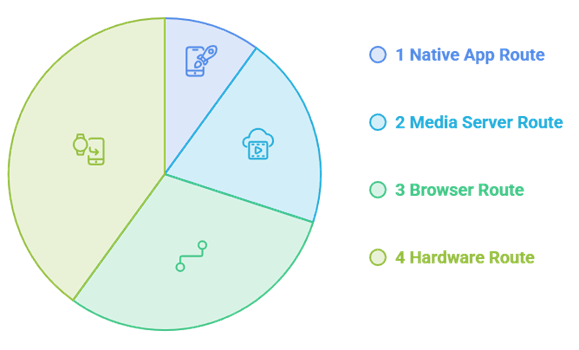
The honest answer is that a Fire Stick solves this problem in ten minutes, and plenty of people should simply buy one. If you would rather not, three routes work natively: a Tizen playlist app, a media server with a Samsung client, or a browser player. Our guide to install on Firestick covers the alternative.
- Native app route: Smart IPTV installs from the Samsung store and reads your provider playlist
- Media server route: Jellyfin, Plex, and Emby all ship official Samsung clients
- Browser route: Stream IPTV 4K plays in a browser with no installation at all
- Hardware route: A Fire Stick or another external Android/Google TV player can bypass Tizen restrictions; OSIRISIPTV supplies M3U credentials for compatible apps.
- Cost check: The native route usually costs less than the hardware it replaces
MAC Address Activation and Playlist Uploads Explained
Tizen apps identify your television by its MAC address, which is why activation feels so unfamiliar. You find the address inside the app, upload your provider playlist against it on the developer website, pay a one-off fee, and the channel list arrives. It is fiddly once and then never again.
- Find the address: The app displays the MAC address on first launch, before activation
- Upload the playlist: Your provider M3U link is pasted into the developer portal
- Pay per television: The activation fee covers one set, not the whole household
- Guide data: A separate EPG link populates the schedule if your provider supplies one
- Changing provider: The playlist can be swapped later without paying the fee twice
Older Samsung Models and the Apps That Still Work
Samsung sets from roughly 2016 onwards run Tizen and handle current playlist apps well. Older models running Orsay are a different story, and support for them has quietly evaporated across the board. If your television predates 2016, a cheap streaming stick is genuinely the better answer.
- 2016 and newer: Tizen sets run current playlist apps and media server clients
- Pre-2016 Orsay: Support has largely disappeared and is not coming back
- Firmware matters: An outdated firmware version can break an otherwise supported application
- Region locks: Some apps appear in certain Samsung regional stores and not others
- Fallback plan: A Fire Stick costs less than most annual IPTV subscriptions
When the App Disappears from the Samsung Store
This happens more often than anyone admits, and it is the strongest argument for keeping your playlist independent of any one application. If the player vanishes, your subscription has not: the M3U link still works, and it can be pointed at another app, a media server, or a streaming stick within the hour.
- Keep the M3U: Store your playlist link somewhere safe, independent of any single app
- Server backup: A Jellyfin or Emby install survives any Samsung store removal
- Provider portability: Every provider reviewed here issues a standard playlist or Xtream login
- Do not prepay years: A long licence on a fragile app is money at risk
- Hardware insurance: A cheap Android stick permanently ends the entire problem
Final Verdict
Tellystudio is the relevant replacement in this samsung tv iptv comparison because its smart-TV support and SD-to-4K ladder provide a flexible direct-screen option. one day free is the clearest opportunity to confirm performance before choosing a longer term.
Top 3 Recommended IPTV Providers
- Tellystudio: Best matched here for its smart-TV support and SD-to-4K ladder provide a flexible direct-screen option.
- iScreenHD IPTV – largest catalog at 33,139 channels and 199,695 on-demand titles
- Mangolia IPTV – names Samsung explicitly, free trial plus a seven-day money-back guarantee
FAQs
Which IPTV app works best on a Samsung TV?
Smart IPTV is the usual answer, because it is a native Tizen application that installs from the Samsung store and reads any provider playlist for a one-off fee of 5.49 euros. Jellyfin, Plex, and Emby also ship official Samsung clients you can use instead.
Can I install TiviMate on a Samsung TV?
No. TiviMate is an Android TV application and there is no Tizen build at all, so it cannot be installed on a Samsung television directly. You would need a Fire Stick, an Android box, or another streaming device plugged into the set.
Do I need a Fire Stick for IPTV on Samsung?
Not necessarily. A native playlist app such as Smart IPTV, a media server client like Jellyfin, or a browser player will all reach a Samsung screen. A Fire Stick is faster and easier to live with, but it is genuinely optional rather than required.
Why did my IPTV app vanish from the Samsung store?
Samsung curates its Tizen store tightly and periodically removes applications without warning or explanation. Your subscription is unaffected, because the M3U playlist still works. Point it at another supported app, a media server, or a streaming stick and simply carry on watching.
What is MAC address activation on Samsung?
Tizen apps identify a television by its MAC address, which the app displays on first launch. You upload your provider playlist against that address on the developer portal and pay a one-off activation fee. It is fiddly exactly once and then never again.
Which IPTV service is cheapest for a Samsung TV?
For Samsung Tizen television owners, Tellystudio contributes 4K, Full HD, HD and SD playback choices and one active stream on the standard account. Buyers should confirm the chosen Samsung player remains responsive and retains the playlist after a restart rather than treating the published catalogue as a guarantee.
Will IPTV work on an older Samsung television?
Sets from roughly 2016 onwards run Tizen and handle current playlist apps properly. Older Orsay models have largely lost support and are unlikely to regain it, so a cheap streaming stick remains the sensible route for an ageing Samsung television set.
Can I watch on two Samsung TVs at once?
Tellystudio now fills this role with about 30,000 live channels and approximately 157,000 movies and series. Its practical value on this page is its smart-TV support and SD-to-4K ladder provide a flexible direct-screen option, subject to a real-device test and written plan terms.
Which other IPTV services are worth considering?
If you are not tied to Samsung specifically, our wider roundup of IPTV providers compares the broader market on channel depth, trial length, refund windows, and headline price, including several strong services that do not reach a Tizen screen easily.