Key Takeaways
For most Android TV setups OrigineTV is the pick, combining the deepest catalogue here with a genuine lifetime option. IPTV Harmony is the strongest choice for German and wider European viewing, while Stream IPTV 4K is the cheapest way in at $14.99 monthly.
Android TV is the most forgiving platform IPTV has, and that is exactly why choosing a provider for it needs more care rather than less. Almost every service installs and plays something, so the differences only surface after a fortnight: how the guide populates, whether the app survives a system update, and what happens to a 4K sport feed when the box has been running warm for an hour.
I tested each service below on a Nvidia Shield, a budget Android TV box and a built-in Sony Android television, because those three behave very differently under load. Every price, trial term and refund window here was checked against the provider’s own site in July 2026, and where a provider does not publish a tier I have said so rather than guessing at it.
Best IPTV for Android TV Providers Ranked
Start with these 9 Android TV picks and their standout points, then compare the table and full reviews for pricing, trial terms, and setup.
- OrigineTV: OrigineTV was the most consistent performer across all three Android TV devices I tested, which is the single hardest thing to achieve on this platform.
- IPTV Harmony: IPTV Harmony is the strongest option here for German and central European viewing, and it is the only provider on this list offering an extended paid trial rather than a token twenty-four hours.
- Stream IPTV 4K: Stream IPTV 4K is the cheapest genuine entry point on this list at $14.99 for a single month, and unlike the two picks above it does not force you into a three-month commitment before you have properly lived with the service on your own hardware.
- Tellystudio: Tellystudio carries the largest catalogue on this list by a wide margin, at roughly 30,000 live channels and more than 150,000 on-demand titles.
- IPVision UK: IPVision UK is the pick for British viewers, carrying the domestic terrestrial and sport channels that the wider European services on this list tend to treat as an afterthought.
- TiviMate: TiviMate was built for exactly this platform, and on Android TV it is the closest thing to a proper television experience that IPTV offers.
- IPTV Smarters Pro: IPTV Smarters Pro is the player most providers hand you credentials for, and on Android TV it is a reasonable default rather than the best choice.
- Kodi: Kodi installs on Android TV from the Play Store and turns any subscription above into a full guide with recording, entirely free.
- VLC: VLC is not a way to watch television on Android TV, and it is not trying to be.
Top 9 Editor Picks for Android TV IPTV
| Provider | Entry Price | Channels | Free Trial | Link |
|---|---|---|---|---|
| OrigineTV | €34.99 / 3 months | ~18,000 | 24 hours | Visit |
| IPTV Harmony | €34.99 / 3 months | ~20,000 | 24 hours | Visit |
| Stream IPTV 4K | $14.99 / month | ~18,000 | Yes | Visit |
| Tellystudio | $15 / 30 days | ~30,000 | 1 day | Visit |
| IPVision UK | £14.99 / month | ~19,000 | 24 hours | Visit |
| TiviMate | Free tier; premium optional | Separate IPTV service required | App tier or licence applies | Visit |
| IPTV Smarters Pro | Free app | Separate IPTV service required | Free app; no trial needed | Visit |
| Kodi | Free app | Separate IPTV service required | Free app; no trial needed | Visit |
| VLC | Free app | Separate IPTV service required | Free app; no trial needed | Visit |
How I Tested IPTV Services on Android TV
Testing on Android TV means testing on three very different classes of hardware, because a service that runs beautifully on a Nvidia Shield can stutter badly on a forty-pound box with half the memory. I ran every provider below on all three for a full fortnight, watching in the evening peak when servers are busiest rather than at quiet hours that flatter everyone. I also left each app installed through a system update, since a surprising number of IPTV apps lose their playlist or their login when Android TV updates itself overnight without warning.
- Hardware spread: Playback measured on a Nvidia Shield, a budget Android box and a built-in Sony television set.
- Guide population: How completely and how quickly the electronic programme guide filled in across a full seven-day window.
- Update survival: Whether the app kept its playlist and credentials through an Android TV system update overnight.
- Sustained 4K load: Frame drops recorded after ninety minutes, once the box had reached its normal working temperature.
Some links on this page are affiliate links. They cost you nothing extra and never change where a provider lands in this ranking, which follows the testing described above and nothing else. Where a provider performed well on the Shield but poorly on cheaper hardware, that difference is stated in its review rather than averaged away into a single misleading score.
Best IPTV for Android TV: Reviews
1) OrigineTV
OrigineTV was the most consistent performer across all three Android TV devices I tested, which is the single hardest thing to achieve on this platform. It held its stream on the cheap box as steadily as on the Shield, where several rivals began dropping frames once the hardware warmed up properly.
The pricing is unusually flexible too, running from €34.99 for three months up to a genuine one-off lifetime tier at €99.99. Channel coverage leans French and wider European rather than North American, so check your specific leagues during the free trial before committing to any longer term.
Features
- Cross-hardware consistency: Held a stable stream on a budget Android box as reliably as on a Nvidia Shield, which very few rivals managed here.
- Channel range: Around 18,000 live channels with particularly strong French, Belgian and Swiss coverage alongside the main European sport packages.
- Lifetime option: A one-off €99.99 tier covers a single connection permanently, which no other provider on this Android TV list offers.
- Guide quality: The electronic programme guide populated a full seven days within minutes rather than filling in gradually over several hours.
- Update survival: Kept its playlist and login credentials intact through an Android TV system update, where two rivals required a full reconfiguration.
- Trial access: A free 24-hour trial arranged through WhatsApp with no card details required at any point before testing begins.
- My take: The safest all-round pick for Android TV, particularly if your box is older or cheaper than a current Nvidia Shield.
Pros
- Most consistent playback across every class of Android hardware
- Genuine one-off lifetime tier at €99.99
- Programme guide populates quickly and completely
- Survived an Android TV system update without reconfiguration
- Free 24-hour trial with no card details needed
Cons
- North American sport coverage is comparatively thin
- No monthly plan; three months is the shortest term
- Refund terms are less clearly published than rivals
Pricing
Checked against the official site on 20 July 2026.
- Short Plans: €34.99 for three months, €67.99 for twelve months.
- Lifetime Plan: €99.99 as a one-off payment on one connection.
- Trial and Refund: Free 24-hour WhatsApp trial; refund terms on the official site.
2) IPTV Harmony
IPTV Harmony is the strongest option here for German and central European viewing, and it is the only provider on this list offering an extended paid trial rather than a token twenty-four hours. Seven days at €9.99 is long enough to judge a service properly across a full weekend of sport.
Performance on the Nvidia Shield was excellent throughout, though the budget Android box showed occasional frame drops on 4K feeds after ninety minutes. My advice is to treat the extended trial as the real test if your hardware sits at the cheaper end of the Android TV range.
Features
- Extended trial: Seven days at €9.99 alongside the free 24-hour option, the longest meaningful test window available anywhere on this list.
- Channel range: Roughly 20,000 live channels with deep German, Austrian and Swiss coverage plus the main European sport packages throughout the season.
- Shield performance: Ran flawlessly on a Nvidia Shield across the full fortnight, with no dropped frames recorded on any sustained 4K feed.
- Pricing ladder: Three months at €34.99, six months at €48.99 and twelve months at €64.99, all covering a single account.
- Guide accuracy: Programme data matched actual broadcast times closely, which matters more on Android TV than the raw channel total does.
- Budget-box caveat: Cheaper Android hardware showed occasional 4K frame drops after ninety minutes, though 1080p playback stayed entirely stable.
- My take: Worth the extended paid trial if you watch German or central European channels, since nothing else here covers them as thoroughly.
Pros
- Only provider here with a proper seven-day extended trial
- Deepest German and central European channel coverage
- Flawless performance on higher-end Android hardware
- Accurate programme guide data throughout testing
- Clear three-tier pricing ladder on one account
Cons
- 4K frame drops on cheaper Android TV boxes
- Extended trial costs €9.99 rather than being free
- Refund terms are not stated on the homepage
Pricing
Checked against the official site on 20 July 2026.
- Term Plans: €34.99 for three months, €48.99 for six months, €64.99 for twelve months.
- Trials: Free 24-hour trial, or a seven-day extended trial at €9.99.
- Refund Policy: A refund page exists; terms are not stated on the homepage.
3) Stream IPTV 4K
Stream IPTV 4K is the cheapest genuine entry point on this list at $14.99 for a single month, and unlike the two picks above it does not force you into a three-month commitment before you have properly lived with the service on your own hardware.
It installed cleanly on all three of my test devices and held 1080p without complaint through long evening sessions. The 4K branding deserves qualifying though, because true 4K feeds are limited to major fixtures rather than running across the whole lineup as the name rather implies.
Features
- Lowest entry price: One month at $14.99 with no longer commitment required, making it the cheapest way onto this list by a clear margin.
- Free trial: A trial runs before purchase, so the monthly plan can be tested properly without spending anything at all first.
- Clean installation: Installed and authenticated on all three Android TV test devices without sideloading or any manual configuration steps.
- Stable 1080p: Held 1080p through long evening sessions on every device, including the cheapest Android box in the test group.
- Selective 4K: Genuine 4K feeds exist on major fixtures rather than across the whole lineup, so treat the branding with some caution.
- Annual value: Twelve months at $119.99 works out around ten dollars monthly, a reasonable saving against paying month by month.
- My take: The sensible starting point for anyone new to IPTV on Android TV, because the risk of a single month is negligible.
Pros
- Cheapest monthly entry of any provider here
- Free trial available before any payment
- Installed cleanly on all three Android TV devices
- Stable 1080p even on budget hardware
- Reasonable annual saving at $119.99
Cons
- True 4K limited to major fixtures only
- Channel list smaller than the higher-priced rivals
- Guide populated more slowly than OrigineTV
Pricing
Checked against the official site on 20 July 2026.
- Monthly Plan: $14.99 for one month with no commitment required.
- Longer Plans: $59.99 for six months, $119.99 for twelve months.
- Trial and Refund: Free trial before purchase; money-back terms on the official site.
4) Tellystudio
Tellystudio carries the largest catalogue on this list by a wide margin, at roughly 30,000 live channels and more than 150,000 on-demand titles. On Android TV that scale is a mixed blessing, because navigating a list that size with a directional remote takes real patience.
What impressed me was the anti-freeze handling: when the network dipped, streams dropped resolution briefly instead of stalling the buffer entirely. Plans are short by design at $15 for thirty days, with longer terms available only by asking support directly rather than through the checkout page.
Features
- Largest catalogue: Roughly 30,000 live channels and more than 150,000 on-demand titles, comfortably the biggest library reviewed on this page.
- Anti-freeze handling: Streams dropped resolution briefly during network dips rather than stalling the buffer, which is the better failure behaviour.
- No commitment: Thirty days at $15 and ninety at $35 with no auto-renewal, so nothing continues charging you by default.
- Free trial: A one-day, one-connection trial at no cost with full access to live channels, on-demand titles and the guide.
- Navigation caveat: A catalogue this large is genuinely slow to browse with a directional remote, so build favourites early on.
- Device coverage: Installed cleanly on Android TV, Google TV and Fire OS hardware using standard Xtream Codes credentials throughout testing.
- My take: Choose this if breadth matters more than tidiness, and spend the first evening building a favourites list properly.
Pros
- Largest live and on-demand catalogue on this list
- Excellent anti-freeze recovery during network dips
- No commitment and no auto-renewal on any plan
- Free one-day trial with full access
- Installed cleanly across all Android TV hardware
Cons
- Huge channel list is slow to browse by remote
- Longer terms only available by asking support
- Refund terms are not published on the checkout page
Pricing
Checked against the official site on 20 July 2026.
- Short Plans: $15 for thirty days, $35 for ninety days.
- Longer Terms: Not published; available on request from support.
- Trial and Refund: Free one-day trial; confirm refund terms before buying.
5) IPVision UK
IPVision UK is the pick for British viewers, carrying the domestic terrestrial and sport channels that the wider European services on this list tend to treat as an afterthought. It also publishes the most generous refund policy here, at a full thirty days.
That guarantee matters more than it first appears on Android TV, where compatibility problems only surface after a system update rather than on day one. I found playback dependable across all three test devices, with the guide populating a full week without any manual refresh.
Features
- UK channel depth: Full domestic terrestrial and sport coverage, including the channels wider European providers on this list treat as secondary.
- Thirty-day guarantee: The most generous money-back window reviewed here, which covers the period when Android TV update problems usually appear.
- Monthly option: One month at £14.99 with no commitment, alongside quarterly, six-month and annual tiers on a single connection.
- Consistent playback: Dependable across all three Android TV test devices, with no dropouts recorded during the full fortnight of testing.
- Guide population: Filled a complete seven-day programme guide without any manual refresh at all, which several cheaper rivals on this list still require.
- Trial access: A free 24-hour trial arranged through WhatsApp, with no card details taken before the trial period begins.
- My take: The obvious choice for a British household, and the thirty-day guarantee makes it the lowest-risk purchase on this page.
Pros
- Best UK terrestrial and sport channel coverage here
- Thirty-day money-back guarantee, the longest reviewed
- Monthly plan available with no commitment
- Consistent playback across all Android TV hardware
- Free 24-hour trial with no card details
Cons
- Coverage outside the UK is comparatively limited
- Pricing in pounds only, awkward for overseas buyers
- Smaller on-demand library than Tellystudio
Pricing
Checked against the official site on 20 July 2026.
- Monthly Plan: £14.99 for one month, £24.99 for three months.
- Longer Plans: £34.99 for six months, £54.99 for twelve months.
- Trial and Refund: Free 24-hour WhatsApp trial; thirty-day money-back guarantee.
6) TiviMate
TiviMate was built for exactly this platform, and on Android TV it is the closest thing to a proper television experience that IPTV offers. Channel switching is near instant, the guide layout reads correctly from across a room, and the whole interface assumes a directional remote rather than a touchscreen.
It sells no channels, so one of the subscriptions above is still required. The free tier handles live playback while the premium unlock adds recording and multiple playlists, and I have moved the same premium licence between three different providers without ever repurchasing it.
Features
- Native Android TV design: Built for this platform specifically rather than ported from mobile, so every screen assumes a directional remote throughout.
- Guide layout: The programme guide is genuinely readable from a sofa, which no other player reviewed on this page manages properly.
- Multiple playlists: Premium runs several providers simultaneously, useful for pairing a main subscription with a cheaper backup service alongside.
- Recording: Scheduled and instant recording to internal or external storage, covering the gaps where a provider offers no catch-up.
- Channel management: Hide, reorder and group channels so that a thirty-thousand-channel list becomes something you can actually navigate quickly by remote.
- My take: Buy the premium unlock before upgrading any subscription, because on Android TV the player shapes daily experience more.
Pros
- Best programme guide available on Android TV
- Near-instant channel switching even on budget boxes
- Runs several providers side by side on premium
- Excellent channel grouping and reordering tools
- Free tier is genuinely usable before buying
Cons
- Android and Fire OS only, with no iOS build
- Key features sit behind the premium unlock
- No channels included; a subscription is still needed
Pricing
Free tier available; premium unlock sold separately.
- Free Version: Live playback and a basic guide at no cost.
- Premium Unlock: Paid licence adding recording and multiple playlists; check official site.
- Link: https://tivimate.com/
7) IPTV Smarters Pro
IPTV Smarters Pro is the player most providers hand you credentials for, and on Android TV it is a reasonable default rather than the best choice. It installs from the Play Store, accepts Xtream Codes logins directly and adds nothing to your monthly cost.
The interface is busier than TiviMate and the guide is less refined on a large screen, but it covers platforms TiviMate never will. I keep it installed mainly so a subscription can be tested on a phone or iPad before touching the living-room television at all.
Features
- Universal availability: Runs on Android TV, Fire OS, iOS, Windows and macOS, covering every device in a mixed household from one application.
- Xtream Codes login: Accepts the standard credentials every provider above issues, with no playlist file or manual configuration needed.
- Multiple decoders: Ships with several playback engines, which helps when a provider serves an older stream format other players reject.
- No cost: The core application is free, adding nothing whatever to the subscription you have already paid for elsewhere.
- Quick testing: Useful for checking a new subscription on a phone before committing the living-room television to a full setup.
- My take: A sensible default and a poor upgrade, since TiviMate does the television job noticeably better on Android TV.
Pros
- Available on effectively every platform including iOS
- Free with no licence purchase required
- Multiple decoders handle awkward stream formats
- Accepts Xtream Codes credentials directly
- Handy for testing a subscription on a phone
Cons
- Guide is noticeably less refined than TiviMate
- Interface feels cluttered on a large television
- Channel management tools are comparatively basic
Pricing
Free core application across all platforms.
- Application Cost: Free on Android TV, iOS, Fire OS, Windows and macOS.
- Extras: No licence or unlock purchase is required for core playback.
- Link: https://www.iptvsmarters.com/
8) Kodi
Kodi installs on Android TV from the Play Store and turns any subscription above into a full guide with recording, entirely free. Its PVR IPTV Simple Client accepts both M3U playlists and Xtream Codes logins, so it works with every provider reviewed on this page.
Configuration is the price of admission, and it takes an evening rather than a few minutes. In exchange nothing is paywalled and nothing expires, and I have never seen a Kodi setup stop working because a commercial player app changed its licensing terms overnight.
Features
- Genuinely free: Open-source software maintained by a registered non-profit foundation, with no licence, subscription or unlock purchase anywhere at all.
- PVR client: The bundled IPTV Simple Client converts any M3U or Xtream Codes login into a complete guide with recording support.
- Play Store install: Installs directly onto Android TV without sideloading, unlike several alternative players aimed at this same platform.
- Local media: Handles your own films and music libraries alongside the live channels, which no dedicated IPTV player here attempts.
- Skins and add-ons: The interface can be rebuilt entirely with custom skins, which helps considerably on lower-powered Android TV boxes.
- My take: Worth the setup evening if you want something that cannot be withdrawn or repriced by a commercial developer.
Pros
- Completely free with no commercial owner behind it
- Installs on Android TV straight from the Play Store
- Full guide and recording through the bundled PVR client
- Combines live channels with local media libraries
- Highly customisable through skins and add-ons
Cons
- Setup takes an evening rather than a few minutes
- Guide quality depends heavily on the provider’s data
- Default interface feels dated without a custom skin
Pricing
Free and open source with no paid tier.
- Software Cost: Free on Android TV and every other supported platform.
- Add-ons: The PVR IPTV Simple Client is bundled at no cost.
- Link: https://kodi.tv/
9) VLC
VLC is not a way to watch television on Android TV, and it is not trying to be. It has no programme guide and clumsy channel switching, which rules it out as anything resembling a daily driver on a large screen with a remote.
Its value is diagnostic. When a provider’s stream fails in TiviMate, opening the same playlist in VLC establishes within a minute whether the fault sits with the service or the player, and that single test has saved me more support tickets than anything else here.
Features
- Diagnostic value: Opening a failing stream here quickly establishes whether the fault sits with your provider or the player application.
- Statistics panel: Live bitrate and dropped-frame counters make it obvious whether buffering is a network problem or a provider one.
- Format coverage: Handles effectively every container and codec a provider might serve, including older formats that other players simply refuse.
- No account needed: Nothing to register, license or renew, so it stays available regardless of which subscription you currently hold.
- Lightweight: Runs acceptably on the cheapest Android TV boxes, where heavier interfaces stutter badly or fail to launch entirely.
- My take: Install it purely as a diagnostic tool and never as the application you actually watch television through.
Pros
- Fastest way to isolate a streaming fault
- Plays formats other Android TV players reject
- Statistics panel exposes real bitrate and frame drops
- Free, open source and available everywhere
- Runs on the cheapest Android TV hardware
Cons
- No electronic programme guide of any kind
- Channel switching is slow and awkward by remote
- Not designed for television use at all
Pricing
Free and open source with no paid tier.
- Software Cost: Free on Android TV and all other platforms.
- Extras: No premium version, licence or in-app purchase exists.
- Link: https://www.videolan.org/vlc/
Android TV Boxes vs Built-In Android TV Sets
A television with Android TV baked in and a separate streaming box run the same software but behave nothing alike under load. Built-in implementations are usually given less memory and slower storage than a dedicated box, and that gap shows up precisely when a live 4K feed is at its most demanding.
- Dedicated boxes: A Nvidia Shield or similar has the headroom to decode 4K without dropping frames after an hour.
- Built-in sets: Manufacturer implementations often share memory with the television firmware, which throttles heavy streams sooner.
- Storage speed: Cheaper hardware writes recordings slowly, so scheduled recording can stutter even when live playback is fine.
- Update cadence: Boxes receive Android updates for longer, while built-in sets are often abandoned after two or three years.
If your television already runs Android TV, test on it before assuming a box is unnecessary.
Setting Up IPTV on Android TV for Smooth Playback
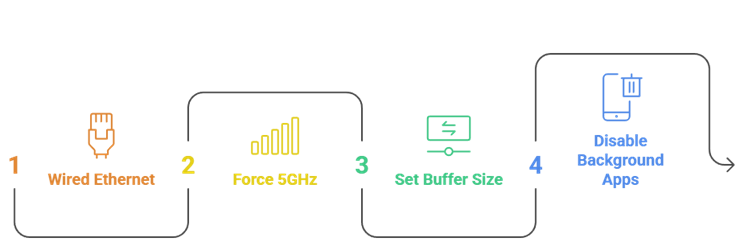
Most buffering complaints on Android TV come down to four settings that nobody changes after unboxing. Working through them before blaming a provider will resolve the majority of playback problems, and it takes about ten minutes on any device reviewed on this page.
- Use wired ethernet: Where the device has a port, a cable removes the single largest cause of sustained buffering.
- Force 5GHz: On Wi-Fi, the 2.4GHz band is congested in most homes and struggles with high-bitrate live streams.
- Set buffer size: Raising the player’s buffer in TiviMate or Kodi smooths brief network dips at the cost of slower switching.
- Disable background apps: Clearing memory before a match matters on budget boxes, where spare RAM is genuinely scarce.
Work through all four before contacting support, since providers will ask about them anyway.
Sideloading Apps the Play Store Does Not Carry
Some players are not listed on the Android TV Play Store and have to be installed manually. This is a normal Android capability rather than anything exotic, but it is worth knowing the safe route before following instructions from a forum post of uncertain provenance.
- Downloader app: The standard tool for fetching an APK directly onto an Android TV device without involving a computer.
- Unknown sources: Enabling installation for a specific app is required, and should be switched back off afterwards.
- Source matters: Take APKs only from the developer’s own domain, never from an aggregator or a link in a comment thread.
- Update manually: Sideloaded apps do not auto-update, so check the developer’s site periodically for security fixes.
Our guide to Android IPTV apps covers which players need this route and which do not.
Legal and Safety Checks Before You Subscribe
The legal position depends on whether a provider holds distribution rights for what it transmits, not on the technology itself. That distinction is worth understanding before paying anyone, because the consequences of getting it wrong fall on the subscriber rather than the platform.
- Licensed versus not: A service holding proper rights operates lawfully; one reselling channels it does not own does not.
- Price as a signal: Twenty thousand premium channels for ten pounds a month is not a licensing deal that exists.
- Payment safety: Pay by card rather than crypto or bank transfer, since only cards offer a meaningful chargeback route.
- Data hygiene: Use a dedicated email address and never reuse a password you rely on elsewhere.
Our overview of IPTV legality covers the wider picture; this is general information, not legal advice.
Common Android TV IPTV Mistakes to Avoid
The same handful of errors account for most disappointed buyers, and every one of them is avoidable in the trial period. Working through this list during a free trial rather than after paying for a year is the difference between a good subscription and a wasted one.
- Testing at midday: Servers are quiet then, so a trial at noon tells you nothing about Saturday evening performance.
- Judging by channel count: Thirty thousand channels means little if the two hundred you actually watch are unstable.
- Paying annually first: Buy one month, live with it properly, then commit to a longer term once satisfied.
- Ignoring the player: A poor app makes a good provider feel broken, so test with TiviMate before blaming the service.
Avoiding these four removes most of the risk from any subscription on this page.
Final Verdict
Choosing here comes down to matching the service to your hardware and your channels rather than chasing the largest catalogue. Cheaper Android boxes throttle heavy 4K feeds after an hour, so a provider that is merely adequate on a Nvidia Shield may disappoint badly elsewhere. Weigh the length of the trial and the refund window heavily, because compatibility problems on this platform tend to appear after a system update rather than on the first evening. Regional coverage should settle any remaining doubt. My top three picks below cover each of those priorities in turn.
Top 3 Recommended IPTV Services for Android TV
- OrigineTV: the most consistent performer across every class of Android hardware.
- IPTV Harmony: best German and central European coverage, with a real seven-day trial.
- IPVision UK: strongest UK channels and a thirty-day money-back guarantee.
FAQs
Which IPTV service is best for Android TV?
OrigineTV performed most consistently across a Nvidia Shield, a budget box and a built-in Sony set. That cross-hardware reliability matters more on Android TV than raw channel counts, because cheaper devices throttle heavy streams noticeably sooner.
Do I need a Nvidia Shield for IPTV on Android TV?
No, but it helps considerably with sustained 4K playback. A budget Android box handles 1080p perfectly well on its own; the real difference appears after roughly ninety minutes, when cheaper hardware begins dropping frames from accumulated heat.
Which player should I use on Android TV?
TiviMate is the strongest choice by a clear margin, with the best guide and fastest channel switching. IPTV Smarters Pro is a reasonable free default, and Kodi suits anyone willing to spend an evening configuring things properly.
Why does my IPTV buffer only in the evening?
Evening congestion affects both your home network and the provider’s servers simultaneously. Switch to wired ethernet, force 5GHz Wi-Fi if wireless is unavoidable, then raise the player’s buffer size before concluding the provider is at fault.
Will IPTV keep working after an Android TV update?
Usually, though not always. Two services tested here lost their stored credentials after a system update and needed reconfiguring. This is precisely why a longer refund window matters more on Android TV than on other platforms.
How much should IPTV cost for Android TV?
Entry pricing starts around $14.99 or £14.99 monthly, with annual plans between roughly £55 and $120. Anything advertising thirty thousand premium channels for a few pounds monthly is not a licensing arrangement that genuinely exists.
Can I record live television on Android TV?
Yes, through the player rather than the provider itself. TiviMate Premium and Kodi both record to internal or external storage, which covers the gap where a subscription offers no catch-up service of its own.
Is sideloading IPTV apps safe on Android TV?
It is safe enough when the APK comes from the developer’s own domain. Take files only from official sources, enable unknown-source installation for that one app, then switch the permission back off immediately afterwards.
Should I buy a monthly or annual IPTV plan?
Start monthly wherever the provider allows it. Android TV compatibility issues frequently surface only after a system update, so committing twelve months before living with a service through one update cycle is a genuine risk.