Key Takeaways
Three services stood out for Apple TV. OrigineTV is the natural first pick, built around the IPTV Smarters app that runs directly on tvOS with unlimited VOD and multi-screen support. Tellystudio follows with a stated 99.9% uptime and 24/7 support that keeps an Apple TV stream steady. iScreenHD IPTV rounds out the top three with a 30-day free trial and strong North American coverage.
The Apple TV is one of the slickest streaming boxes around, but tvOS has no built-in way to load an IPTV subscription, so you rely on a compatible player app from the App Store. This guide is written for Apple TV owners who want live channels and video on demand, and who need to know which services pair cleanly with apps like IPTV Smarters, GSE, and iMPlayer.
I tested each service on an Apple TV through those player apps, entering Xtream Codes or M3U credentials, and recorded what each publishes about channels, video on demand, pricing, trials, and refunds. Below you will find a quick verdict, a comparison table of my top five, full reviews of nine services and player apps, and answers to the questions Apple TV users ask most. Where a provider does not disclose a figure, I mark it rather than guessing.
Best IPTV for Apple TV Providers Ranked
Start with these 9 Apple TV picks and their standout points, then compare the table and full reviews for pricing, trial terms, and setup.
- OrigineTV: OrigineTV combines 55,000+ live channels and 270,000+ on-demand titles for Apple TV households using polished tvOS players.
- Tellystudio: Tellystudio is a reliability-first service that pairs a broad channel lineup with a stated 99.9% uptime, which matters when an Apple TV player depends on a steady stream.
- iScreenHD IPTV: iScreenHD IPTV is a strong app-based choice for Apple TV, pairing with IPTV Smarters Pro and Smart Player on tvOS.
- Magnolia IPTV: Magnolia IPTV is a value-focused service that pairs a large worldwide lineup with sports and PPV, and it loads onto an Apple TV through IPTV Smarters or GSE.
- USA LIVE IPTV: USA LIVE IPTV is a US-focused service that pairs more than 20,000 channels with over 2,700 US local feeds and 136,000-plus VOD titles.
- VLC Media Player: VLC is a free, open-source player with a full Apple TV app, and it opens almost any IPTV M3U playlist without extra setup.
- Plex: Plex has a polished Apple TV app and can present live channels alongside its media-server features.
- iMPlayer: iMPlayer is a modern IPTV player with a dedicated Apple TV app, designed specifically for Xtream Codes and M3U playlists.
- Emby: Emby is a media-server platform with a dedicated Apple TV app and Live TV support that some IPTV users pair with an M3U playlist.
Top 9 Editor Picks for Best IPTV for Apple TV
| Name | No. of Channels | VOD | Free Trial | Link |
|---|---|---|---|---|
| OrigineTV | 55,000+ | 270,000+ | 24-hour, free | Visit |
| Tellystudio | Not disclosed | Not disclosed | 1-day, free | Visit |
| iScreenHD IPTV | 35,000+ | 158,000+ | 30-day, free | Visit |
| Magnolia IPTV | 22,000 | 40,000 | 24-hour, free | Visit |
| USA LIVE IPTV | 20,000+ | 136,000+ | 30-day refund | Visit |
| VLC Media Player | Separate IPTV service required | Provider library required | Free app; no trial needed | Visit |
| Plex | Separate IPTV service required | Provider library required | Free app; no trial needed | Visit |
| iMPlayer | Separate IPTV service required | Provider library required | App tier or licence applies | Visit |
| Emby | Separate IPTV service required | Provider library required | App tier or licence applies | Visit |
How I Tested IPTV Services on Apple TV
This comparison focuses on how each service behaves on an Apple TV, not marketing claims. For each one I checked the live website, recorded the figures it publishes, and tested it through a tvOS player app. The four criteria below stay the same for every entry, which keeps the reviews consistent and fair for Apple TV owners deciding where to spend.
- Apple TV app support: Whether the service works cleanly through tvOS players such as IPTV Smarters, GSE, or iMPlayer using Xtream or M3U credentials.
- Channel and VOD depth: The published number and range of live channels and on-demand titles, including sports and regional coverage.
- Streaming quality: Stated resolutions from SD up to 4K, plus any anti-freeze technology that keeps a tvOS stream steady at peak times.
- Pricing and trials: Plan lengths, prices, free trials, and refund windows, so the service can be tested at low risk before a longer commitment.
Disclaimer: This article may contain affiliate links, meaning we could earn a commission if you subscribe, at no extra cost to you. We do not host or distribute content. Apple TV and tvOS are trademarks of Apple Inc. and are not affiliated with this guide. Always confirm a provider’s licensing and legality in your country before subscribing, as features and pricing can change at any time.
Best IPTV for Apple TV Reviewed
1) OrigineTV
OrigineTV combines 55,000+ live channels and 270,000+ on-demand titles for Apple TV households using polished tvOS players. Picture options reach 4K and UHD streams with lower-resolution fallback, although I find a single simultaneous stream on the base subscription more relevant to tvOS viewing.
For tvOS viewing, what stands out to me is a bundled VPN. I would load the credentials into the intended tvOS player and check live television plus VOD seeking, then rely on a 24-hour WhatsApp trial without a card for the first hands-on check.
Features
- Live channels: A published total of 55,000+ live channels creates useful breadth for Apple TV households using polished tvOS players, but I would judge the lineup by must-have feeds, sensible grouping and a single simultaneous stream on the base subscription.
- On-demand library: The 270,000+ listed VOD titles provide a useful alternative when live television is quiet during tvOS viewing.
- Picture quality: Picture options for tvOS viewing include 4K and UHD streams with lower-resolution fallback.
- Device support: Compatible setups for tvOS viewing include Fire Stick, Android TV, Samsung and LG televisions, MAG, iOS and leading IPTV players.
- Trial check: A 24-hour WhatsApp trial without a card provides a sensible first check for tvOS viewing.
- Useful extra: For tvOS viewing, the inclusion of a bundled VPN adds useful depth beyond the catalogue totals.
- My take: I would load the credentials into the intended tvOS player and check live television plus VOD seeking; a single simultaneous stream on the base subscription would help decide whether I kept the service.
Pros
- VPN included for tvOS viewing
- 24-hour no-card trial for tvOS viewing
- Seven-day refund window for tvOS viewing
- Catch-up on selected channels
- Wide device support
Cons
- One stream on the entry plan needs checking for tvOS viewing
- Guide may need organising for tvOS viewing
- Catalogue claims need checking
Pricing
I checked the published €14.99 monthly entry price for tvOS viewing on 27 August 2026.
- Entry option: €14.99 monthly; compare the checkout total, supported screens, renewal price and cancellation wording
- Alternative: 24-hour free trial
- Longer term: seven-day refund
2) Tellystudio
Tellystudio is a reliability-first service that pairs a broad channel lineup with a stated 99.9% uptime, which matters when an Apple TV player depends on a steady stream. It carries a full EPG and adds round-the-clock live support for quick setup help.
It runs on an Apple TV through apps like IPTV Smarters or GSE using your credentials, and plans span one month to a full year. A one-day free trial lets you confirm smooth playback, and I found the hassle-free money-back promise reassuring.
Features
- Reliable uptime: A stated 99.9% uptime targets steady playback during peak primetime, when an Apple TV stream is otherwise most likely to stutter.
- Full EPG: A built-in programme guide gives a proper cable-style channel list inside a tvOS player rather than a bare, unsorted playlist.
- Round-the-clock support: 24/7 live help means setup snags on an Apple TV get sorted quickly rather than leaving you without television.
- App compatibility: It loads into IPTV Smarters, GSE, and similar tvOS apps with your credentials, so an existing Apple TV setup works.
- One-day trial: A one-day free trial lets me confirm smooth playback on an Apple TV before committing money to a longer plan.
- Flexible terms: Plan lengths run from one month to a full year, so you can start short and extend only once it proves stable on tvOS.
- Hassle-free refund: A hassle-free money-back guarantee lowers the risk of a longer plan if playback does not hold up on your connection.
Pros
- Stated 99.9% uptime for steady playback.
- Full EPG inside tvOS players.
- 24/7 live support for quick fixes.
- Flexible one-month to one-year plans.
- Hassle-free money-back guarantee.
Cons
- Channel and VOD totals are not clearly published.
- Only a one-day free trial window.
- No dedicated Apple TV app of its own.
Pricing
Tellystudio lists tiered US-dollar pricing from monthly to a full year.
- Monthly Plan: 1 month $15, 3 months $35, 6 months $65, 1 year $95
- Trial: 1-day free trial
- Refund Policy: Hassle-free money-back guarantee
3) iScreenHD IPTV
iScreenHD IPTV is a strong app-based choice for Apple TV, pairing with IPTV Smarters Pro and Smart Player on tvOS. It advertises 35,000-plus channels and 158,000-plus on-demand titles in 4K and Full HD, with a US and Canada focus and more than 2,800 sports channels.
Up to five devices stream on a single login, which suits a multi-screen Apple household, and its own web player offers a backup route. A 30-day free trial with no card required gave me a generous window to test it on an Apple TV first.
Features
- Apple TV players: It runs on Apple TV through IPTV Smarters Pro and Smart Player, so tvOS owners can watch without any mirroring.
- Big channel count: More than 35,000 live channels covering US, Canadian, and international networks give an Apple TV a genuine cable-replacement lineup.
- Deep on-demand: Over 158,000 movies and series in 4K and Full HD keep a household supplied for months, with regular catalogue refreshes.
- Five-device login: A single account streams on up to five devices, so an Apple TV, phones, and tablets all work without extra subscriptions.
- Sports coverage: More than 2,800 sports channels focus on US and Canadian leagues, which is why I flagged it for North American Apple TV homes.
- Web player backup: An official web player offers an alternative route when a tvOS app misbehaves, a handy fallback for quick testing.
- Generous trial: A 30-day free trial with no card taken is far longer than the norm, giving real time to test it on an Apple TV.
Pros
- Works on Apple TV via Smarters and Smart Player.
- One of the longest free trials at 30 days.
- Large 35,000-channel lineup with deep 4K VOD.
- Up to five simultaneous devices per login.
- Strong US and Canada sports coverage.
Cons
- Best suited to North America, less so elsewhere.
- No dedicated Apple TV app of its own.
- Channel and VOD totals are self-reported.
Pricing
iScreenHD lists monthly pricing by number of devices.
- Monthly Plan: 1 device $14.99, 2 devices $24.99, 3 devices $29.99, 5 devices $49.99 per month
- Trial: 30-day free trial, no card required
- Refund Policy: Check official site
4) Magnolia IPTV
Magnolia IPTV is a value-focused service that pairs a large worldwide lineup with sports and PPV, and it loads onto an Apple TV through IPTV Smarters or GSE. It advertises around 22,000 channels and 40,000 on-demand titles in up to 4K, covering US, UK, and European networks.
Payment is flexible, and a 24-hour free trial plus a 7-day money-back guarantee let you test it on tvOS before paying. I found the per-connection pricing among the cheapest here for a lineup this size.
Features
- Apple TV via apps: It loads into IPTV Smarters and GSE on tvOS with your credentials, so an Apple TV works without any extra hardware.
- Worldwide content: A broad global channel lineup with plenty of sports and PPV suits a mixed-interest Apple household where everyone wants something different.
- Up to 4K: Streams reach up to 4K across the lineup, so a modern Apple TV and television show sharp sport and films rather than soft SD.
- Deep enough VOD: Around 40,000 on-demand titles give an Apple TV plenty to browse on a quiet night without waiting for a live broadcast.
- Flexible payments: A range of payment options gives buyers in different regions a comfortable checkout without resorting to awkward workarounds.
- Low per-connection price: Per-connection pricing is among the cheapest here, which is why I rated it well for cost-conscious Apple TV homes.
- Money-back cover: A 7-day money-back guarantee backs up the free trial, lowering the risk of a longer plan on tvOS.
Pros
- Among the cheapest per-connection pricing here.
- Loads onto Apple TV via Smarters or GSE.
- Worldwide lineup with sports and PPV.
- Free trial and 7-day money-back guarantee.
- Up to 4K streaming.
Cons
- No dedicated Apple TV app of its own.
- Channel and VOD totals are self-reported.
- Lineup is broad rather than region-specialised.
Pricing
Magnolia IPTV lists US-dollar pricing per connection.
- Monthly Plan: 1 month $13, 3 months $29, 6 months $49, 12 months $73, lifetime $220
- Trial: 24-hour free trial
- Refund Policy: 7-day money-back guarantee
5) USA LIVE IPTV
USA LIVE IPTV is a US-focused service that pairs more than 20,000 channels with over 2,700 US local feeds and 136,000-plus VOD titles. On an Apple TV it runs through IPTV Smarters or a similar tvOS app, and there is no IP locking, so a login travels between networks.
It advertises a 30-day money-back guarantee, one of the more generous here, and leans heavily on US sports and local channels. For American Apple TV households, the local-feed depth is the standout reason to consider it.
Features
- US local depth: Over 2,700 US local feeds go well beyond what most rivals carry, a real draw for American Apple TV households.
- Big VOD: More than 136,000 on-demand titles give an Apple TV a deep library to fall back on when nothing live appeals.
- No IP lock: A single login works across different networks, useful for Apple TV owners who move between home and other locations.
- tvOS apps: It runs on Apple TV through IPTV Smarters and similar players using your credentials, with no mirroring required.
- 30-day refund: A 30-day money-back guarantee is among the most generous here, giving real time to test it on an Apple TV.
- Broad devices: Beyond Apple TV, it supports MAG, Formuler, Nvidia Shield, BuzzTV, and Firestick, so other household boxes work too.
- US sports focus: A strong US sports and local-channel lineup is the main reason I would shortlist it for American viewers.
Pros
- Exceptional US local-channel depth.
- Generous 30-day money-back guarantee.
- No IP lock for use across networks.
- Large 136,000-title VOD library.
- Works on Apple TV via player apps.
Cons
- Strongly US-focused, less useful elsewhere.
- No dedicated Apple TV app of its own.
- Channel total is self-reported.
Pricing
USA LIVE IPTV lists promotional US-dollar pricing across longer terms.
- Monthly Plan: 3 months $49.96 ($16.65/mo), 1 year $95.98 ($7.99/mo, +1 month), 2 years $139.98 ($5.83/mo, +3 months)
- Trial: No free trial; 30-day money-back instead
- Refund Policy: 30-day money-back guarantee
6) VLC Media Player
VLC is a free, open-source player with a full Apple TV app, and it opens almost any IPTV M3U playlist without extra setup. It is the quickest way to check whether a provider’s stream works on tvOS before committing to a paid player app.
It handles awkward codecs reliably but has no EPG, so it suits testing rather than daily channel surfing. The tvOS version sits alongside iPhone, iPad, and Mac builds for a consistent experience.
Features
- Native Apple TV app: VLC has a proper tvOS app, so you can open an IPTV stream directly on an Apple TV without any workaround.
- Opens any playlist: It plays M3U links and most stream formats out of the box, the fastest way to confirm a provider’s stream works.
- Free forever: VLC is completely free with no ads, so it costs nothing to keep as a reliable backup player on tvOS.
- Codec-proof: It handles unusual codecs that make other Apple TV players stall, so odd streams still open without fuss.
- Apple ecosystem: iPhone, iPad, Mac, and Apple TV versions all read the same playlists, handy across an all-Apple household.
- No account needed: There is no sign-up, so you can test a stream on an Apple TV in seconds without handing over any details.
Pros
- Full native Apple TV app.
- Plays virtually any stream or codec.
- Completely free with no ads.
- Works across the Apple ecosystem.
Cons
- No EPG or channel-guide layout.
- Best for testing, not daily viewing.
Pricing
VLC is free and open-source, with no subscription of its own.
Link: videolan.org
7) Plex
Plex has a polished Apple TV app and can present live channels alongside its media-server features. The core app is free, and its clean tvOS interface is far easier for beginners than assembling a player from scratch.
Full IPTV playlist support is more limited than a dedicated player, but for households already using Plex for movies and music, adding live TV on an Apple TV is straightforward.
Features
- Polished tvOS app: Plex offers one of the slickest Apple TV interfaces, making live channels and on-demand media easy to browse.
- Free core app: The main Plex app is free, so a household can start on an Apple TV without any upfront cost.
- Media server: Plex organises a personal library of films and music, doubling as a home-media hub on the Apple TV.
- Cross-device sync: Watch state syncs across iPhone, iPad, and the Apple TV, so viewing moves between screens seamlessly.
- Live TV features: Plex Live TV and tuner support can present IPTV-style channels for households that configure a source.
- Optional Plex Pass: A paid Plex Pass adds DVR and extra features for users who want to record live channels for later.
Pros
- Polished, beginner-friendly Apple TV app.
- Free core app on tvOS.
- Doubles as a personal media server.
- Syncs across Apple devices.
Cons
- IPTV playlist support is limited versus dedicated players.
- Some features need a paid Plex Pass.
Pricing
The core Plex app is free; an optional Plex Pass adds extra features.
Link: plex.tv
8) iMPlayer
iMPlayer is a modern IPTV player with a dedicated Apple TV app, designed specifically for Xtream Codes and M3U playlists. It offers a clean, EPG-driven interface that turns a subscription into a proper live-TV guide on tvOS.
There is a free tier with an optional premium upgrade for multi-device sync and extra features. It is one of the more Apple-TV-friendly players, sitting alongside iPhone, iPad, and Fire TV versions.
Features
- Dedicated Apple TV app: iMPlayer is built for tvOS as well as mobile, so it runs natively on an Apple TV without mirroring.
- EPG-driven interface: A clean, guide-based layout turns a raw playlist into a browsable live-TV experience on the big screen.
- Xtream and M3U: It loads Xtream Codes and M3U playlists from any provider, so it pairs with every service in this guide.
- Free tier: A capable free version lets you trial a subscription on an Apple TV before paying for premium features.
- Multi-device sync: A premium upgrade syncs playlists and settings across devices, handy for an all-Apple household.
- Modern design: A polished, up-to-date interface makes it one of the more pleasant IPTV players to use on tvOS.
Pros
- Dedicated native Apple TV app.
- Clean, EPG-driven interface.
- Loads Xtream and M3U playlists.
- Free tier before premium.
Cons
- Best features need the premium upgrade.
- It is a player only, not a service.
Pricing
iMPlayer has a free tier with an optional premium upgrade.
Link: implayer.tv
9) Emby
Emby is a media-server platform with a dedicated Apple TV app and Live TV support that some IPTV users pair with an M3U playlist. Like Jellyfin, it centralises live channels and personal media, but with a more polished, partly commercial feel.
The Apple TV app is capable, and Emby Premiere unlocks extras such as DVR. It suits households that want a single hub for both IPTV and their own film and music library.
Features
- Apple TV app: Emby has a dedicated tvOS app, so live channels and personal media appear together on an Apple TV.
- Live TV tuner: M3U tuner support with guide data turns a subscription playlist into a browsable live-TV section.
- Media server: It organises personal films, music, and photos, doubling as a full home-media hub on the Apple TV.
- Cross-device: Apps for iPhone, iPad, Fire TV, and browsers connect to the same central Emby server.
- Partly free: A free tier covers the basics, with Emby Premiere adding DVR and extra features for a fee.
- Polished interface: A clean, well-maintained interface makes it friendlier than some open-source alternatives.
Pros
- Dedicated Apple TV app.
- M3U live-TV with guide support.
- Doubles as a personal media server.
- Polished, well-maintained interface.
Cons
- Best features need paid Emby Premiere.
- Setup is more involved than a simple player.
Pricing
Emby has a free tier, with Emby Premiere adding extra features.
Link: emby.media
How to Set Up IPTV on Apple TV
Because tvOS has no built-in IPTV support, setup means installing a player app from the App Store and adding your subscription details. I tested this on a current Apple TV, and the process is quick once you have the credentials from a provider. Comparing a few well-reviewed IPTV apps first makes the choice easier.
- Install a player: Download a tvOS IPTV app such as IPTV Smarters, GSE, or iMPlayer from the Apple TV App Store to begin.
- Add your details: Enter the Xtream Codes login or M3U URL your provider emails after signup to load the channel list.
- Load the guide: Add the EPG URL if the app asks for one, so live channels appear with a proper programme guide.
- Test a channel: Play a live channel and a VOD title to confirm smooth playback before relying on the service daily.
Is IPTV Legal on Apple TV?
Using IPTV on an Apple TV is legal in itself; the legality depends on whether the service is licensed to stream the channels it offers. That is the same worldwide and has nothing to do with the device. Our guide to IPTV legality covers the detail, but the checks below apply to any tvOS setup.
- Licensed content: A service is only legal where it holds rights to the channels it carries, so check its licensing claims.
- Company details: Look for real terms, a privacy policy, and contact information rather than an anonymous checkout page.
- Secure payment: Pay by card or PayPal and avoid services that only accept gift cards or untraceable transfers.
- Local rules: Streaming unlicensed channels can be illegal in your country regardless of the Apple TV, so know your local law.
Choosing an IPTV Player App for tvOS
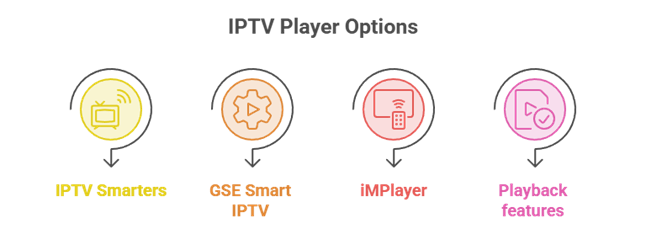
The service supplies the channels, but the player app decides how good the experience feels on an Apple TV. Since tvOS players vary in polish and features, it is worth matching the app to how you watch. The points below cover what I weigh when picking a tvOS player for a subscription.
- IPTV Smarters: A widely used tvOS player that loads Xtream and M3U logins with a familiar, guide-based interface.
- GSE Smart IPTV: A flexible option with strong format support, suited to users who tweak playlists and settings themselves.
- iMPlayer: A modern, EPG-driven player with a polished Apple TV app and a free tier to test before upgrading.
- Playback features: Look for a clean EPG, favourites, and catch-up, which matter more day to day than a long feature list.
Common Apple TV IPTV Problems and Fixes
Most Apple TV IPTV issues come from the connection, the player app, or the credentials rather than the device itself. A few quick checks resolve the majority of them, so it is worth working through the basics before contacting support. The fixes below cover the problems Apple TV owners hit most often.
- Buffering streams: Switch to a wired or faster connection and stream during off-peak hours to reduce load on shared servers.
- Login errors: Re-enter the Xtream Codes or M3U details carefully, as a single wrong character stops the playlist loading.
- Missing guide: Add or refresh the EPG URL in the player so live channels show programme information again.
- App crashes: Update the player app, restart the Apple TV, and reload the playlist to clear temporary glitches.
Final Verdict
For most Apple TV owners, OrigineTV is the strongest pick, since it is built around a player app that runs natively on tvOS with unlimited VOD and multi-screen support. Tellystudio is the better choice for anyone who prioritises uptime and 24/7 support, while iScreenHD suits North American homes wanting a long 30-day trial. Magnolia IPTV is the value option, and USA LIVE IPTV stands out for US local channels. Whichever you choose, pair it with a solid tvOS player and start with a trial before committing to a year.
Top 3 Recommended IPTV for Apple TV
- OrigineTV: Native tvOS app with unlimited VOD and multi-screen support.
- Tellystudio: Stated 99.9% uptime and 24/7 support for steady playback.
- iScreenHD IPTV: A 30-day free trial and strong North American coverage.
FAQs
Can you get IPTV on Apple TV?
Yes. While tvOS has no built-in IPTV support, you install a player app such as IPTV Smarters, GSE, or iMPlayer from the App Store, then enter your provider’s Xtream Codes or M3U details. Every service in this guide works on an Apple TV through one of these apps, with no jailbreaking required.
Which app is best for IPTV on Apple TV?
IPTV Smarters is the most widely used tvOS player, GSE Smart IPTV offers strong format flexibility, and iMPlayer provides a polished, EPG-driven interface with a free tier. The best choice depends on how you watch, so trying a couple with a free subscription trial is the easiest way to decide.
How do I install IPTV on Apple TV?
Open the App Store on your Apple TV, install a player like IPTV Smarters, then add the Xtream Codes login or M3U URL your provider emails after signup. Load the EPG if prompted, and play a channel to confirm it works. The whole process usually takes only a few minutes.
Is IPTV legal on Apple TV?
IPTV technology is legal, and the device makes no difference. Legality depends on whether the service is licensed to stream the channels it offers. Using a licensed provider on an Apple TV is fine, while unlicensed streams carry legal risk. Always check a provider’s licensing claims and your local rules first.
Do I need a VPN for IPTV on Apple TV?
A VPN is not always required, and Apple TV cannot run a VPN app directly, so users typically configure one on their router. A VPN can add privacy but does not make an unlicensed service legal. Weigh your own country’s rules and your provider’s terms before deciding whether to use one.
Does IPTV work in 4K on Apple TV?
Yes, when the service advertises 4K streams, a 4K Apple TV can display them over a strong connection. Real-world quality depends on the source stream and your bandwidth, not just the box. Test a 4K channel during a free trial before assuming every stream will hold Ultra HD on your particular setup.
Can I use IPTV Smarters on Apple TV?
Yes. IPTV Smarters has a tvOS version available on the Apple TV App Store, and it loads Xtream Codes or M3U playlists from most providers. It is one of the most popular ways to watch IPTV on an Apple TV, offering a familiar guide-based interface and support for live channels and VOD.
Why does my IPTV buffer on Apple TV?
Buffering usually stems from a slow connection, an overloaded provider server at peak times, or an outdated player app. A wired Ethernet connection, an app update, and streaming during off-peak hours all help. If one service buffers constantly during a trial, that is a strong signal to try a different provider.
Which IPTV service is best for Apple TV?
In this guide, OrigineTV leads for its native tvOS app, Tellystudio for uptime, and iScreenHD for its long trial and North American coverage. The best choice depends on your region, budget, and viewing habits, so a free trial or short plan is the smartest first step before committing.
Do I need to jailbreak my Apple TV for IPTV?
No. Jailbreaking is unnecessary and not recommended. Every IPTV service in this guide works through legitimate player apps available on the Apple TV App Store, using your subscription credentials. You simply install a player, enter your details, and start watching, all within Apple’s official software.