Key Takeaways
Three services stood out for British viewers. IPVision UK is the natural first choice, with UK-based servers, heavy Premier League and EFL coverage, and the longest money-back window here at 30 days. OrigineTV follows with the largest overall catalogue and a bundled VPN. SofaIPTV rounds out the top three with a 12,000-channel sports lineup covering UEFA nights and the major leagues.
Finding a reliable IPTV service in the UK means cutting through dozens of near-identical websites that all promise Premier League football, Sky and TNT Sports channels, and thousands of movies for a few pounds a month. This guide is written for British cord-cutters and sports fans who want a clear, side-by-side view of what each service actually offers before spending any money.
I compared nine services and player apps on the things that matter to UK viewers: UK channel and sports coverage, server location, video on demand, pricing in pounds, trials, and refund terms. Below you will find a quick verdict, a comparison table of my top five, full reviews of every option, and answers to the questions British buyers ask most. Where a figure is not disclosed, I mark it rather than guessing.
Best IPTV UK Service Providers Ranked
Start with these 9 UK picks and their standout points, then compare the table and full reviews for pricing, trial terms, and setup.
- IPVision UK: IPVision UK is built specifically for British viewers, and it is my top pick for a UK-focused service.
- OrigineTV: OrigineTV brings the largest catalogue in this guide to UK homes, listing more than 55,000 live channels and over 270,000 on-demand titles in up to 4K.
- SofaIPTV: SofaIPTV combines 20,000+ live channels and 80,000+ on-demand titles for British households replacing satellite or cable packages.
- Tellystudio: Tellystudio takes this position because its affordable monthly entry and broad device support make it easy to test on existing hardware.
- Stream IPTV 4K: Stream IPTV 4K leads with resolution in its name, advertising more than 20,000 worldwide channels in 4K alongside a large on-demand library and country-by-country channel lists that include the UK.
- TiviMate: TiviMate is a hugely popular IPTV player for Android and Fire TV, and many UK users pair it with a subscription’s Xtream Codes or M3U playlist.
- Jellyfin: Jellyfin is a free, open-source media server that some IPTV users combine with its Live TV and M3U tuner feature to manage a subscription’s playlist.
- Kodi: Kodi is a free, open-source media centre that British IPTV users often turn into a live-TV front end using the PVR IPTV Simple Client add-on.
- VLC Media Player: VLC is the free, open-source player most British users already have on a laptop, and it opens almost any IPTV M3U playlist without add-ons.
Top 9 Editor Picks for Best IPTV UK
| Name | No. of Channels | VOD | Free Trial | Link |
|---|---|---|---|---|
| IPVision UK | 40,000+ | 150,000+ | 24-hour, free | Visit |
| OrigineTV | 55,000+ | 270,000+ | 24-hour, free | Visit |
| SofaIPTV | 20,000+ | 80,000+ | 24-hour, free | Visit |
| Tellystudio | 30,000+ | 157,000+ | one day free | Visit |
| Stream IPTV 4K | 20,000+ | Large | 36-hour, free | Visit |
| TiviMate | Separate IPTV service required | Provider library required | App tier or licence applies | Visit |
| Jellyfin | Separate IPTV service required | Provider library required | Free app; no trial needed | Visit |
| Kodi | Separate IPTV service required | Provider library required | Free app; no trial needed | Visit |
| VLC Media Player | Separate IPTV service required | Provider library required | Free app; no trial needed | Visit |
How I Tested These UK IPTV Services
This comparison focuses on what British viewers actually get, not marketing slogans. For each service I checked the live website, recorded the figures it publishes, and weighed how well it serves a UK audience. The four criteria below stay the same for every entry, which keeps the reviews consistent and fair for anyone choosing a UK service this year.
- UK channel and sports coverage: How thoroughly the service carries UK terrestrial channels and British sport, including Premier League, EFL, and pay-TV events.
- Server location and stability: Whether UK or nearby European servers keep latency low and streams steady during peak evening kick-offs.
- Channel and VOD depth: The published number and range of live channels and on-demand titles, with international coverage alongside UK content.
- Pricing and trials: Plan lengths, prices in pounds where shown, free trials, and refund windows, so a service can be tested at low risk.
Disclaimer: This article may contain affiliate links, meaning we could earn a commission if you subscribe, at no extra cost to you. We do not host or distribute content. Streaming unlicensed channels may be illegal in the UK, so always confirm a provider’s licensing and your local rules before subscribing. Features and pricing can change at any time.
Best IPTV UK Services Reviewed
1) IPVision UK
IPVision UK is built specifically for British viewers, and it is my top pick for a UK-focused service. It advertises more than 40,000 channels with a full EPG and over 150,000 on-demand titles in up to 4K, with heavy Premier League and EFL coverage.
The service runs on UK-based servers, which keeps latency low during evening kick-offs, and supports TiviMate, IPTV Smarters, Perfect Player, Kodi, and GSE. A 24-hour free trial and a 30-day money-back guarantee, the longest here, make it easy to test on your own connection.
Features
- UK sports focus: Heavy Premier League, EFL, and pay-TV event coverage makes this the standout pick for British football fans who follow the domestic season closely.
- UK-based servers: Local server hosting keeps latency low during evening kick-offs, when distant servers tend to stutter on live British sport.
- Large channel list: More than 40,000 live channels with a full EPG cover UK terrestrial networks plus strong European, North American, and Asian content.
- Deep VOD: Over 150,000 movies and series on demand give households a sizeable British and international library for nights when nothing live appeals.
- Multi-device streaming: Higher plans support several screens at once, so different family members can watch separate UK channels without extra logins.
- Broad app support: It works with TiviMate, IPTV Smarters, Perfect Player, Kodi, and GSE, which meant my existing setup worked without any changes.
- Familiar payments: Visa, Mastercard, PayPal, Apple Pay, and Bancontact are accepted, covering the mainstream payment routes UK buyers actually use.
Pros
- Longest money-back guarantee here at 30 days.
- UK-based servers for low-latency British sport.
- Heavy Premier League and EFL coverage.
- Multi-device streaming on higher plans.
- Transparent pound pricing across plan lengths.
Cons
- Focus is UK content, less suited to other regions.
- Adult content is included and must be disabled manually.
- Channel and VOD totals are self-reported.
Pricing
IPVision UK lists pound pricing for one, two, and three connections.
- Monthly Plan: 1 month £14.99, 6 months £34.99, 12 months £54.99 (one connection)
- Trial: Free 24-hour trial via WhatsApp
- Refund Policy: 30-day money-back guarantee, with terms on the official site
2) OrigineTV
OrigineTV brings the largest catalogue in this guide to UK homes, listing more than 55,000 live channels and over 270,000 on-demand titles in up to 4K. Its Europe-focused lineup carries strong UK and continental sport, movies, and international content in one package.
It works across Windows, macOS, iOS, Android, Apple TV, Samsung, Firestick, and Chromecast, and a bundled VPN adds privacy that UK streamers often want. A 24-hour free trial through WhatsApp with no card let me sample the enormous lineup before paying anything.
Features
- Largest catalogue: More than 55,000 live channels and 270,000-plus on-demand titles make this the deepest lineup here for UK and international viewers alike.
- Built-in VPN: A bundled VPN adds privacy and can bypass network blocks, which many UK streamers value, without paying extra for a separate service.
- European focus: A Europe-centred lineup carries solid UK terrestrial and continental channels alongside a huge international grid of sport and entertainment.
- 4K streaming: Ultra HD streams with a stable-bitrate setup hold quality on a wired British broadband line without dropping during peak evening viewing.
- Wide device net: Windows, macOS, iOS, Android, Apple TV, Samsung, Firestick, and Chromecast are supported, so almost any UK living-room setup works.
- No auto-renewal: Plans run from three months to a lifetime option with no auto-renewal, which I appreciated for keeping control over recurring costs.
- EPG and catch-up: A built-in guide and catch-up window make it easy to plan viewing and rewatch British shows missed earlier in the week.
Pros
- Largest published channel and VOD catalogue here.
- Free 24-hour trial with no card required.
- Built-in VPN valued by UK streamers.
- Broad device support for any UK setup.
- No-contract pricing with a lifetime option.
Cons
- Pricing is in euros rather than pounds.
- One subscription streams on a single screen at a time.
- Catalogue size is self-reported.
Pricing
OrigineTV publishes euro pricing across short and long terms.
- Monthly Plan: 3 months €34.99, 12 months €67.99, lifetime €99.99 (one connection)
- Trial: 24-hour free trial via WhatsApp, no card
- Refund Policy: Check official site
3) SofaIPTV
SofaIPTV combines 20,000+ live channels and 80,000+ on-demand titles for British households replacing satellite or cable packages. Picture options reach high-definition streams with 4K availability advertised for selected content, although I find live sports and PPV groups more relevant to British television.
For British television, the first detail I would examine is proprietary applications. During British television, I would verify the required British channels and watch during a busy football window. I would also confirm whether the lifetime plan requires a large upfront payment during British television.
Features
- Live channels: A published total of 20,000+ live channels creates useful breadth for British households replacing satellite or cable packages, but I would judge the lineup by must-have feeds, sensible grouping and live sports and PPV groups.
- On-demand library: 80,000+ on-demand titles add a substantial film-and-series library for British television.
- Picture quality: Picture options for British television include high-definition streams with 4K availability advertised for selected content. I would compare one demanding channel at two resolutions during British television to see whether UK entertainment, football and dependable evening guide data remains consistent.
- Device support: Compatible setups for British television include Smart TVs, Fire Stick, Android, iOS and Windows plus proprietary apps.
- Trial check: A 24-hour free trial provides a sensible first check for British television.
- Useful extra: For British television, the inclusion of proprietary applications adds useful depth beyond the catalogue totals.
- My take: I would verify the required British channels and watch during a busy football window; live sports and PPV groups would help decide whether I kept the service.
Pros
- 24-hour trial supports UK entertainment, football and dependable evening guide data
- Ten-day guarantee supports UK entertainment, football and dependable evening guide data
- Sports and PPV groups for British television
- Proprietary apps
- 24/7 support
Cons
- High lifetime-plan cost for British television
- Extra screens raise the price for British television
- Catalogue totals are provider-reported for British television
Pricing
I checked the published 24-hour trial at $0 entry price for British television on 27 August 2026.
- Entry option: free 24-hour trial; compare the checkout total, supported screens, renewal price and cancellation wording
- Alternative: $13 monthly
- Longer term: $28 for three months
4) Tellystudio
Tellystudio takes this position because its affordable monthly entry and broad device support make it easy to test on existing hardware. It publishes about 30,000 live channels and approximately 157,000 movies and series, with 4K, Full HD, HD and SD playback choices for this iptv in the uk comparison. For UK homes using smart televisions and streaming sticks, that creates a clear use case without duplicating the surrounding options.
one day free provides the main iptv in the uk check. I would check BBC and commercial-channel availability, football peaks and regional EPG accuracy during the free day. Confirm current support, licensing and refund terms.
FEATURES
- Topic fit: Its affordable monthly entry and broad device support make it easy to test on existing hardware, giving UK homes using smart televisions and streaming sticks.
- Live catalogue: About 30,000 live channels and approximately 157,000 movies and series; confirm the required iptv in the uk feeds rather than trusting totals alone.
- Picture quality: 4K, Full HD, HD and SD playback choices, allowing iptv in the uk resolution to match the screen, connection and programme.
- Device coverage: Smart televisions, Fire TV, Android TV, IPTV Smarters, computers and mobile devices support the iptv in the uk setup without replacement hardware.
- Plan structure: Monthly through three-year terms, with a separate lifetime option, while one active stream on the standard account defines simultaneous iptv in the uk use.
- Testing priority: One day free; check BBC and commercial-channel availability, football peaks and regional EPG accuracy during the free day before choosing a longer subscription.
- My take: Tellystudio fits this position for its iptv in the uk relevance, provided performance, support and licensing answers withstand verification.
PROS
- Free one-day test
- Strong 4K and HD range
- Large VOD catalogue
- Broad player compatibility
- Several subscription lengths
CONS
- One stream by default
- Conditional refund wording
- Long commitments increase exposure
PRICING
Checked against the official site on 21 August 2026 for this iptv in the uk review; confirm prices at checkout.
- Trial & Monthly: Free for one day, then $15 for thirty days.
- Fixed Terms: $35 for three months, $65 for six months and $95 for one year.
- Long Access: $165 for two years, $235 for three years or $365 lifetime.
5) Stream IPTV 4K
Stream IPTV 4K leads with resolution in its name, advertising more than 20,000 worldwide channels in 4K alongside a large on-demand library and country-by-country channel lists that include the UK. It supports up to five simultaneous connections for a busy British household.
A browser-based web player means you can test a 4K UK stream without installing anything, and setup guides cover Firestick, Android TV, and mobile. A 36-hour free trial and a 3-day money-back window gave me time to confirm quality before paying.
Features
- 4K focus: More than 20,000 worldwide channels stream in 4K, so a modern UK television shows sharp sport and films rather than upscaled SD.
- UK country list: Country-by-country channel lists include the UK, making it quick to find British networks rather than scrolling one giant grid.
- Five connections: Up to five simultaneous streams suit a British household running several UHD screens at once without buying extra plans.
- Web player: A browser-based player lets you test a 4K stream on any device before installing an app, a low-effort way to check quality.
- Setup guides: Clear guides cover Firestick, Android TV, and mobile, so a UK user can get running without hunting for instructions elsewhere.
- No auto-renewal: Flat pricing with no auto-renewal on file meant I never worried about a surprise charge after the plan ended.
- Large VOD: A sizeable on-demand library backs up the live channels for nights when nothing British is on live.
Pros
- Strong 4K focus across the lineup.
- UK country channel list for quick access.
- Up to five simultaneous connections.
- Browser web player for easy testing.
- No auto-renewal on plans.
Cons
- Only a 3-day money-back window.
- Pricing is in US dollars, not pounds.
- Channel total is self-reported.
Pricing
Stream IPTV 4K lists flat US-dollar pricing with no auto-renewal.
- Monthly Plan: 1 month $14.99, 3 months $39.99, 6 months $59.99, 12 months $119.99
- Trial: 36-hour free trial
- Refund Policy: 3-day money-back guarantee
6) TiviMate
TiviMate is a hugely popular IPTV player for Android and Fire TV, and many UK users pair it with a subscription’s Xtream Codes or M3U playlist. It is not a service itself but one of the most polished front ends for watching IPTV on a British television.
The free version is generous, while TiviMate Premium adds multi-playlist support, recording, and scheduling. It delivers a genuinely cable-like EPG, though it does not run on iOS or Apple TV, which is worth knowing before you buy hardware.
Features
- Polished EPG: TiviMate presents a slick, cable-style programme guide that makes a raw IPTV playlist feel like a proper UK television service.
- Xtream and M3U: It loads Xtream Codes and M3U playlists from any provider, so it pairs cleanly with every UK service in this guide.
- Fire TV favourite: It runs beautifully on Fire TV Stick and Android TV, the most common streaming devices in British living rooms.
- Free tier: A capable free version covers the basics, so you can trial it with a UK subscription before paying for Premium.
- Premium extras: TiviMate Premium adds multiple playlists, recording, and scheduling for households that want more control over live TV.
- Custom layouts: Adjustable layouts and favourites let you push British channels to the front for faster access night to night.
Pros
- One of the most polished IPTV players available.
- Cable-style EPG and favourites.
- Runs well on Fire TV and Android TV.
- Capable free version before Premium.
Cons
- No iOS or Apple TV version.
- Best features need paid Premium.
Pricing
TiviMate is free, with an optional Premium upgrade for extra features.
Link: tivimate.com
7) Jellyfin
Jellyfin is a free, open-source media server that some IPTV users combine with its Live TV and M3U tuner feature to manage a subscription’s playlist. It is more of a home-server project than a plug-and-play player, but it is completely free and self-hosted.
It supports M3U playlists with XMLTV guide data, giving a British household a private, ad-free front end. Setup is more technical than TiviMate, so it best suits users comfortable running a small always-on server at home.
Features
- Free and open-source: Jellyfin costs nothing and has no premium tier, making it an appealing self-hosted option for cost-conscious UK households.
- Live TV tuner: An M3U tuner with XMLTV guide support turns a subscription playlist into a browsable, cable-style live-TV section.
- Self-hosted privacy: Because it runs on your own hardware, no third party tracks viewing, which privacy-minded British users appreciate.
- Wide client apps: Apps exist for phones, browsers, Fire TV, and Android TV, so household screens connect to the same central server.
- Local media too: Jellyfin also organises personal films and music, doubling as a full home-media hub alongside live channels.
- Active development: A busy open-source community keeps it updated with regular fixes and new features throughout the year.
Pros
- Completely free and open-source.
- Private, self-hosted, no tracking.
- M3U live-TV with EPG support.
- Doubles as a personal media server.
Cons
- More technical to set up than TiviMate.
- Requires a device to act as a server.
Pricing
Jellyfin is free and open-source, with no subscription of its own.
Link: jellyfin.org
8) Kodi
Kodi is a free, open-source media centre that British IPTV users often turn into a live-TV front end using the PVR IPTV Simple Client add-on. It runs on almost anything, from a cheap Android box to a Windows PC plugged into the living-room television.
Once a UK subscription’s M3U playlist and EPG are loaded, Kodi behaves much like a cable guide. It is endlessly customisable, though the first-time setup takes more patience than a ready-made app like TiviMate.
Features
- Free and open-source: Kodi costs nothing and is actively maintained, a low-risk way for UK users to test a playlist before buying a paid player.
- PVR add-on: The PVR IPTV Simple Client loads M3U playlists and EPG data, turning Kodi into a proper British-style live-TV guide.
- Runs anywhere: Windows, Android, macOS, and Linux builds mean almost any device in a UK home can become a Kodi front end.
- Highly customisable: Skins and add-ons let advanced users tailor the interface far beyond what a closed streaming app allows.
- Local media too: Alongside IPTV, Kodi organises personal films, music, and photos, doubling as a complete home-media hub.
- Big community: A large community publishes British setup guides and fixes, so most questions already have a clear answer online.
Pros
- Completely free and open-source.
- Powerful IPTV playback via add-ons.
- Runs on nearly every platform.
- Huge community and documentation.
Cons
- Setup is more involved than TiviMate.
- No official UK support channel.
Pricing
Kodi is free and open-source, with no subscription of its own.
Link: kodi.tv
9) VLC Media Player
VLC is the free, open-source player most British users already have on a laptop, and it opens almost any IPTV M3U playlist without add-ons. It is the fastest way to check whether a UK provider’s stream actually works before setting up a dedicated app.
It is famously reliable with awkward codecs, but it has no EPG, so it suits quick testing rather than daily channel surfing. Versions exist for Windows, macOS, Android, and iOS.
Features
- Opens any playlist: VLC plays M3U links and most stream formats out of the box, the quickest way to confirm a UK provider’s stream works.
- Free forever: It is completely free with no ads or upsells, so it costs nothing to keep as a reliable backup player.
- Codec-proof: VLC handles unusual codecs that make other players stall, so odd UK streams still open without fuss.
- Lightweight: It runs smoothly on older laptops and phones, so testing a British stream does not demand powerful hardware.
- Cross-platform: Windows, macOS, Android, and iOS versions all read the same playlists for quick checks on any device.
- No account needed: There is no sign-up, so you can test a UK stream in seconds without handing over any details.
Pros
- Completely free with no ads.
- Plays virtually any stream or codec.
- Extremely lightweight and stable.
- Available on every major platform.
Cons
- No EPG or channel-guide layout.
- Best for testing, not daily viewing.
Pricing
VLC is free and open-source, with no subscription of its own.
Link: videolan.org
Is IPTV Legal in the UK?
IPTV technology is perfectly legal in the UK, but streaming channels a service is not licensed to carry is not, and enforcement has grown around illegal Premier League streams in particular. Before paying, a few checks lower the risk. Our full guide to IPTV legality goes deeper, but the essentials below apply to any British setup.
- Licensed vs unlicensed: A service carrying Sky, TNT, or Premier League feeds without a licence is operating illegally, however cheap it happens to look.
- Company transparency: Look for real terms, a privacy policy, and contact details rather than an anonymous checkout page with no company behind it.
- Secure payment: Pay by card or PayPal and avoid services that only take gift cards or untraceable crypto transfers.
- Personal risk: UK enforcement has targeted sellers more than individual viewers, but the legal risk still sits with unlicensed streams.
UK Sports on IPTV: What to Expect
Sport is the main reason many British viewers try IPTV, so it is worth knowing what these services typically carry. Coverage varies, and no unlicensed service can guarantee a specific channel will stay up, especially during high-profile Premier League fixtures. The points below set realistic expectations before you subscribe to anything.
- Football coverage: Most services advertise Premier League, EFL, and European football, though channel stability during the biggest kick-offs varies.
- Pay-TV events: Sky Sports, TNT Sports, and pay-per-view boxing often appear, but availability can change from one week to the next.
- Server load: Popular fixtures strain shared servers, so anti-freeze technology and nearby servers matter more than raw channel counts.
- Backups help: Keeping a short trial of a second service is a practical fallback when a match stream drops mid-game.
What to Look for in a UK IPTV Service
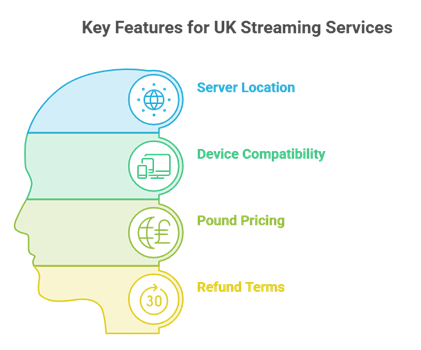
Beyond channel counts, a few practical details separate a smooth UK service from a frustrating one. Because most British homes stream through a Fire TV Stick or Smart TV, compatibility and stability matter as much as the size of the catalogue. If you use a Fire Stick, our steps to install on Firestick help you get set up quickly.
- UK server location: Local or nearby European servers keep latency low during evening kick-offs and reduce buffering on live sport.
- Device compatibility: Support for Fire TV, Android, and Smart TVs covers the hardware in most British living rooms.
- Pound pricing: Services that bill in pounds avoid currency-conversion surprises on a UK card statement.
- Clear refund terms: A trial or money-back window lets you test British channels before committing to a full year.
Common Mistakes UK Buyers Make
Most regrets with IPTV in the UK come from a handful of avoidable mistakes, usually made in a rush to catch a weekend fixture. A little caution before paying saves money and disappointment when a match really matters. The traps below catch out first-time British buyers most often.
- Paying yearly first: Committing to a long plan before testing stability during a live Premier League match on your own connection.
- Chasing the cheapest: Picking the lowest price over server quality, then buffering through the big games that mattered.
- Ignoring device limits: Overlooking how many simultaneous streams a plan allows across the household screens.
- Buying from clones: Paying a copycat site instead of the provider’s real domain and losing the money entirely.
Final Verdict
Tellystudio is the relevant replacement in this iptv in the uk comparison because its affordable monthly entry and broad device support make it easy to test on existing hardware. one day free is the clearest opportunity to confirm performance before choosing a longer term.
Top 3 Recommended IPTV for the UK
- IPVision UK: UK servers, heavy Premier League and EFL coverage, 30-day guarantee.
- OrigineTV: Largest overall catalogue with a bundled VPN.
- SofaIPTV: A 12,000-channel sports lineup for football fans.
FAQs
Is IPTV legal in the UK?
IPTV itself is legal in the UK. What is illegal is streaming channels a service is not licensed to carry, such as unlicensed Premier League, Sky, or TNT Sports feeds. Using a properly licensed provider is fine, while unlicensed streams carry legal risk. Always check a service’s licensing claims and your own situation before subscribing.
Can I watch Premier League on IPTV?
Many IPTV services advertise Premier League coverage, but only licensed broadcasters such as Sky and TNT Sports are legally entitled to show it. Unlicensed streams are common yet illegal, and they can drop during big fixtures. If you want reliable, legal coverage, an official broadcaster subscription remains the safest route.
Do UK IPTV services work on Firestick?
Yes. The Amazon Fire TV Stick is the most popular IPTV device in the UK, and every service in this guide works on it, usually through an app like IPTV Smarters or TiviMate. You install the player, enter the credentials from your provider, and load the playlist to start watching British channels.
Do I need a VPN for IPTV in the UK?
A VPN is not always required, and some providers include one. British users sometimes use a VPN for privacy or to reduce ISP throttling, but it does not make an unlicensed service legal. Weigh your own priorities and your provider’s terms before deciding whether a VPN is worth adding to the setup.
Which IPTV is best for UK sports?
For UK sport, IPVision UK stands out thanks to UK-based servers and heavy Premier League and EFL coverage, while SofaIPTV offers a large 12,000-channel sports lineup covering UEFA and the majors. The best choice depends on which competitions you follow, so use a free trial during a live fixture to judge stability.
How much does IPTV cost in the UK?
Prices vary, but most services here run from around £11 to £15 a month, with yearly plans often working out cheaper per month. Some bill in pounds and others in dollars or euros, so check the currency before paying. A short plan first is a safer way to judge value than committing to a year.
Will my ISP block IPTV in the UK?
Some UK ISPs block known illegal streaming domains under court orders, particularly around live Premier League matches. This can interrupt unlicensed streams. Licensed services are not usually affected. A VPN can sometimes bypass such blocks, but it does not change the legal status of the underlying stream, so weigh the risks first.
Can I get a free trial before paying?
Most services in this guide offer a free trial, typically 24 to 36 hours, and several add a money-back guarantee on top. IPVision UK offers the longest window here at 30 days. A trial is the best way to test British channels and server stability on your own connection before committing any money.
Does UK IPTV include Sky and TNT Sports channels?
Many services advertise Sky Sports and TNT Sports feeds, but carrying them without a licence is illegal, and such streams can be unstable during popular events. Availability changes often. For guaranteed access, a legitimate Sky or TNT subscription is the reliable option, whatever an unlicensed service claims to offer.
What internet speed do I need for IPTV in the UK?
Around 10 Mbps handles HD comfortably, while 25 Mbps or more is safer for 4K streams. A wired connection to the streaming device reduces buffering during peak evening kick-offs. If a service buffers constantly during a trial on a fast British connection, that usually points to the provider’s servers rather than your line.