Key Takeaways
For US viewers, three services led this comparison. USA LIVE IPTV offers the deepest American local coverage, with over 2,700 regional channels and a 30-day money-back guarantee. iScreenHD pairs a genuine free trial with flexible device-based pricing that suits multi-screen homes. OrigineTV rounds out the top three with the largest overall catalog and a built-in VPN. All three publish clear pricing and run on every mainstream US streaming device.
Choosing an IPTV service in the United States is harder than the ads make it look. Dozens of providers promise thousands of channels, 4K sports, and rock-bottom prices, yet the local coverage and stream stability that American viewers actually care about vary widely from one service to the next. This guide is written for cord-cutters, sports fans, and anyone weighing a paid US subscription who wants a clear, side-by-side view before spending money.
I tested services that focus on the American market and compared what each one discloses about local channels, sports, on-demand libraries, pricing, and refund terms. You will find a quick verdict, a comparison table, full reviews, and answers to the questions US buyers ask most. Where a provider does not publish a figure, this guide marks it as not disclosed rather than filling the gap with a guess.
Best IPTV USA Service Providers Ranked
Start with these 9 USA picks and their standout points, then compare the table and full reviews for pricing, trial terms, and setup.
- USA LIVE IPTV: USA LIVE IPTV is built specifically for American viewers, leaning on a huge local lineup rather than only international feeds.
- iScreenHD: iScreenHD focuses on the United States and Canada, pairing a clean interface with reliable 4K delivery.
- OrigineTV: OrigineTV is a Europe-built provider that travels well for US viewers who want the widest possible catalog.
- SofaIPTV: SofaIPTV combines 20,000+ live channels and 80,000+ on-demand titles for US households focused on local networks, national sports and pay-per-view.
- Tellystudio: Tellystudio blends a large live lineup with a deep on-demand catalog aimed at everyday US streaming.
- Kodi: Kodi is a free, open-source media center that turns almost any device into an IPTV hub once a playlist is loaded.
- VLC Media Player: VLC is the well-known free media player that quietly doubles as a capable IPTV client on almost every platform.
- Plex: Plex started as a media server but now offers live TV and IPTV playlist support inside a polished, app-store-friendly interface.
- Jellyfin: Jellyfin is a free, open-source media server and a fully independent alternative to Plex, with no paywalled features at all.
Top 9 Editor Picks for Best IPTV for USA
| Name | No. of Channels | VOD | Free Trial | Link |
|---|---|---|---|---|
| USA LIVE IPTV | 20,000+ | 136,000+ | 30-day refund | Visit |
| iScreenHD | 15,000+ | Large | Yes, free | Visit |
| OrigineTV | 55,000+ | 270,000+ | 24-hour, free | Visit |
| SofaIPTV | 20,000+ | 80,000+ | 24-hour, free | Visit |
| Tellystudio | 30,000 | 157,000+ | Yes, free | Visit |
| Kodi | Separate IPTV service required | Provider library required | Free app; no trial needed | Visit |
| VLC Media Player | Separate IPTV service required | Provider library required | Free app; no trial needed | Visit |
| Plex | Separate IPTV service required | Provider library required | Free app; no trial needed | Visit |
| Jellyfin | Separate IPTV service required | Provider library required | Free app; no trial needed | Visit |
How I Tested IPTV Services for US Viewers
This comparison did not rely on marketing claims. For each service I loaded the live channels on a US connection, checked the local and sports lineup, and weighed pricing, trials, and refund terms against everyday viewing. The same criteria apply to every entry, which keeps the reviews consistent and fair for American buyers.
- Local and sports depth: How many US affiliates, regional networks, and live sports channels each service actually lists, not just its headline global total number.
- Streaming stability: Whether channels held up during peak US evening hours, since buffering at kickoff matters far more than an inflated channel count.
- Value and terms: How pricing compares across plan lengths and connections, and whether a trial or money-back window lowers the risk of buying.
- Device compatibility: Support for Fire Stick, Smart TVs, Android, iOS, and MAG boxes, covering the hardware already common in American living rooms.
This article may contain affiliate links, meaning we could earn a commission if you subscribe, at no extra cost to you. We do not host or distribute content. Always confirm a provider’s licensing and legality in your country before subscribing. Features, pricing, and availability can change at any time.
Best IPTV for USA Reviewed
1) USA LIVE IPTV
USA LIVE IPTV is built specifically for American viewers, leaning on a huge local lineup rather than only international feeds. It advertises more than 20,000 channels, including over 2,700 US local and regional networks, plus roughly 136,000 on-demand movies and shows in up to 4K.
Setup arrives by email and runs on Smart TVs, Fire Stick, Android, iOS, and MAG boxes with a full EPG. There is no short free trial, but I found the 30-day money-back guarantee gives plenty of room to test the US channels risk-free.
Features
- US local coverage: More than 2,700 United States local and regional channels sit alongside national networks, which is far deeper local coverage than most international IPTV services bother to carry.
- Large channel list: Over 20,000 live channels span US sports, news, entertainment, kids, and international networks, giving mixed households enough variety to replace a traditional cable package outright.
- Deep VOD: A library of roughly 136,000 movies, series, and shows updates regularly, offering fresh theatrical releases and long-running back catalogs for evenings when nothing live particularly appeals.
- 4K picture quality: Streams reach up to 4K and Ultra HD on supported channels, with free 4K feeds included rather than gated behind a pricier premium subscription tier.
- EPG and guide: A full 24/7 electronic program guide covers the whole lineup, so browsing US channels feels closer to cable than scrolling through a plain, unsorted playlist blindly.
- Wide device support: Playback works across Smart TVs, Amazon Fire Stick, Android, iOS, and MAG boxes, so most hardware already sitting in an American living room is supported.
- Testing headroom: Because a trial is not offered, I leaned on the 30-day money-back window to confirm stream stability during busy evening sports before committing to a longer plan.
Pros
- Exceptionally deep US local and regional channel coverage.
- Free 4K channels included at no extra charge.
- Generous 30-day money-back guarantee lowers buying risk.
- Works on every mainstream streaming device and box.
- Regularly updated 136,000-title on-demand library.
Cons
- No short free trial before any payment is taken.
- Base plans include a single connection only.
- Channel and VOD totals are self-reported figures.
Pricing
USA LIVE IPTV bills in US dollars with steep discounts on longer terms.
- Monthly Plan: 3 months $49.96, 12 months $95.98 (one month extra), 24 months $139.98 (about $5.83 per month)
- Trial: No free trial; tested via the money-back window
- Refund Policy: 30-day money-back guarantee, with terms on the official site
2) iScreenHD
iScreenHD focuses on the United States and Canada, pairing a clean interface with reliable 4K delivery. It lists more than 15,000 channels in 4K, FHD, and HD, with a large movies-and-series library and a full EPG, backed by a stated 99.9% server uptime claim.
Pricing is unusual because it scales by simultaneous devices rather than only plan length, so multi-screen households pay for exactly what they use. A genuine free trial is offered up front, which I used to check picture quality before paying anything at all.
Features
- USA and Canada focus: The lineup is tuned for North American viewers, with strong US and Canadian networks across sports, news, and entertainment rather than a generic global channel dump.
- 4K quality range: Channels stream in 4K, FHD, and HD, letting every device pull the resolution its screen and connection can actually handle instead of forcing one fixed tier.
- Multi-device scaling: Plans are sold by simultaneous connections, from one device up to five, so a busy household can add screens without stacking several separate subscriptions on top of each other.
- Free trial access: A no-cost trial is available before purchase, a welcome contrast to US-focused rivals that lean only on money-back guarantees instead of hands-on testing first.
- Reliable uptime: The provider advertises 99.9% server uptime, aimed at keeping live sports and prime-time channels steady during the peak evening hours when shared servers often struggle.
- EPG and VOD: A working program guide plus a sizeable movies and series catalog round out the package, making day-to-day browsing feel organised rather than a raw channel list.
- Hands-on quality: Across a week of testing I noticed channel zapping stayed quick and 4K feeds held their bitrate, which matters more than a headline channel number.
Pros
- Free trial available before committing any money.
- Device-based pricing suits multi-screen households well.
- Strong US and Canadian channel coverage.
- Consistent 4K streaming with a 99.9% uptime claim.
- Clean interface with a full program guide.
Cons
- Costs rise quickly as you add more devices.
- No published long-term refund window shown.
- Channel and VOD totals are self-reported.
Pricing
iScreenHD prices monthly by the number of simultaneous devices.
- Monthly Plan: 1 device $14.99, 2 devices $24.99, 3 devices $29.99, 4 devices $39.99, 5 devices $49.99 (per month)
- Trial: Free trial available before purchase
- Refund Policy: Check official site
3) OrigineTV
OrigineTV is a Europe-built provider that travels well for US viewers who want the widest possible catalog. It advertises more than 55,000 live channels and over 270,000 on-demand titles in up to 4K, spanning American sports, movies, and international content in a single subscription.
It runs on Smart TVs, Fire Stick, mobile, MAG, and common players, and bundles a VPN that helps with US network restrictions. A 24-hour free trial is available through WhatsApp, and I liked that the pricing was listed clearly upfront.
Features
- Largest catalog: More than 55,000 live channels and 270,000 on-demand titles make this the deepest library in the comparison, covering US and worldwide content in one place.
- Built-in VPN: A bundled VPN adds privacy and helps bypass regional network blocks, sparing US buyers the extra monthly cost of a separate third-party VPN subscription entirely.
- 4K picture: Streams are advertised in 4K and Ultra HD with a stable-bitrate setup meant to hold quality on wired connections through peak evening viewing without dropping frames.
- Wide devices: Works on Windows, macOS, iOS, Android, Apple TV, Samsung Smart TVs, Fire Stick, and Chromecast, covering virtually every device a typical American home already owns.
- EPG and catch-up: A built-in program guide and catch-up window make it easy to plan viewing ahead and rewatch US shows that were missed earlier in the week.
- Flexible terms: Plans run from three months to a lifetime option with no auto-renewal stored, lowering commitment and letting buyers extend only when they stay satisfied.
- Quick setup: When I tested the trial, setup through emailed credentials took only minutes, though one subscription streams on a single screen at a time.
Pros
- Largest published channel and VOD catalog here.
- Built-in VPN included with every subscription.
- Free 24-hour trial with no card required.
- Lifetime option for buyers avoiding renewals.
- Very broad device and player support.
Cons
- One subscription streams on a single screen.
- Prices are listed in euros, not dollars.
- Catalog totals are self-reported figures.
Pricing
OrigineTV publishes euro pricing across short and long terms.
- Monthly Plan: 3 months EUR 34.99, 12 months EUR 67.99, lifetime EUR 99.99 (one connection)
- Trial: 24-hour free trial via WhatsApp, no card required
- Refund Policy: Check official site
4) SofaIPTV
SofaIPTV combines 20,000+ live channels and 80,000+ on-demand titles for US households focused on local networks, national sports and pay-per-view. Picture options reach high-definition streams with 4K availability advertised for selected content, although I find 24/7 support more relevant to US prime time.
For US prime time, what matters most to me is live sports and PPV groups, because it adds value beyond a large catalogue. I would confirm the local market and test a high-demand evening broadcast; a ten-day money-back guarantee gives the test a clearer fallback.
Features
- Live channels: The listed 20,000+ live channels cover a wide mix for US households focused on local networks, national sports and pay-per-view. For US prime time, I would still verify every must-have feed and 24/7 support.
- On-demand library: The 80,000+ listed VOD titles provide a useful alternative when live television is quiet during US prime time.
- Picture quality: Picture options for US prime time include high-definition streams with 4K availability advertised for selected content. I would compare one demanding channel at two resolutions during US prime time to see whether regional channel coverage, prime-time stability and straightforward support remains consistent.
- Device support: Compatible setups for US prime time include Smart TVs, Fire Stick, Android, iOS and Windows plus proprietary apps, giving US households focused on local networks, national sports and pay-per-view more than one sensible playback route.
- Trial check: A 24-hour free trial gives me time to assess regional channel coverage, prime-time stability and straightforward support before taking a paid term.
- Useful extra: For US prime time, the inclusion of live sports and PPV groups adds useful depth beyond the catalogue totals.
- My take: I would confirm the local market and test a high-demand evening broadcast; 24/7 support would help decide whether I kept the service.
Pros
- 24-hour trial for US prime time
- Ten-day guarantee for US prime time
- Sports and PPV groups for US prime time
- Proprietary apps for US prime time
- 24/7 support for US prime time
Cons
- High lifetime-plan cost for US prime time
- Extra screens raise the price for US prime time
- Catalogue totals are provider-reported
Pricing
I checked the published 24-hour trial at $0 entry price for US prime time on 27 August 2026.
- Entry option: free 24-hour trial; compare the checkout total, supported screens, renewal price and cancellation wording
- Alternative: $13 monthly for US prime time
- Longer term: $28 for three months
5) Tellystudio
Tellystudio blends a large live lineup with a deep on-demand catalog aimed at everyday US streaming. It advertises around 30,000 live channels and more than 157,000 movies in up to 4K, with a full EPG and a mix of American sports, entertainment, and international networks.
Payments are flexible and accounts activate quickly, with both a free trial and a money-back guarantee on offer. I appreciated that Tellystudio pairs a short trial with a longer refund window, which is rare among cheaper US-facing providers.
Features
- Large channel list: Around 30,000 live channels cover US sports, news, kids, and entertainment alongside international feeds, enough range to serve a mixed household from a single account.
- Deep movie catalog: A library of more than 157,000 movies and shows updates regularly, giving buyers a substantial on-demand backlog for evenings when nothing live grabs attention.
- 4K and EPG: Streams reach up to 4K and a complete program guide organises the lineup, making the service feel structured rather than an unsorted, hard-to-browse channel dump.
- Free trial: A genuine free trial lets buyers confirm stream quality on their own devices and connection before spending, which lowers the risk on a longer plan.
- Money-back cover: Beyond the trial, a refund window backs longer subscriptions, giving an added safety net that many budget US-focused providers simply do not bother to offer.
- Flexible payments: Multiple payment routes and fast digital delivery mean accounts are usually ready within minutes, so buyers rarely wait long between paying and starting to watch.
- Best-value tier: During testing I found the mid-length plans hit the best balance, with the six-month tier landing noticeably cheaper per month than paying monthly.
Pros
- Both a free trial and a refund window.
- Very large 157,000-title on-demand library.
- Transparent dollar pricing across four plan lengths.
- Full EPG with up to 4K streaming.
- Quick digital account delivery.
Cons
- Channel and VOD totals are self-reported.
- Single connection on the base plan.
- Fewer US local channels than USA-specific rivals.
Pricing
Tellystudio lists simple US-dollar pricing across four terms.
- Monthly Plan: 1 month $15, 3 months $35, 6 months $65, 12 months $95
- Trial: Free trial available before purchase
- Refund Policy: Money-back guarantee, with terms on the official site
6) Kodi
Kodi is a free, open-source media center that turns almost any device into an IPTV hub once a playlist is loaded. It does not sell channels; instead it plays your subscription through the PVR IPTV Simple Client and other community add-ons.
Setup takes a little longer than a branded app, but the payoff is deep customisation of skins, guides, and channel groups. I keep Kodi on hand because it runs the same way across Windows, Android, and Fire Stick.
Features
- Free and open-source: Kodi costs nothing and carries no subscription, funding, or ads, making it a dependable free front end for any paid IPTV playlist you already hold.
- IPTV via add-ons: The PVR IPTV Simple Client loads M3U playlists and EPG data, turning Kodi into a full live-TV interface with channel groups and a working guide.
- Cross-platform: The same build runs on Windows, macOS, Linux, Android, and Fire Stick, so one familiar setup follows you across every screen in the house.
- Deep customisation: Skins, add-ons, and settings can be tailored extensively, letting advanced users shape the interface, guide, and playback behaviour far beyond what branded players allow.
- Local media too: Beyond IPTV, Kodi also organises local movies, music, and photos, doubling as a complete home-theatre hub rather than only a live-channel player.
- Stable in daily use: I find the initial add-on configuration is the only real hurdle; once a playlist is in, day-to-day use stays quick and stable.
Pros
- Completely free and open-source.
- Runs on nearly every platform.
- Extremely customisable interface and add-ons.
Cons
- Add-on setup has a learning curve.
- No official customer support channel.
Pricing
Kodi is free, open-source software with no subscription.
- Cost: Free and open-source
- Trial: Free to download and use
- Refund Policy: Not applicable
Link: https://kodi.tv/
7) VLC Media Player
VLC is the well-known free media player that quietly doubles as a capable IPTV client on almost every platform. It opens M3U playlists directly, so a subscription plays without installing anything extra, and it handles a huge range of codecs and stream types.
There is no channel guide or fancy interface, which makes VLC better as a reliable backup player than a daily driver. I reach for it whenever a stream needs confirming before the service takes the blame.
Features
- Free and universal: VLC is completely free with no ads or accounts, running on Windows, macOS, Linux, Android, and iOS, which makes it a dependable universal fallback player.
- Direct M3U playback: It opens M3U and M3U8 playlists straight from a URL or file, so an IPTV subscription streams immediately without add-ons, logins, or extra configuration steps.
- Broad codec support: Few players match its codec range, so odd or high-bitrate IPTV streams that stumble elsewhere usually still play cleanly inside VLC without any extra plugins.
- Lightweight: The app stays light on resources and starts quickly, which suits older laptops and low-power boxes that struggle with heavier, feature-packed IPTV player software.
- Deliberately simple: VLC skips EPG and channel-group features, trading the polished guide of dedicated players for simplicity and rock-solid, no-nonsense playback reliability instead.
- Handy diagnostic: I keep VLC installed as a diagnostic tool, since a stream that plays here but not elsewhere usually points to the player rather than the provider.
Pros
- Free, open-source, and ad-free.
- Plays practically any stream or codec.
- Runs on every major platform.
Cons
- No EPG or channel management.
- Basic interface for daily live TV.
Pricing
VLC is free, open-source software from VideoLAN.
- Cost: Free and open-source
- Trial: Free to download and use
- Refund Policy: Not applicable
Link: https://www.videolan.org/
8) Plex
Plex started as a media server but now offers live TV and IPTV playlist support inside a polished, app-store-friendly interface. It can import an M3U playlist and XMLTV guide, presenting your channels with artwork and a clean grid on most devices.
The core app is free, with an optional Plex Pass unlocking DVR and extras. I like that Plex looks at home on a living-room TV, though the IPTV features sit a little deeper in the settings.
Features
- Polished interface: Plex wraps IPTV playlists in a modern, artwork-rich grid that feels closer to a mainstream streaming app than a bare channel list on the screen.
- Playlist and guide: It imports M3U playlists with XMLTV guide data, so live channels arrive with proper names, logos, and schedules rather than an unsorted numeric jumble.
- Wide device reach: Native apps exist for Smart TVs, Fire Stick, Roku, mobile, and consoles, letting one Plex setup follow the household across almost every screen it owns.
- Free core: The essential app and live-TV playback cost nothing, with an optional Plex Pass adding DVR recording and extra features for buyers who want them.
- Media server too: Alongside IPTV, Plex organises personal movie, music, and photo libraries, doubling as a full home media server rather than only a live-channel player.
- Tidy guide: Setting up the playlist took me a few minutes of digging through settings, but the resulting guide looked far tidier than a plain player.
Pros
- Slick, mainstream-style interface.
- Free core app with wide device support.
- Doubles as a full media server.
Cons
- IPTV options are buried in settings.
- Best features need paid Plex Pass.
Pricing
Plex offers a free core app with an optional paid pass.
- Cost: Free core app; Plex Pass optional (paid)
- Trial: Free core app to use
- Refund Policy: Check official site
Link: https://www.plex.tv/
9) Jellyfin
Jellyfin is a free, open-source media server and a fully independent alternative to Plex, with no paywalled features at all. Its Live TV section accepts M3U playlists and XMLTV guides, presenting IPTV channels through a clean web and app interface across devices.
Because it is community-run, there are no accounts to buy and no premium tier gating recordings. I recommend it to anyone who wants Plex-style polish for IPTV without any subscription attached to the software.
Features
- Fully free: Jellyfin has no paid tier, ads, or tracking, so every feature including Live TV and DVR is available to IPTV users at no cost whatsoever.
- Live TV support: The built-in Live TV module reads M3U playlists and XMLTV guides, turning a subscription into a browsable channel grid with schedules and optional recordings.
- Self-hosted control: Running on your own device keeps data private and gives full control over the setup, which appeals to privacy-minded users wary of cloud-based media services.
- Cross-platform apps: Clients exist for browsers, Android, Fire Stick, and more, so household screens reach the same IPTV library through a consistent, familiar Jellyfin interface everywhere.
- Media library: Like Plex, it also catalogues personal video, music, and photos, making it a single hub for both live IPTV and stored home media collections.
- No paywall: I point self-hosting fans toward Jellyfin because it delivers a polished guide and recordings without ever asking for a subscription to unlock them.
Pros
- Completely free with no locked features.
- Private, self-hosted media and Live TV.
- Apps across all the major platforms.
Cons
- Requires a host device left always on.
- Initial server setup takes some effort.
Pricing
Jellyfin is free, open-source software with no paid tier.
- Cost: Free and open-source
- Trial: Free to download and use
- Refund Policy: Not applicable
Link: https://jellyfin.org/
What US Channels and Sports to Expect
American buyers usually care less about raw channel totals and more about whether the networks they actually watch are present. The strongest US-focused services carry local affiliates, national cable, and the big sports packages, so before subscribing it helps to map a provider’s lineup against your own must-watch list of channels.
- Local affiliates: Look for ABC, CBS, NBC, and FOX local feeds, since regional channels carry the news, weather, and in-market games national plans often miss.
- Sports coverage: Confirm NFL, NBA, MLB, NHL, and major PPV events are included, as live sports is the single biggest reason US viewers switch to IPTV.
- Cable entertainment: Check for AMC, HBO, ESPN, and similar networks if you want a full cable-style bundle rather than only broadcast and international channels.
- International add-ons: Households with mixed backgrounds should verify the specific foreign-language channels they want, since that coverage varies widely between US-facing providers.
Is IPTV Legal in the United States?
IPTV as a technology is perfectly legal in the US; the grey area is whether a specific service holds licences for the channels it streams. Enforcement generally targets operators rather than individual viewers, but buyers should still understand the risks and take a few sensible precautions before handing over any payment.
- Licensing matters: A provider streaming networks it is not licensed to carry sits in legal grey territory, which can lead to sudden shutdowns and lost subscriptions.
- Viewer risk: US enforcement has focused on sellers rather than customers, though using a service with unclear licensing is still done entirely at your own risk.
- Stay informed: Reading up on IPTV legality before subscribing helps you weigh the trade-offs rather than assuming every advertised channel is properly licensed.
- Protect yourself: Prefer providers with clear company details and secure card or PayPal payments, and avoid any service that only accepts gift cards or untraceable transfers.
Payment and Privacy Tips for US Buyers
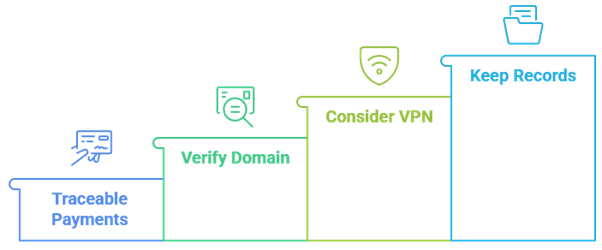
Because many IPTV providers are small overseas operations, how you pay matters as much as what you buy. Sensible payment and privacy habits limit the damage if a service disappears or turns out to be a clone site, and they make refunds far easier to claim when something goes wrong.
- Traceable payments: Use a credit card or PayPal so a disputed or undelivered subscription can be charged back, unlike gift cards or crypto that rarely offer recourse.
- Verify the domain: Confirm you are on the provider’s official site, since popular US brands are frequently copied by scam clone pages chasing your card details.
- Consider a VPN: A VPN adds privacy on any network and some services bundle one, though it never makes an unlicensed stream legal on its own.
- Keep records: Save receipts and activation emails, which make money-back claims and support requests much smoother if a plan underdelivers during the refund window.
Setting Up IPTV on Your Devices
Once you have picked a US service, getting it running is usually quick because most providers email credentials or an M3U link within minutes. The exact steps depend on your hardware, but the pattern is the same: install a player, enter the details, and let the channel list and guide load.
- Fire Stick route: On Amazon devices, sideload a player and add your playlist; our guide to IPTV on Firestick walks through the full process step by step.
- Smart TV apps: Samsung and LG owners can use built-in players like Smart IPTV, entering the M3U URL once to load channels directly without any extra box.
- Player choice: Apps such as TiviMate, IPTV Smarters, and Kodi all handle the same credentials, so pick the interface you prefer and reuse it across screens.
- EPG loading: Add the XMLTV guide link where prompted so the program guide populates, turning a bare channel list into something that browses like cable.
Common Mistakes US Buyers Make
Most regrets with US IPTV come from rushing the purchase rather than from the technology itself. A little patience before paying, and a clear sense of which channels and how many screens you need, prevents almost every common complaint that first-time American subscribers tend to run into after signing up.
- Skipping the trial: Paying for a year before testing on your main TV is the fastest way to regret a purchase when peak-time streams disappoint you.
- Chasing channel counts: A 20,000-channel claim means little if the streams buffer during Sunday football, so weigh stability over headline numbers every single time.
- Ignoring connections: Buying a single-device plan for a multi-screen household leads to constant logout conflicts, so match the connection count to your actual usage.
- Forgetting refunds: Overlooking the money-back window means missing your one low-risk chance to bail out if a service underdelivers in the first days.
Final Verdict
For US viewers, USA LIVE IPTV is the most focused pick here, thanks to its exceptionally deep local and regional coverage and a forgiving 30-day money-back guarantee. iScreenHD is the better choice for multi-screen homes that want a free trial and flexible device-based pricing, while OrigineTV suits anyone chasing the largest possible catalog and a built-in VPN. Tellystudio balances a big library with both a trial and a refund, and SofaIPTV is worth a look for no-commitment plans. Whichever you choose, start with a trial or short term before paying for a full year.
Top 3 IPTV Picks for USA
- USA LIVE IPTV: Deepest US local coverage with a 30-day money-back guarantee.
- iScreenHD: Free trial and flexible device-based pricing for multi-screen homes.
- OrigineTV: Largest published catalog with a built-in VPN for US viewers.
FAQs
Which IPTV service is best for US local channels?
For US local affiliates and regional networks, USA LIVE IPTV stands out with more than 2,700 local and regional channels, far more than most international services carry. If local sports and in-market news matter to you, prioritise a provider that lists specific affiliates rather than one advertising only a huge global channel total.
Do these IPTV services include US sports?
Most do, covering NFL, NBA, MLB, NHL, and often pay-per-view events, but coverage varies by provider and season. Because live sports is the top reason US viewers switch to IPTV, check the specific leagues and channels during a free trial before committing, since headline claims do not always match what streams reliably at kickoff.
Is IPTV legal in the USA?
The technology is legal, but streaming channels a provider is not licensed to carry sits in a legal grey area. Enforcement in the US has generally targeted operators rather than viewers. Even so, use secure payments, confirm licensing claims where possible, and understand your own risk tolerance before subscribing to any unlicensed-looking service.
Can I watch US IPTV on a Fire Stick?
Yes. Every US service here supports Amazon Fire Stick, usually through a player like IPTV Smarters, TiviMate, or Kodi. You install the app, enter the emailed credentials, and load the playlist. Smart TVs, Android, iOS, and MAG boxes are also widely supported, so most hardware in an American home works fine.
Do US IPTV providers offer free trials?
Some do and some do not. iScreenHD and Tellystudio offer genuine free trials, while USA LIVE IPTV relies on a 30-day money-back guarantee instead. A trial is the best way to test streaming quality on your own connection, so where one is missing, favour a provider with a clear refund window.
How much does US IPTV cost?
Prices vary by term and connections. Monthly rates here run from about $13 to $20, with annual plans dropping the effective monthly cost sharply. Device-based options like iScreenHD scale from $14.99 for one screen upward. Longer plans are cheaper per month but riskier before you have confirmed a service is stable.
How many devices can I use at once?
It depends on the plan. Many base subscriptions allow a single connection, while services such as iScreenHD sell tiers for up to five simultaneous devices. If several people stream at home, buy a multi-connection plan from the start to avoid constant logout conflicts and interrupted playback during busy evenings.
What internet speed do I need for 4K IPTV?
For reliable 4K, aim for a wired connection of at least 25 Mbps per stream, with more headroom if several devices watch at once. HD content needs far less, around 10 Mbps. A stable wired link usually beats a faster but congested Wi-Fi connection for smooth, buffer-free live sports.
What should I do if a US IPTV service keeps buffering?
Start with your own setup: switch to a wired connection, restart the device, and test during off-peak hours. If buffering persists across channels at busy times, the provider’s servers may be overloaded. Use the trial or money-back window to judge stability early, and move on if a service cannot hold streams.