Key Takeaways
USA LIVE IPTV is the first sponsored option to compare for published two- to four-device bundles. IPTV Harmony suits families wanting separate two- or three-account packages and session controls. IPVision UK offers published monthly tiers for UK viewers, although checkout prices remain unconfirmed. For eligible US homes, the mainstream alternatives below provide clearer household documentation. Choose by concurrent viewing needs and verified terms, not a promise of unlimited device compatibility.
The best IPTV with multiple connections is the plan that lets everyone watch at the same time without exceeding its stream or household rules. A provider supporting five devices does not necessarily include five simultaneous streams. Some sell extra connections on one subscription; others bundle separate accounts, and mainstream live-TV apps often reserve larger allowances for one home network.
I compared eight services by their published connection limits, billed totals, account arrangements, and trial conditions. This guide explains which options suit two TVs, three independent viewers, or a larger household, and where the available information still needs confirmation. You will also find a way to count recordings and multiview sessions, compare cost per connection, and test a plan on your actual devices before making a longer commitment.
Best IPTV Providers with Multiple Connections Ranked
Start with these 8 Multiple Connections picks and their standout points, then compare the table and full reviews for pricing, trial terms, and setup.
- USA LIVE IPTV: USA LIVE IPTV publishes family bundles for two, three, or four devices, making it a useful starting point for a household with several active viewers.
- IPTV Harmony: IPTV Harmony makes a useful distinction between installing an account on several devices and watching on them together.
- IPVision UK: IPVision UK is worth comparing when a UK household needs two or three concurrent screens but wants a short initial commitment.
- OrigineTV: OrigineTV provides a dedicated two-connection price column, which makes it relevant for a couple using separate televisions.
- StreamingNordic IPTV: StreamingNordic IPTV labels its family packages Duo and Trio, with two and three connections respectively.
- YouTube TV: YouTube TV is a mainstream US live-TV option with a different model from an M3U subscription.
- Hulu + Live TV: Hulu + Live TV pairs its standard two-screen allowance with an optional Unlimited Screens add-on.
- Fubo: Fubo publishes a generous home allowance for its current US-English plans: up to ten devices on the Home Network, plus three additional mobile or browser streams away from home.
Top 8 Editor Picks for Multiple IPTV Connections
| Provider | Published simultaneous option | Example billed total | Important limit | Link |
|---|---|---|---|---|
| USA LIVE IPTV | 2, 3 or 4 devices | $109.98 / 3 months / 3 devices | Confirm credentials and permitted locations | Visit |
| IPTV Harmony | 2 or 3 separate accounts | €119.99 / 12 months / 2 accounts | One stream per account | Visit |
| IPVision UK | 2 or 3 connections | £23.99 / month / 2 connections | Guide price; checkout unconfirmed | Visit |
| OrigineTV | 2-connection X2 tier | €69.99 / 3 months / 2 connections | Select X2; ordinary plan is single stream | Visit |
| StreamingNordic IPTV | Duo 2 or Trio 3 connections | €119.99 / 12 months / Duo | Annual family commitment | Visit |
| YouTube TV | 3 streams; 4K Plus expands home viewing | $82.99/month; $92.98 with 4K Plus | Expanded viewing is home-network only | Visit |
| Hulu + Live TV | 2 screens; Unlimited Screens add-on | $89.99/month; $99.98 with add-on | Unlimited at home; away limits apply | Visit |
| Fubo | Up to 10 home devices + 3 mobile/browser away | Current price not verified | TV devices must stream from one location | Visit |
Prices and published terms checked on 10 September 2026. Currencies are kept as quoted; these are not exchange-rate comparisons. Monthly equivalents elsewhere in this guide are calculations, not separate monthly offers. Unconfirmed checkout details are labelled explicitly.
Best IPTV with Multiple Connections Reviewed
1) USA LIVE IPTV
USA LIVE IPTV publishes family bundles for two, three, or four devices, making it a useful starting point for a household with several active viewers. The dedicated multi-device page also advertises no IP locking. I would shortlist it for its clearly stated connection tiers rather than its channel-count claims.
The important comparison is the amount billed for the entire bundle. Its annual four-device package costs $249.98 upfront, while the three-month equivalent costs $139.98. Those are different commitments, not monthly subscriptions at the advertised monthly equivalent. Confirm how credentials are allocated and which locations are permitted before placing an order.
Features
- Connection tiers: Published bundles cover two, three, and four devices, so households can compare the advertised allowance against their busiest viewing period before selecting a subscription.
- Network flexibility: The family page advertises no IP locking. Get written confirmation for simultaneous home and mobile use because network flexibility does not automatically authorize unrestricted sharing.
- Billed totals: The twelve-month four-device bundle is $249.98 upfront. Comparing that total with shorter plans avoids confusing a monthly equivalent with a cancel-anytime monthly payment option.
- Separate viewing: Ask for the purchased number of independent streams during activation. A list of supported televisions and phones alone does not establish a simultaneous viewing allowance.
- Trial distinction: The homepage promotes its refund guarantee instead of a standard free trial. Confirm any offered trial directly and avoid assuming a trial includes every paid connection.
- Household checks: Before extending a subscription, run different channels across your actual screens together. Record errors, start times, and affected devices so support can investigate specific failures.
- My take: The clearest fit is a three- or four-viewer household that wants published bundle prices and can verify the provider’s location and activation rules before purchase.
Pros
- Two, three, and four-device bundles have clearly published billed totals.
- No IP locking is explicitly advertised on the family page.
- Three-month plans offer a shorter commitment than the annual bundles.
- The site publishes a thirty-day money-back promise for subscribers.
- A dedicated family page makes comparing connection tiers relatively straightforward.
Cons
- The displayed monthly equivalent generally requires a larger upfront payment.
- No standard free trial was confirmed from the current homepage.
- Advertised streaming and refund promises still need checking against written terms.
Pricing
Published information checked on 10 September 2026; exceptions noted below.
- Monthly Plan: No monthly family tier confirmed; three months costs $79.98/2 devices, $109.98/3, or $139.98/4.
- Trial: Not confirmed; twelve-month bundles cost $149.98/2 devices, $199.98/3, or $249.98/4.
- Refund Policy: A 30-day guarantee is advertised; confirm eligibility and process before paying.
2) IPTV Harmony
IPTV Harmony makes a useful distinction between installing an account on several devices and watching on them together. Its FAQ says one account permits one active stream; the two-account and three-account bundles provide simultaneous viewing. I prefer this explanation because it tells a family exactly what the extra purchase buys.
The controls address a common household problem: an old device keeping a session open. The provider describes a Kick Out function and a network-reset option. These controls manage existing access; they do not increase your allowance. Assign each purchased account carefully, and keep the private control links out of shared screenshots.
Features
- Account allocation: Each account represents one simultaneous connection. Two- and three-account packages suit independent viewers, while larger households must request a custom quote instead of assuming unlimited access.
- Session control: The provider describes a Kick Out tool for closing an existing session. This can help when someone leaves playback running on a forgotten household device.
- Network reset: A private control link can reset the network associated with access. Confirm the travel rules before treating this function as permission for concurrent use across homes.
- Playlist control: Country selection and channel customization can simplify family browsing. Ask to remove unwanted categories at account level, then check parental restrictions separately inside each player application.
- Trial scope: A free twenty-four-hour trial is offered, with a paid extended option. Request two or three test accounts if simultaneous viewing is the deciding factor for purchase.
- Bundle value: The annual two-account price is €119.99 versus €129.98 for two individual annual accounts. That €9.99 saving matters less if the extra stream will remain unused.
- My take: This is a practical shortlist choice for families who want separate logins and session controls, provided the restrictive refund terms are understood before any longer commitment.
Pros
- The FAQ clearly explains one account versus simultaneous viewing.
- Two-account and three-account prices appear in the interactive plan selector.
- Private controls address stale sessions and network changes directly.
- A free twenty-four-hour trial can establish basic device compatibility.
- Customizing channel categories can reduce clutter for different household viewers.
Cons
- One account cannot be watched concurrently on two different devices.
- Refund eligibility requires an unresolved complete outage under restrictive conditions.
- More than three simultaneous connections require a separately agreed custom package.
Pricing
Published information checked on 10 September 2026; exceptions noted below.
- Monthly Plan: Two accounts cost €59.99/3 months or €119.99/12 months; three cost €79.99 or €159.99 respectively.
- Trial: Free 24 hours; extended seven-day trial advertised at €9.99. Confirm the number of test accounts.
- Refund Policy: Conditional on complete service failure remaining unresolved for three calendar days after contacting support; exclusions apply.
3) IPVision UK
IPVision UK is worth comparing when a UK household needs two or three concurrent screens but wants a short initial commitment. Its official subscription guide lists monthly, quarterly, half-year, and annual connection tiers. I would begin with the monthly option and validate the exact channels each viewer needs before extending.
There is an important verification limit here: the official guide was readable, but the linked product pages did not provide a usable checkout confirmation during this review. The amounts below are published guide prices, not a final quote. Confirm the billed currency, stream count, and household policy directly on the current order.
Features
- Short commitments: The official guide lists monthly two- and three-connection options. These can reduce the amount committed while a household checks whether simultaneous viewing meets its requirements.
- Published pricing: Two connections are listed at £23.99 for one month; three cost £29.99. Treat these as guide prices until the current product or checkout confirms them.
- Annual comparison: The guide lists £89.99 annually for two connections and £119.99 for three. Divide by twelve for budgeting, while remembering the whole amount is committed upfront.
- Trial request: A twenty-four-hour free trial is advertised without payment details. Ask whether the trial can activate every screen, rather than demonstrating only one working connection.
- Upgrade route: The subscription guide directs existing customers to support for additional connections. Confirm any upgrade charge, remaining-term treatment, and activation timing before changing the household’s plan.
- Viewing priorities: Check the precise UK channels, regional feeds, subtitles, and programme guide your family uses. An advertised large catalogue cannot establish availability for a particular evening’s programme.
- My take: The monthly tiers make this useful for cautious UK comparisons, but unresolved checkout verification keeps it below options whose current bundle prices were directly accessible.
Pros
- Published monthly options cover both two and three simultaneous screens.
- The official guide provides several durations for comparing commitments.
- A free trial is advertised before a paid subscription.
- The provider documents a support route for connection upgrades.
- UK-focused information helps readers frame relevant channel and device questions.
Cons
- Guide prices could not be independently confirmed at current checkout.
- A clear same-household or multi-IP allowance still needs confirmation.
- Published catalogue and performance claims were not verified through streaming tests.
Pricing
Published information checked on 10 September 2026; exceptions noted below.
- Monthly Plan: Official guide lists £23.99/2 connections or £29.99/3; annual equivalents are £89.99 and £119.99 upfront.
- Trial: Free 24-hour trial advertised; request the required simultaneous allowance. Checkout pricing remains unconfirmed.
- Refund Policy: The guide advertises 30 days; obtain the current policy and exclusions before purchasing.
4) OrigineTV
OrigineTV provides a dedicated two-connection price column, which makes it relevant for a couple using separate televisions. Its FAQ warns that the ordinary single subscription cannot stream on multiple devices simultaneously. I would choose by the clearly labelled connection tier, because the general compatibility claims do not override that restriction.
The two-connection three-month package appears at €69.99 on both the pricing page and its corresponding product page. That cross-check is useful, although it does not establish playback quality. There is little apparent bundle saving against two single plans, and the restrictive activation refund language makes a trial especially important before purchasing.
Features
- Two-screen tier: The pricing page explicitly separates one-connection and two-connection offers. Select the correct column and retain the order confirmation showing the allowance your household has purchased.
- Price cross-check: The three-month X2 product page and pricing grid both display €69.99. Matching sources reduce ambiguity about the advertised total, although taxes or payment adjustments may differ.
- Budget comparison: Two single three-month plans total €69.98 versus €69.99 for X2. The bundle’s advantage is potential administrative simplicity, not a discount at this duration on listed prices.
- Single-plan restriction: The FAQ warns against simultaneous playback on an ordinary subscription. Installing another app or using a different network does not change the connection tier already purchased.
- Format compatibility: The provider lists M3U and MAG support. Confirm whether your chosen connection package uses shared credentials, separate accounts, or device binding before setting up multiple televisions.
- Refund constraint: The policy states no refunds after activation, although later wording discusses troubleshooting. Resolve that inconsistency before paying and treat post-activation refunds as unavailable unless explicitly confirmed.
- My take: This fits a two-screen shortlist when the exact X2 package is confirmed. It is less attractive for households prioritizing flexible refunds or a discounted family bundle.
Pros
- A dedicated X2 tier explicitly identifies the two-connection allowance.
- The three-month price matches its corresponding published product page.
- Several durations are displayed for planning the upfront commitment.
- The FAQ explains the limitation of an ordinary single subscription.
- Published setup formats help buyers ask precise device-compatibility questions.
Cons
- The listed two-connection prices offer almost no saving over separate plans.
- Post-activation refund language is restrictive and contains inconsistent later wording.
- Larger household tiers are not established by the two-connection pricing column.
Pricing
Published information checked on 10 September 2026; exceptions noted below.
- Monthly Plan: X2 costs €69.99/3 months, €97.99/6 months, or €135.99/12 months; no monthly X2 tier confirmed.
- Trial: A 24-hour free trial is advertised; confirm whether two streams can be tested together.
- Refund Policy: The published policy states no refund after activation. Clarify contradictory troubleshooting language before paying.
5) StreamingNordic IPTV
StreamingNordic IPTV labels its family packages Duo and Trio, with two and three connections respectively. The English homepage publishes annual totals, giving households a concrete comparison instead of a vague promise of multi-device support. I would consider it when longer-duration packages match an established viewing routine and tested channel requirements.
The Duo package is €119.99 for twelve months and Trio is €159.99. Its advertised free trial can help with initial compatibility, but the family allowance must be requested explicitly. The linked website may open in Portuguese, so check the language, currency, and selected package before proceeding with an order.
Features
- Named packages: Duo explicitly pairs two screens with two connections, while Trio pairs three screens with three connections. These labels make the intended household capacity straightforward to compare.
- Annual totals: The English homepage lists Duo at €119.99 and Trio at €159.99. These are annual payments; neither price should be presented as a rolling monthly subscription.
- Incremental cost: Upgrading the listed annual Duo package to Trio costs €40. Buy that third connection only if another viewer regularly needs independent playback at the same time.
- Trial preparation: A twenty-four-hour trial is advertised, but the homepage does not establish that it includes the family allowance. Request concurrent access for the intended screens before testing.
- Language checks: Regional pages and currency choices can change the shopping context. Confirm the plan name, euro total, duration, and number of connections together on the final order.
- Family suitability: The provider advertises adult categories alongside general entertainment. Ask for unwanted content to be removed and test PIN restrictions on every device used by children.
- My take: The published Duo and Trio totals are useful for budgeting, but the annual commitment and unconfirmed refund details make a full household trial especially valuable.
Pros
- Duo and Trio clearly state their screen and connection allowances.
- Annual family totals are published on the English homepage.
- The price of adding a third annual connection is transparent.
- A free trial is advertised for checking initial compatibility.
- Regional language and currency options are available on the website.
Cons
- The displayed family packages require an annual upfront commitment.
- Current refund eligibility could not be verified from accessible policy information.
- The linked regional page can display different language and currency options.
Pricing
Published information checked on 10 September 2026; exceptions noted below.
- Monthly Plan: No monthly family quote confirmed; Duo is €119.99/year and Trio €159.99/year on the English homepage.
- Trial: Free 24 hours advertised. Ask whether two or three connections can be enabled for the trial.
- Refund Policy: Not verified; obtain written current terms before committing to an annual family package.
6) YouTube TV
YouTube TV is a mainstream US live-TV option with a different model from an M3U subscription. Its main plan includes three simultaneous streams and six accounts, while 4K Plus adds unlimited viewing on the home network. I would compare it when simple family access matters more than a huge advertised catalogue.
The six accounts do not mean six simultaneous streams on the standard plan. Each member can maintain an individual library, but the shared viewing limit still applies. This distinction makes the upgrade decision easier: a three-viewer household may already have enough capacity, while a busier home can price the optional add-on.
Features
- Base allowance: The main plan includes three simultaneous streams shared across the household. Six individual accounts organize people and libraries; they do not multiply that standard stream allowance.
- Home expansion: The 4K Plus add-on enables unlimited streams on the designated home network and three outside it. Account, region, device, and content restrictions continue to apply.
- Native setup: Use the official YouTube TV app or website instead of importing credentials into an unrelated IPTV player. Check the supported-device list for each television before subscribing.
- Personal libraries: Individual household accounts separate recommendations and cloud recordings. This can be useful when several viewers follow different sports teams, series, and news programmes within one subscription.
- Content exceptions: NFL Sunday Ticket’s home-stream allowance applies to its programming. It does not independently unlock unlimited viewing across the YouTube TV channel lineup without the appropriate add-on.
- My take: This is a strong alternative for eligible US homes seeking documented household rules. Confirm local channels first, then decide whether three streams already cover normal viewing.
Pros
- Three simultaneous streams are included in the main plan.
- An optional add-on expands home viewing beyond the standard allowance.
- Household accounts provide individual libraries and recommendations for viewers.
- Official apps remove the need for third-party playlist configuration.
- Published home-network guidance explains how to activate the expanded allowance.
Cons
- The main subscription costs substantially more than the listed client bundles.
- Service availability and household requirements restrict use outside eligible US homes.
- Premium content can have different stream rules from the main subscription.
Pricing
Published information checked on 10 September 2026; exceptions noted below.
- Monthly Plan: Main plan $82.99; 4K Plus $9.99 extra, totaling $92.98/month before applicable taxes or other extras.
- Trial: Eligibility and duration vary; check the current offer. Expired promotional prices are excluded from this comparison.
- Refund Policy: The official FAQ says partial billing periods are not refunded; cancel before the next renewal.
Link: https://tv.youtube.com/
7) Hulu + Live TV
Hulu + Live TV pairs its standard two-screen allowance with an optional Unlimited Screens add-on. This makes it relevant when a household already wants the broader Hulu bundle and needs several televisions running at home. I would calculate the complete monthly cost before deciding whether the additional home capacity justifies the expense.
Unlimited Screens is tied to the Home Network, with separate limits for away-from-home viewing and certain premium networks. It is not unrestricted sharing across several houses. Check those exceptions against your actual viewing habits, particularly if someone regularly travels while other family members watch premium channels on televisions at home.
Features
- Standard allowance: The base Hulu service supports two simultaneous screens. Choose the required live-TV subscription first, then evaluate whether the additional home-screen capacity is necessary for your household.
- Home add-on: Unlimited Screens costs an additional $9.99 monthly for eligible live-TV subscriptions. Its home-network condition matters as much as the word unlimited when comparing different plans.
- Mobile exception: Away-from-home viewing has its own device allowance rather than unlimited access. Read the add-on’s current mobile and premium-network restrictions before planning a family trip around them.
- Combined budget: The advertised $89.99 live-TV plan plus the $9.99 screen add-on totals $99.98 monthly. Taxes, premium networks, and other selected extras may increase the final amount.
- Trial priorities: Use any eligible trial to check local-channel availability and playback on the busiest evening. A working stream on one phone does not demonstrate every television’s reliability.
- My take: This makes most sense when the household values the included entertainment bundle. Extra screens alone do not justify paying for content and services nobody will watch.
Pros
- Two simultaneous screens can cover a smaller household without upgrading.
- Unlimited Screens provides an explicit option for busier home viewing.
- The add-on’s monthly price makes the extra capacity easy to budget.
- Live channels and on-demand viewing are available within the service.
- Official help explains the conditions attached to the home-screen allowance.
Cons
- Unlimited home viewing costs extra above the live-TV subscription.
- Away-from-home and premium-network exceptions prevent a universally unlimited allowance.
- US location, availability, and household requirements still apply to viewing.
Pricing
Published information checked on 10 September 2026; exceptions noted below.
- Monthly Plan: Advertised Hulu with ads + Live TV is $89.99; add Unlimited Screens for $9.99, totaling $99.98 before extras.
- Trial: A three-day live-TV trial is advertised for eligible subscribers; confirm current eligibility and add-on access.
- Refund Policy: Review cancellation and billing terms at signup; do not assume unused days qualify for a refund.
Link: https://www.hulu.com/
8) Fubo
Fubo publishes a generous home allowance for its current US-English plans: up to ten devices on the Home Network, plus three additional mobile or browser streams away from home. I would consider it for a larger household after checking the exact plan, local sports coverage, and final subscription price.
The restriction likely to surprise buyers concerns television devices. Fubo says TVs can stream from only one location at a time, even when mobile viewing elsewhere is allowed. That makes it suitable for several TVs in one home, but a poor match for anyone expecting simultaneous television access across two separate houses.
Features
- Home capacity: The official US help page lists up to ten simultaneous home devices for current US-English plans. Verify that the selected package still includes this specific allowance.
- Away allowance: Three additional streams can run through mobile devices or browsers outside the home. That is a device-specific exception, not permission to operate televisions across several locations.
- Television restriction: Connected TV devices can stream from one location at a time. Someone watching a television elsewhere may therefore conflict with home viewing despite spare stream capacity.
- Plan differences: The Latino plan is described separately with two simultaneous devices by default. Do not transfer the US-English plan’s larger allowance to another package or country automatically.
- Network identity: Multiple internet networks can be treated as different locations. Confirm which connection is designated home, when a household uses separate broadband services or backup mobile internet.
- My take: The high home allowance is attractive for larger families, but plan eligibility and the one-location television rule should be settled before price comparisons or trial activation.
Pros
- Current US-English plan guidance lists ten simultaneous home devices.
- Three additional mobile or browser streams are described for travel.
- Official documentation clearly distinguishes TV devices from mobile viewing.
- Several televisions can work together within the permitted home location.
- Separate guidance identifies the smaller standard allowance on the Latino plan.
Cons
- TV devices cannot stream from two different locations at once.
- The final plan price could not be verified in this review.
- Country, package, and network differences can change the available stream allowance.
Pricing
Published information checked on 10 September 2026; exceptions noted below.
- Monthly Plan: Check the current location-specific quote; the accessible plan route did not provide a reliable final price.
- Trial: Availability and duration depend on the current offer and eligibility; confirm the included screen allowance.
- Refund Policy: Read current cancellation and billing terms before signup; no refund guarantee is assumed here.
Link: https://www.fubo.tv/
How Did We Evaluate Multi-Connection IPTV?
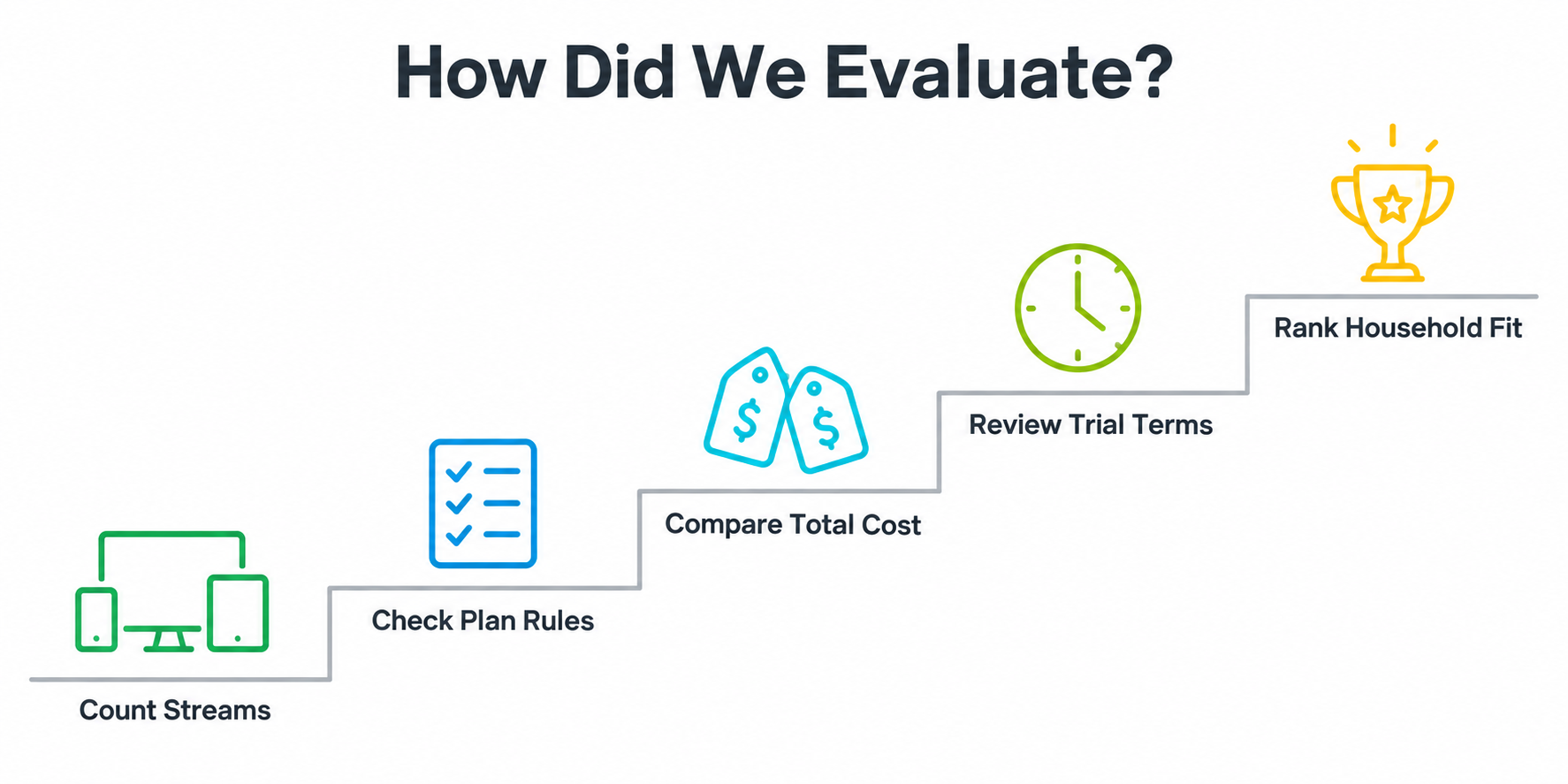
I checked provider plan pages, FAQs, and help documentation for the details that decide whether multiple screens work together. This comparison evaluates published terms rather than hands-on playback performance. The criteria below apply to every service, with inaccessible prices and unclear conditions identified so readers can see the limits of the evidence.
- Stream allowance: Separate supported devices, household accounts, and simultaneous playback; identify whether larger plans provide shared capacity or individual logins.
- Total cost: Record the billed amount and duration, include required screen add-ons, and calculate the extra cost of another viewer.
- Usage restrictions: Check home-network conditions, television versus mobile exceptions, and whether trials demonstrate the full purchased connection allowance.
- Evidence quality: Prefer official plan and policy pages, cross-check prices where accessible, and flag contradictions or unavailable checkout information clearly.
Affiliate disclosure: The first five entries are sponsored placements and contain affiliate links; a purchase may earn a commission at no extra cost to you. Their order considers this topic’s published terms within that group. Sponsorship does not verify channel rights, service performance, or refund delivery. Confirm authorization for the content offered in your country before subscribing.
How Many IPTV Connections Does Your Household Need?
Count the independent video streams that run during your busiest normal evening. Owning six devices does not mean you need six connections. For a conventional playlist-based service, a separate recording or another channel in a multiview layout may also consume capacity. Native services can count their own multiview features differently.
- Two televisions: Two people watching different programmes together usually require two simultaneous connections, regardless of installed apps.
- Recordings: Add capacity for a separate recording stream when the player and provider count it independently.
- Multiview: Four independent playlist streams plus another television can require five connections, even across only two devices.
- Idle devices: A sleeping screen or background app may retain playback; stop streams explicitly before counting available capacity.
Write down one realistic peak-use scenario, then confirm that exact scenario with the provider before choosing a tier.
How to Compare the Real Cost of Extra Connections
Compare identical durations before calling a family package cheaper. Monthly equivalent equals the total divided by months covered; cost per connection divides that result by the simultaneous allowance. Keep currencies separate and include player licences, screen add-ons, and applicable taxes. A low annual equivalent can still require substantial money upfront.
- Bundle cost: Divide the complete package price by its duration before comparing it with a rolling monthly subscription.
- Used capacity: Calculate value using the streams your household needs, not the largest allowance advertised by providers.
- Upgrade cost: Subtract the smaller package’s billed total to see what another connection adds over the same term.
- Commitment risk: A short trial or monthly plan can justify a higher equivalent while household suitability remains uncertain.
Check the actual invoice and renewal terms; a promotional monthly equivalent is not necessarily an available payment schedule.
| Worked example | Calculation | What it means |
|---|---|---|
| Harmony annual Duo | €119.99 ÷ 12 ÷ 2 ≈ €5.00 | Per connection per month; €119.99 paid upfront |
| USA LIVE annual 4-device | $249.98 ÷ 12 ÷ 4 ≈ $5.21 | Per connection per month; $249.98 paid upfront |
| OrigineTV three-month X2 | €69.99 versus 2 × €34.99 = €69.98 | No meaningful bundle discount at listed prices |
Can Multiple IPTV Connections Work on Different Networks?
A multi-connection allowance answers how many streams can play, not where they may play. Ask separately about the household, public IP addresses, mobile data, travel, and televisions away from home. Keep access within the subscription terms. A VPN changes network routing; it does not buy additional viewing rights or connections.
- Home network: Confirm whether all simultaneous televisions must use the designated home broadband connection for the purchased allowance.
- Mobile travel: Check whether away viewing is restricted to phones or browsers and whether it reduces home capacity.
- Separate homes: Do not interpret no IP locking or extra accounts as permission to share across unrelated households.
- Content rights: Check availability in your country; large catalogues, payment options, or working trials do not establish authorization.
For background on provider selection, compare our IPTV providers guide alongside the current service terms.
How to Set Up and Evaluate Several IPTV Screens
Start with a suitable plan or trial including the full connection allowance. Install supported apps from their official sources, then enter each assigned account on the correct device. Test one stream, then add the others. Distinguish a broken individual setup from a problem that appears only under simultaneous load.
- Account mapping: Label private credentials by device or viewer; never publish playlists, passwords, or access links in screenshots.
- Concurrent test: Run different channels together on every planned screen, including live programmes and on-demand playback when available.
- Network test: Compare wired playback with Wi-Fi, then test the most distant room during a normal busy evening.
- Evidence log: Note channel, time, device, active-stream count, and error message; repeat the scenario after support changes settings.
Use more than a quick channel launch as evidence; check sustained viewing, channel changes, and any separate recording you need.
For bandwidth planning, add the actual stream bitrates and leave capacity for other household activity. As an illustration, three 8 Mbps streams total 24 Mbps before overhead or other use. A 30–36 Mbps allowance adds 25–50% headroom to that example, but it is not a universal HD requirement. Higher-bitrate feeds need more; measure performance where each device is used.
Why Does the Second IPTV Connection Buffer or Stop?
Failure timing gives useful clues. If the first stream stops exactly when the second starts, investigate the account allowance or stale sessions first. If all devices slow together, check bandwidth and congestion. If only one room fails, test that device closer to the router before buying a larger subscription.
- Immediate rejection: Confirm the stream count, close unused sessions, and ask support whether the account was provisioned correctly.
- Shared buffering: Pause heavy downloads and lower stream quality temporarily to see whether household traffic is the constraint.
- One-device failure: Compare another app or wired connection on supported hardware; verify credentials without resetting every device.
- Single-channel failure: Try other channels on the same device, report the failing feed instead of changing unrelated settings.
An extra connection fixes an allowance shortage; it cannot repair weak Wi-Fi, a failing device, or an unavailable channel.
Final Verdict
Choose a package by the number of independent streams your household actually uses, then check how those streams are delivered and where they may run. Two accounts, two registered devices, and two simultaneous connections are not interchangeable promises. A useful shortlist has a clear billed total, an explicit allowance, and a way to test the complete setup before a longer commitment. Prioritize documented household rules and suitable channel access over oversized catalogues or unverified uptime claims. When a provider cannot confirm the package, checkout amount, or refund conditions, keep that uncertainty in the decision rather than assuming the most generous interpretation.
Top 3 Recommended Options to Compare
- USA LIVE IPTV: Compare published family bundles when three or four viewers need simultaneous access.
- IPTV Harmony: Compare separate-account packages when clear allocation and session controls suit your household.
- IPVision UK: Compare monthly UK options after confirming the current checkout total and terms.
FAQs
What does two connections mean on an IPTV subscription?
It normally means two independent streams may play at the same time, subject to the provider’s account and location rules. It does not necessarily limit installations to two devices. Ask whether the package uses one login with two active streams or two separate single-stream accounts.
Can I use a one-connection IPTV subscription on two TVs?
Often you can switch between supported TVs, provided only one is playing and device binding does not prevent switching. Watching both together generally requires another connection or account. Follow the provider’s instructions for closing the first session; do not assume putting a TV into standby stops its stream.
How many connections does TiviMate multiview need?
For independently fetched playlist channels, budget one provider connection per active stream unless your provider confirms different handling. Four channels in multiview plus a separate television could need five connections. A player licence unlocks app features; it does not increase the stream allowance sold by the IPTV provider.
Does recording IPTV use an extra connection?
It can when the player opens another stream to record a different channel while you watch. Cloud DVR and same-stream recording may behave differently. Test the exact setup and ask the provider how recording sessions are counted before adding a scheduled recording to an already fully used subscription.
Can IPTV connections be shared with family in another house?
Only when the subscription’s household and location terms permit that arrangement. Extra streams or separate logins do not automatically authorize cross-household sharing. Some services allow mobile travel but prevent televisions at two locations from playing together. Confirm device type, permitted location, and concurrent use as separate questions before purchasing.
Will buying more connections improve IPTV picture quality?
No. More connections increase the permitted simultaneous viewing allowance; they do not automatically improve video quality, Wi-Fi coverage, or server performance. Each additional stream also uses bandwidth. If a single stream already buffers, investigate that problem before assuming a larger account will make the existing connection more reliable.
Is a multi-connection plan always cheaper than separate subscriptions?
No. Compare the complete billed totals for the same duration and currency. Some bundles offer discounts, while others mainly simplify administration. Include player costs and screen add-ons, and compare only the number of streams you will use. An unused extra connection does not create savings for your household.
Can catch-up TV affect the simultaneous connection limit?
Yes, catch-up playback may open an active stream that counts toward the allowance, depending on the provider and app. Check it alongside live viewing during the trial. Our IPTV catch-up guide explains the feature; the subscription’s current terms determine how simultaneous playback is counted.
Which plan is best for a household with three viewers?
Start with a plan explicitly allowing three simultaneous streams or three separate active accounts. Add capacity only for independently counted recordings or multiview sessions you actually use. Then compare the billed total, household restrictions, trial scope, and required channels. There is no universal winner across countries and viewing needs.