Key Takeaways
For most movie-first viewers, OrigineTV is the strongest starting point because it publishes the deepest VOD catalog and offers a short trial. Tellystudio follows with a large film-and-series library plus a free one-day test. StreamingNordic IPTV is the better fit for multilingual and multi-device homes. Treat every catalog total as self-reported and verify ten favorite titles on your own connection and display before buying.

The best IPTV for movies is not automatically the service advertising the biggest VOD number. A useful movie subscription needs a searchable catalog, working posters and metadata, fast start and seek times, dependable subtitles and audio tracks, honest resolution labels, and enough connections for the screens in your home. Those details determine whether movie night feels effortless or becomes another hour of troubleshooting.
I compared five active paid services and four established player apps using the movie-specific criteria competitors often skip. Published channel and VOD totals remain provider claims, not independent audits, so I treated trials, refund terms, catalog organization, device support, and transparent limitations as seriously as headline numbers. Always confirm content licensing in your country and test the exact films, languages, and devices you care about before committing.
Best IPTV for Movies Providers Ranked
Start with these 9 Movies picks and their standout points, then compare the table and full reviews for pricing, trial terms, and setup.
- OrigineTV: OrigineTV leads this movie-focused comparison because its published catalog is unusually deep: more than 270,000 shows and VOD entries alongside over 55,000 live channels.
- Tellystudio: Tellystudio publishes a movie-friendly lineup of more than 157,000 VOD movies and television series plus over 30,000 live channels.
- StreamingNordic IPTV: StreamingNordic IPTV is strongest for households that combine international films with Nordic and European viewing.
- USA LIVE IPTV: USA LIVE IPTV is the most North America-focused paid option in this list.
- Stream IPTV 4K: Stream IPTV 4K offers the smallest published paid-service movie catalog here, but it compensates with straightforward pricing and a thirty-six-hour free trial.
- IPTV Smarters Pro: IPTV Smarters Pro is a player rather than a content service, so it supplies no channels or movies by itself.
- TiviMate: TiviMate is an Android TV and Fire TV-focused IPTV player known for fast remote-control navigation and managing several playlists.
- Kodi: Kodi is free, open-source media-center software that can organize local movie files and connect to legitimate IPTV sources through PVR clients and supported add-ons.
- VLC Media Player: VLC Media Player is the simplest free option for opening an M3U playlist, network stream, or individual movie file.
Top 9 Editor Picks for Best IPTV for Movies
| NAME | NO. OF CHANNELS | VOD | FREE TRIAL | LINK |
|---|---|---|---|---|
| OrigineTV | 55,000+ | 270,000+ | 24-hour free trial | Visit |
| Tellystudio | 30,000+ | 157,000+ | 1-day free trial | Visit |
| StreamingNordic IPTV | 50,000+ | 150,000+ | Trial by request | Visit |
| USA LIVE IPTV | 20,000+ | 136,000+ | 30-day guarantee | Visit |
| Stream IPTV 4K | 20,000+ | 90,000+ | 36-hour free trial | Visit |
| IPTV Smarters Pro | Separate IPTV service required | Provider library required | Free app; no trial needed | Visit |
| TiviMate | Separate IPTV service required | Provider library required | Evaluate the free tier before upgrading Requirement: Bring a… | Visit |
| Kodi | Separate IPTV service required | Provider library required | Free app; no trial needed | Visit |
| VLC Media Player | Separate IPTV service required | Provider library required | Free app; no trial needed | Visit |
Disclosure: Some provider links are sponsored, so IPTVAdvisors may earn a commission without increasing your price. Placement did not replace movie-specific evaluation. The four software picks are non-sponsored, and their inclusion explains how player choice changes browsing and playback. Catalog figures can change; recheck the provider and licensing status before paying.
Best IPTV for Movies Reviews
1) OrigineTV
OrigineTV leads this movie-focused comparison because its published catalog is unusually deep: more than 270,000 shows and VOD entries alongside over 55,000 live channels. The provider lists 4K and Ultra HD playback, weekly catalog updates, catch-up, EPG data, and backup servers for worldwide viewing.
Movie browsing works through common IPTV players on Fire TV, Android TV, Samsung and LG televisions, Apple devices, computers, and MAG hardware. I would use its 24-hour test to search ten specific films, change subtitles, and seek through several 4K titles before choosing a long plan.
Features
- VOD depth: The official pricing page advertises more than 270,000 shows and on-demand entries, the largest published movie-and-series total among the paid services compared here.
- Picture formats: Listings include Full HD, 4K, and Ultra HD streams, although actual resolution and bitrate should be checked title by title during the trial.
- Movie discovery: Genre groups, search, EPG information, and frequently refreshed listings help reduce the time spent scrolling through a very large catalog on television screens.
- Playback resilience: Backup servers and high-stability claims are useful for VOD because fast starts, reliable seeking, and uninterrupted long films depend on the separate on-demand infrastructure.
- Device reach: Support covers Fire Stick, Android TV, Apple TV, smart televisions, mobile devices, computers, Chromecast, and MAG boxes through compatible IPTV applications.
- Account flexibility: One subscription can be installed on several devices, but simultaneous viewing requires additional connections, an important distinction for families planning separate movie nights.
- My take: Its combination of catalog depth, worldwide coverage, trial access, and broad player compatibility makes it the strongest starting point for serious movie-first testing.
Pros
- Largest published VOD catalog in this comparison.
- Free short trial available before a paid commitment.
- Broad device and IPTV-player compatibility.
- Backup-server and catch-up features are clearly listed.
- No automatic renewal on the standard plans.
Cons
- Catalog and resolution totals are provider-reported, not independently audited.
- One standard connection does not allow simultaneous household streams.
- A huge library can still contain duplicates or incomplete metadata.
Pricing
Checked against the official site on 27 August 2026.
- Monthly Plan: Three months €34.99, six months €48.99, twelve months €67.99 for one connection
- Trial: 24-hour test access can be requested before purchasing
- Refund Policy: Confirm current eligibility and exclusions directly with support before payment
2) Tellystudio
Tellystudio publishes a movie-friendly lineup of more than 157,000 VOD movies and television series plus over 30,000 live channels. Its service pages highlight 4K, FHD, HD, and SD playback, EPG data, anti-freeze technology, worldwide device support, and a dedicated Movies and Series browsing experience.
The catalog is available through smart televisions, Fire TV, Android, iOS, Apple TV, computers, Chromecast, Roku, and compatible player apps. I ranked it second because a free one-day trial lets viewers inspect poster loading, recent releases, episode grouping, and subtitle availability without paying first.
Features
- Movie selection: More than 157,000 VOD movies and series are advertised, giving viewers broad coverage across current releases, established franchises, anime, classics, and international entertainment.
- Free test: A one-day trial is listed at no charge, enough time to test search accuracy, several genres, multiple resolutions, and evening playback stability.
- Quality range: The service lists 4K, FHD, HD, and SD options, allowing lower-bandwidth devices to use lighter streams when maximum resolution is unnecessary.
- Viewing hardware: Support spans Fire TV, Android TV, smart televisions, Apple devices, Roku, Chromecast, Xbox, phones, tablets, and computers through suitable player software.
- Catalog presentation: Dedicated VOD Movies and TV-Series sections aim to separate on-demand discovery from live-channel browsing, a meaningful usability advantage for binge watchers.
- Support access: Twenty-four-hour assistance and guided setup are advertised, useful when credentials load live channels but the separate movie library does not populate correctly.
- My take: The free trial and large movie total make Tellystudio a practical second choice for viewers who want evidence from their own screen before paying.
Pros
- Free one-day test with the advertised full catalog.
- Large VOD total focused on movies and complete series.
- Wide device coverage including consoles and streaming sticks.
- Multiple quality tiers for different connection speeds.
- Live assistance is available around the clock.
Cons
- The main site and newer storefront show different currencies and plan structures.
- One connection permits only one active stream at a time.
- Uptime and catalog totals are self-reported marketing figures.
Pricing
Checked against official Tellystudio pages on 27 August 2026.
- Monthly Plan: Main site starts at $15 monthly; newer storefront lists €12 monthly, €25 quarterly, €39 six-monthly
- Trial: One-day free trial; a thirty-day test is listed at $15
- Refund Policy: Verify the applicable storefront and refund terms before placing an order
3) StreamingNordic IPTV
StreamingNordic IPTV is strongest for households that combine international films with Nordic and European viewing. It advertises over 150,000 movies and series, more than 50,000 live channels, 4K Ultra HD quality, seven-day catch-up, recording on longer plans, and server coverage across many regions and niche genres.
Its annual and family pricing is comparatively clear, including per-device discounts for larger households. I placed it third because the combination of multilingual entertainment, subtitle-friendly positioning, multi-device options, and a seven-day money-back window addresses practical movie-night needs beyond a raw catalog number.
Features
- International cinema: The advertised lineup covers English, French, Spanish, German, Italian, Portuguese, Turkish, Hindi, Nordic, and other regional entertainment for multilingual households.
- VOD catalog: More than 150,000 movies and series are listed, with entertainment libraries included in every standard term rather than sold as an add-on.
- Picture quality: Full HD and 4K are included across plans, but viewers should confirm the bitrate, HDR format, and audio tracks on priority titles.
- Catch-up tools: Seven-day catch-up appears on all plans, while recording is listed on six-month and annual options for supported channels and applications.
- Family pricing: Three or more annual connections receive a lower per-device rate, simplifying legitimate simultaneous viewing across televisions, phones, tablets, and laptops.
- Support path: Activation, trial requests, payment guidance, and technical assistance run through twenty-four-hour WhatsApp support, which may suit buyers preferring direct setup help.
- My take: This is the most rounded option here for multilingual movie fans who also need clearly published family pricing and European channel coverage.
Pros
- Strong multilingual and European entertainment coverage.
- Clear monthly, six-month, annual, and family pricing.
- Seven-day money-back guarantee is publicly stated.
- Catch-up and recording features are included on selected terms.
- Works across major televisions, sticks, boxes, and mobile devices.
Cons
- Trial access must be requested rather than activated automatically.
- Payments are arranged through support instead of a conventional checkout.
- The lifetime option carries more service-continuity risk than short plans.
Pricing
Checked against the official site on 27 August 2026.
- Monthly Plan: €9.99 monthly, €45.99 for six months, €59.99 annually with promotional bonus months
- Trial: Test access is offered through the provider’s WhatsApp request flow
- Refund Policy: Seven-day money-back guarantee is stated for paid plans
4) USA LIVE IPTV
USA LIVE IPTV is the most North America-focused paid option in this list. Its site advertises over 136,000 movies, series, television shows, and VOD entries alongside more than 20,000 live channels, including regional US networks, movie channels, premium entertainment, catch-up, EPG data, and 4K selections.
Plans cover one to four simultaneous connections and work on popular smart televisions, streaming sticks, boxes, phones, tablets, and computers. I would choose the shortest available term first because there is no free trial; the provider instead promotes a thirty-day money-back guarantee for risk reduction.
Features
- North American focus: US local, regional, entertainment, lifestyle, and movie networks receive prominent coverage, with international channels and on-demand titles included alongside them.
- On-demand scale: More than 136,000 movies, series, and TV shows are advertised and described as updated, providing a substantial library for household viewing.
- Household connections: Separate bundles support two, three, or four devices at once without IP locking, useful when family members watch different films simultaneously.
- Living-room support: Fire TV, Samsung, LG, Sony, Hisense, Android TV, Apple TV, Chromecast, Formuler, BuzzTV, MAG, phones, tablets, and computers are listed.
- Playback features: Packages include EPG, catch-up, 4K channels, anti-freeze technology, premium networks, PPV, and VOD without separate content surcharges.
- Travel access: The service says it is not restricted by IP location, although customers should still check regional licensing and local viewing rules.
- My take: Its combination of US coverage, large VOD claims, and multi-connection bundles best suits North American families willing to test under the refund window.
Pros
- Deep US local and regional channel coverage.
- Large published VOD total for movies and series.
- Multi-connection bundles support up to four simultaneous screens.
- Thirty-day money-back guarantee is prominently advertised.
- No IP locking for travel between supported locations.
Cons
- No free trial is offered before payment.
- Activation can take several hours and occasionally up to one day.
- Long promotional plans increase exposure if service quality changes.
Pricing
Checked against the official site on 27 August 2026.
- Monthly Plan: Three months $49.96, one year $95.98, two years $139.98 for one connection
- Trial: No free trial; begin with the shortest practical paid term
- Refund Policy: Thirty-day money-back guarantee is advertised
5) Stream IPTV 4K
Stream IPTV 4K offers the smallest published paid-service movie catalog here, but it compensates with straightforward pricing and a thirty-six-hour free trial. The website lists more than 90,000 movies and series, over 20,000 live channels, 4K playback, EPG support, anti-freeze technology, and international channel groups.
It also provides a browser player plus setup instructions for Fire Stick, Android TV, phones, iPhone, laptops, and popular IPTV apps. I ranked it fifth because the trial is unusually generous, yet its yearly price is higher than several rivals and the published VOD depth is lower.
Features
- Extended trial: Thirty-six hours of free access gives movie viewers time to test peak evening playback, search behavior, seeking, subtitles, and multiple devices.
- VOD inventory: More than 90,000 movies and series are advertised, enough for broad browsing but below the published totals of the four paid services above.
- Web playback: A browser-based player is offered for supported accounts, useful when testing from a laptop without installing another television or mobile application.
- Quality support: The service promotes 4K alongside HD formats, though trial users should verify whether favorite titles are native resolution or compressed upscales.
- Player choice: Setup guidance covers TiviMate, IPTV Smarters Pro, OTT Navigator, XCIPTV, Android devices, Fire Stick, smart televisions, iPhone, and computers.
- International groups: Published channel sections cover the USA, UK, Canada, Europe, France, Germany, Brazil, Arab countries, and India for mixed live-and-movie households.
- My take: The longer trial makes this the easiest paid service to stress-test, but its annual pricing and smaller claimed catalog reduce overall value.
Pros
- Free thirty-six-hour trial before purchase.
- Straightforward pricing across four common terms.
- Browser player is available for convenient testing.
- Broad setup documentation for popular devices and apps.
- Three-day money-back promise follows the trial.
Cons
- Published VOD total is the smallest among the paid picks.
- Annual pricing is expensive compared with several rivals.
- Some embedded review material on the site appears unrelated.
Pricing
Checked against the official site on 27 August 2026.
- Monthly Plan: $14.99 monthly, $39.99 quarterly, $59.99 six-monthly, $119.99 annually
- Trial: Free thirty-six-hour test is offered through support
- Refund Policy: Three-day money-back guarantee is published
6) IPTV Smarters Pro
IPTV Smarters Pro is a player rather than a content service, so it supplies no channels or movies by itself. It earns a place because its dedicated Movies and Series areas, poster grid, search, episode grouping, subtitle controls, external-player support, and Xtream Codes login are practical for VOD-heavy subscriptions.
Compatibility includes Android, iOS, smart televisions, Fire TV, computers, and web-based variants, depending on the official release available for each platform. I recommend it to beginners because provider credentials populate the library automatically, producing a more familiar streaming-app layout than opening raw playlist entries one by one.
Features
- Dedicated VOD areas: Movies and Series appear separately from live channels, with posters, descriptions, categories, seasons, and episodes when the playlist supplies complete metadata.
- Login methods: Xtream Codes API and M3U playlist support cover the account formats most movie-focused IPTV services deliver after activation through email or support.
- Playback controls: Subtitle selection, audio tracks, seeking, aspect ratio, resume behavior, and external-player handoff depend on platform version and source metadata.
- Device coverage: Versions are available across common mobile, television, streaming-stick, and computer platforms, although installation sources and features vary between operating systems.
- No included content: The application does not sell channels, films, or subscriptions, which keeps the player separate from the licensing status of user-added services.
- Beginner navigation: Poster-led menus resemble mainstream streaming applications, making large catalogs easier to explore than generic file browsers or channel-only interfaces.
- My take: It is the easiest free starting player for movie viewers who receive Xtream Codes credentials and want familiar browsing without complex add-on setup.
Pros
- Dedicated Movies and Series libraries.
- Simple Xtream Codes and M3U account login.
- Works on many popular streaming platforms.
- Supports subtitles, audio tracks, and external players.
- Does not bundle or resell IPTV content.
Cons
- Quality and catalog completeness depend entirely on the playlist provider.
- Feature parity differs between device versions.
- Some similarly named websites and clones can confuse downloads.
Pricing
Checked against the official product site on 27 August 2026.
- Price: Free player versions are available; optional premium offerings vary by platform
- Trial: Not applicable because the application supplies no content subscription
- Requirement: A legitimate playlist or provider login is required
Link: https://www.iptvsmarters.com/
7) TiviMate
TiviMate is an Android TV and Fire TV-focused IPTV player known for fast remote-control navigation and managing several playlists. Its movie value comes from global search, favorites, recent items, catch-up integration, external-player support, multiple playlists, and a television-first layout that remains responsive with very large service catalogs.
The player does not include channels or VOD and requires credentials from a lawful source. I prefer it for experienced Android-based households that mix live television with movie libraries, but viewers who want the most Netflix-like series presentation may find IPTV Smarters Pro simpler during initial setup.
Features
- Television interface: Remote-friendly menus and responsive navigation suit Android TV boxes and Fire TV devices where touch-oriented IPTV apps can feel awkward or slow.
- Multiple playlists: Premium features can combine and organize more than one legitimate source, helpful for separating household, regional, and personal media lineups.
- Search tools: Global search, favorites, recent channels, and history reduce repeated scrolling when a provider sends thousands of live and on-demand entries.
- Playback options: External players, buffer settings, audio tracks, subtitles, aspect controls, and catch-up integration offer deeper customization than most beginner-oriented applications.
- VOD dependence: Posters, categories, descriptions, seasons, and playback quality remain only as complete as the metadata and streams supplied by the playlist source.
- Platform limitation: TiviMate is designed primarily for Android-based television devices, so Apple TV, Roku, and some smart-TV owners need a different application.
- My take: This is the strongest television-first player here for large mixed playlists, provided the household uses compatible Android hardware and accepts more configuration.
Pros
- Excellent remote-control experience on televisions.
- Fast navigation through very large playlists.
- Advanced playback and playlist organization options.
- Multiple-source support for experienced users.
- Strong companion to movie and live-TV subscriptions.
Cons
- No channels or movies are included.
- Designed mainly for Android-based TV hardware.
- Best organization features may require the premium tier.
Pricing
Checked against the official product site on 27 August 2026.
- Price: Free functionality is available; premium pricing varies by region and storefront
- Trial: Evaluate the free tier before upgrading
- Requirement: Bring a legitimate M3U or Xtream-compatible playlist
Link: https://tivimate.com/
8) Kodi
Kodi is free, open-source media-center software that can organize local movie files and connect to legitimate IPTV sources through PVR clients and supported add-ons. It is more configurable than a conventional IPTV player, with rich movie artwork, metadata, subtitles, audio passthrough, library views, profiles, and extensive device support.
That flexibility also creates responsibility: third-party add-ons are not automatically legal, safe, or maintained by Kodi. I recommend the official repository, a licensed playlist, and locally owned media only. Setup takes longer than Smarters or TiviMate, but a carefully built Kodi library can become an excellent home-cinema interface.
Features
- Movie library: Local films can be scanned into poster walls with cast, plot, genre, artwork, collections, watched status, and resume points from supported metadata.
- PVR integration: Official PVR clients can connect to legitimate IPTV backends and playlists, combining live television, guide data, recordings, and compatible on-demand sources.
- Home-cinema audio: Advanced output settings support surround formats and audio passthrough when the operating system, receiver, source file, and hardware all permit them.
- Subtitle control: Built-in subtitle settings and reputable services help match languages and timing, while the available tracks still depend on the selected movie source.
- Platform range: Kodi runs on Windows, macOS, Linux, Android, Raspberry Pi, and other supported platforms, with television installation varying by manufacturer and store.
- Add-on caution: The open ecosystem includes unofficial repositories that may be unsafe or facilitate infringement, so users should stay with lawful, trusted sources.
- My take: Kodi offers the richest do-it-yourself cinema experience here, but it rewards careful setup and is less convenient than a direct provider login.
Pros
- Free and open-source with no subscription.
- Excellent local movie-library presentation.
- Advanced subtitle and home-theater audio controls.
- Official PVR clients support legitimate IPTV backends.
- Highly customizable across many operating systems.
Cons
- Initial configuration takes more time.
- Unofficial add-ons can introduce legal and security risks.
- Streaming quality still depends on source and hardware.
Pricing
Checked against the official Kodi site on 27 August 2026.
- Price: Free and open-source software
- Subscription: No Kodi fee; content sources may have separate lawful costs
- Requirement: Use official repositories, owned media, or licensed services
Link: https://kodi.tv/
9) VLC Media Player
VLC Media Player is the simplest free option for opening an M3U playlist, network stream, or individual movie file. It supports a huge range of codecs, subtitle formats, audio tracks, playback speeds, hardware acceleration, casting on selected platforms, and detailed stream information without advertisements or a bundled content catalog.
Its weakness is discovery: VLC presents files and playlist rows rather than a polished poster-based movie service. I use it as a diagnostic player when another app stalls, because opening the same stream in VLC helps distinguish a provider problem from an app problem, codec conflict, or damaged playlist entry.
Features
- Codec coverage: VLC plays an unusually wide range of video and audio formats, reducing the need for extra codec packs on supported operating systems.
- Playlist support: Users can open legitimate M3U files, network URLs, local folders, discs, and individual streams without building a database or creating an account.
- Subtitle tools: Multiple subtitle tracks, delay adjustment, encoding options, text styling, and external subtitle files help repair timing or readability problems during films.
- Audio control: Track selection, synchronization, equalizer settings, channel modes, and passthrough behavior provide useful troubleshooting options for movie sound and dialogue.
- Diagnostic value: Stream statistics and broad format support make VLC helpful for checking whether buffering comes from the source, network, decoder, or primary IPTV application.
- Limited browsing: It lacks the rich poster walls, recommendations, season grouping, parental controls, and provider-specific VOD metadata found in dedicated television players.
- My take: VLC is the best free backup player and troubleshooting tool, but it should complement rather than replace a polished movie-library interface.
Pros
- Free, open-source, and advertisement-free.
- Broad codec and subtitle format support.
- Opens playlists, URLs, files, and network streams.
- Useful playback diagnostics and synchronization controls.
- Available on major desktop and mobile platforms.
Cons
- No Netflix-style poster or discovery interface.
- Television remote navigation is less polished.
- It supplies no channels, movies, or metadata catalog.
Pricing
Checked against the official VideoLAN site on 27 August 2026.
- Price: Free and open-source software
- Subscription: None; VideoLAN does not sell IPTV content
- Requirement: Bring lawful media files, playlists, or network streams
Link: https://www.videolan.org/vlc/
What Makes an IPTV Movie Library Worth Paying For?
Library size is only useful when the catalog behaves like a library. A smaller collection with accurate search, complete franchises, reliable posters, and working subtitles beats a giant dump of repeated or broken entries. Before paying, compare the service against the films and languages your household actually watches, not a marketing total.
- Search ten titles: Include a new release, classic, foreign film, animation, documentary, and something obscure to expose coverage gaps.
- Check duplicates: Repeated posters may represent languages or resolutions, but unexplained copies often inflate the advertised catalog number.
- Inspect metadata: Confirm year, runtime, genre, synopsis, cast, artwork, subtitle language, and audio-track labels are accurate and useful.
- Test completion: Start near the beginning, seek into the middle, and play the final minutes to reveal damaged files or server errors.
For a broader baseline, compare these movie-first findings with our guide to established IPTV providers before choosing a longer subscription.
How Did We Evaluate IPTV Services for Movies?
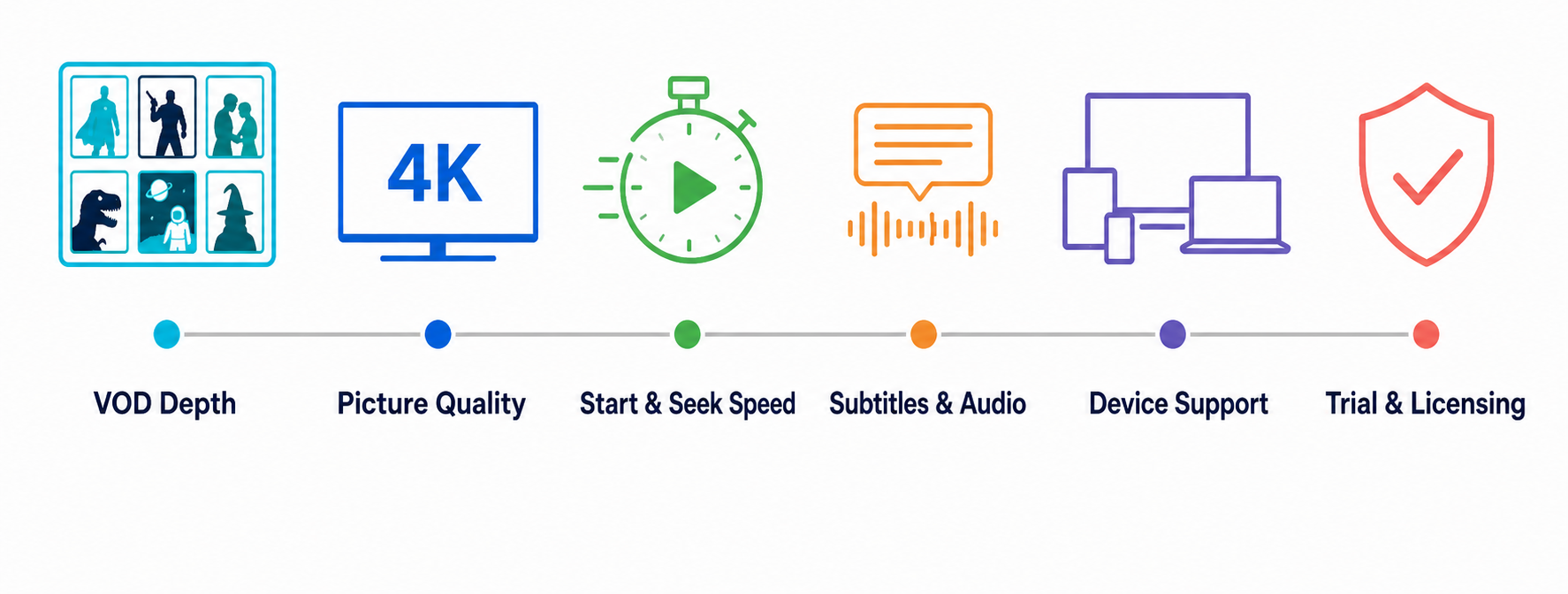
This ranking separates the on-demand experience from live-channel performance. For each service, I checked the current official pages, recorded published catalog and plan details, compared trial and refund protections, and judged how easily a viewer could find, start, navigate, and finish a film on common living-room hardware.
- VOD depth: Published movie-and-series totals, update claims, genre coverage, duplicate risk, and completeness of seasons or collections.
- Playback quality: Advertised HD and 4K support, start speed, seeking behavior, subtitle tracks, audio options, and codec compatibility.
- Discovery: Search accuracy, poster loading, metadata, filters, favorites, watch history, and the number of steps required to start a film.
- Buying safety: Trial length, refund language, payment transparency, simultaneous connections, device coverage, support access, and visible licensing information.
How Much Internet Speed Do 4K IPTV Movies Need?
A 4K badge does not reveal bitrate, codec, frame rate, HDR, or server consistency. Compressed streams may use less bandwidth but lose fine detail, while high-bitrate films need more headroom. Test at the time you normally watch, on the same Wi-Fi or Ethernet connection, and with every household device active.
- Allow headroom: Keep sustained available bandwidth well above the movie bitrate so background updates and other viewers do not trigger buffering.
- Prefer Ethernet: Wired connections remove Wi-Fi interference and usually deliver steadier long-film playback to televisions, boxes, and home-theater receivers.
- Verify the codec: HEVC can deliver comparable quality at lower bandwidth, but older televisions or sticks may lack smooth hardware decoding.
- Judge real detail: Inspect motion, dark scenes, gradients, and fine textures rather than trusting a resolution label displayed by the app.
For most homes, a stable connection and compatible decoder matter more than an impressive speed-test peak measured beside the router.
Subtitles, Audio Tracks, and Family Controls to Test
Movie-focused households often discover language and accessibility problems after subscribing. A title can exist yet lack the needed subtitle track, dub, audio description, or surround mix. The player also affects whether embedded tracks are visible and synchronized, so test both the provider catalog and the exact app you plan to use.
- Subtitle languages: Confirm the needed language on several films, including accented characters, forced subtitles, and synchronization after seeking forward.
- Audio selection: Switch between original and dubbed tracks and verify that labels match what actually plays through the television or receiver.
- Accessibility: Check closed captions, audio description, text size, contrast, and remote shortcuts for anyone who relies on accessible playback.
- Child profiles: Ask whether adult categories can be removed, protected with a PIN, or hidden from shared home-screen and search results.
- Surround sound: Test a known 5.1 title and confirm the player, device, cable, receiver, and stream all preserve the intended channels.
A provider that cannot demonstrate these controls during a trial is a weak fit for multilingual, accessible, or family movie viewing.
Paid IPTV vs Legal Movie Streaming Services
IPTV describes a delivery method, not a guarantee that every catalog is licensed. Mainstream subscription and free ad-supported services generally publish clearer rights, availability, app-store support, parental controls, and customer terms. Independent providers may offer broader bundles, but buyers must investigate who is authorized to distribute the movies in each region.
- Check licensing: Look for company identity, distribution disclosures, regional terms, takedown procedures, and a clear explanation of where content rights come from.
- Avoid impossible promises: Every premium platform, brand-new cinema release, and sports package for a tiny fee deserves serious scrutiny.
- Use secure payment: Prefer traceable methods with buyer protections and avoid sending sensitive identity documents or irreversible payments to unknown sellers.
- Start short: A monthly or quarterly plan limits exposure when reliability, catalog access, ownership, pricing, or legal availability changes unexpectedly.
If licensing cannot be verified, choose authorized local services or free legal platforms instead of assuming a VPN changes the underlying rights.
Five Movie-Night Tests to Run During a Free Trial
Use a trial as a structured test, not a quick glance at the home screen. Write down the results so a huge catalog does not distract from failures that will matter later. Test once during a quiet period and again during prime time, when overloaded infrastructure is more likely to reveal itself.
- Findability test: Search ten planned titles and record exact matches, duplicates, wrong years, missing posters, incomplete collections, and dead entries.
- Playback test: Measure start time, seek repeatedly, pause for several minutes, resume, and finish a full film without restarting the application.
- Quality test: Compare advertised resolution with visible detail, motion handling, compression artifacts, HDR behavior, and audio-channel information on your display.
- Household test: Try every supported device and simultaneous connection while other people browse, game, video-call, or stream over the same network.
- Support test: Ask one specific question about subtitles, connections, or refunds and judge response time, clarity, and whether the answer matches published terms.
The best result is not the biggest catalog; it is the service that passes your repeatable tests with the fewest caveats.
Final Verdict
OrigineTV is the strongest overall starting point for movie-first IPTV because it publishes the largest catalog in this comparison, supports widely used devices and players, and provides short trial access. Tellystudio is close behind for viewers who want a free one-day test and a dedicated Movies and Series presentation. StreamingNordic IPTV is the better family and multilingual choice, while USA LIVE IPTV emphasizes North American households and Stream IPTV 4K offers the longest free test. Regardless of ranking, verify licensing, search your own must-watch list, test subtitles and seeking, and avoid a long plan until the service succeeds during prime time.
Top 3 Recommended IPTV Providers
- OrigineTV: Deepest published VOD catalog with broad devices and short trial access.
- Tellystudio: Large movie library and a convenient free one-day evaluation window.
- StreamingNordic IPTV: Best fit for multilingual libraries, family pricing, and European entertainment.
FAQs
What is the best IPTV for movies?
OrigineTV is the strongest starting point in this comparison because it publishes the deepest VOD catalog and offers short trial access. The best choice still depends on your titles, languages, devices, and location, so test those exact requirements before buying.
Is IPTV good for watching movies and TV series?
It can be, when the provider maintains a fast, organized VOD server with accurate metadata, complete seasons, working subtitles, and dependable seeking. Live-channel stability does not prove movie quality because on-demand content may run on different infrastructure and use different files.
How can I test an IPTV movie library before paying?
Use a free trial to search ten specific titles across genres and years. Play several during prime time, seek forward and backward, change subtitles and audio, test every device, check simultaneous connections, and ask support one question about refund or licensing terms.
Do IPTV providers really have 100,000 or more movies?
Providers usually combine movies and television episodes in the advertised VOD total, and the figure may include languages, resolutions, duplicates, or unavailable entries. Treat every number as self-reported unless independently audited; findability, completeness, working links, and metadata quality matter more.
Can I watch IPTV movies in true 4K?
Some services offer 4K titles, but a label alone does not establish native resolution, bitrate, HDR, or audio quality. During a trial, inspect stream information where available and judge dark scenes, motion, fine detail, buffering, and device decoding on your actual screen.
Which IPTV player is best for movie libraries?
IPTV Smarters Pro is easiest for a familiar Movies and Series layout, while TiviMate offers stronger television-first playlist management. Kodi excels for a customized home-cinema library, and VLC is the most useful free backup player for codecs, individual streams, and troubleshooting.
Why do subtitles or audio tracks go missing on IPTV?
The source may not include the desired track, metadata can be mislabeled, or the player and device may not support the format. Test several films, try another legitimate player, and compare the same title before deciding whether the issue belongs to the catalog or app.
Does an IPTV EPG help with movies on demand?
An IPTV EPG mainly organizes scheduled live channels, including movie networks. VOD discovery instead relies on posters, categories, metadata, search, watch history, and season grouping. A good service should handle both systems without mixing live schedules into the on-demand library.
Is using IPTV for movies legal?
IPTV technology is legal, but a provider still needs rights to distribute each channel and movie in your region. A VPN does not create those rights. Check company details, licensing statements, local law, payment protections, and app-store availability; use authorized alternatives when ownership is unclear.