Key Takeaways
- Catch-up replays broadcasts retained by the provider; it is not a local recording.
- The channel, guide timing, archive, and player must all support replay.
- Test a completed programme to confirm the correct show opens.
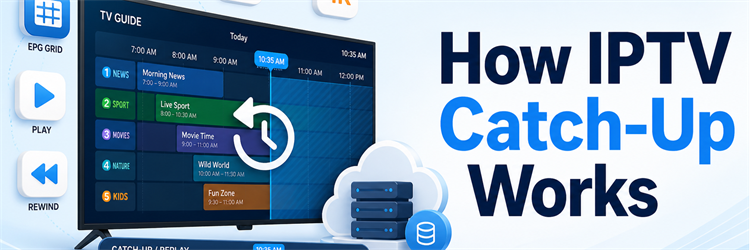
IPTV catch-up lets you open a television guide, move backwards to a programme that has already aired, and play it without recording it yourself. The feature feels simple on screen, but it depends on several parts working together: the provider must retain the broadcast, the guide must identify the correct time slot, and the player must know how to request the archived stream. When any one part fails, the replay can vanish, open the wrong show, or stop early.
That distinction matters because installing a new app cannot create catch-up when a provider has stored nothing. In this guide, I explain how IPTV catch-up works from the live broadcast to the replay button, what the clock icon really means, how long programmes normally remain available, and why the wrong show sometimes opens. You will also learn the practical differences between catch-up, start-over, timeshift, recording, and VOD, plus a reliable troubleshooting order that avoids changing unrelated settings. The result is a practical way to test the feature before paying for a long subscription.
Methodology and Disclaimer
I compared consumer catch-up interfaces with current HLS, DASH, DVR-archive, EPG, M3U, and Xtream implementation documentation, then checked the failure patterns against real player workflows. IPTV is a legal delivery technology, but a replay is lawful only when the service has permission to retransmit and retain that programme. Use licensed providers, protect playlist credentials like passwords, and remember that channel availability, archive length, playback controls, and geographic rights can change without notice.
What IPTV Catch-Up Actually Means
Catch-up, also called replay TV or channel archive, is a server-side copy of a recent live broadcast. Instead of asking the channel for its current feed, your player requests the part stored between a programme’s scheduled start and finish. You usually reach it by scrolling left or backwards in the electronic programme guide.
- Provider controlled: The IPTV service decides which channels are recorded, how long they remain, and which subscriber plans may open them.
- Programme linked: A replay is normally attached to a past EPG listing, so accurate channel IDs, start times, durations, and time zones matter.
- Streamed on request: Selecting an old programme creates a fresh unicast playback session; the complete recording is not automatically downloaded to your device.
- Rolling window: New material replaces older material after the retention limit, which is why yesterday’s show can work while last week’s has disappeared.
The player is the interface, not the recorder. It can reveal and request an available archive, but it cannot recover a programme that the provider never captured or has already deleted.
How IPTV Catch-Up Works Behind the Replay Button
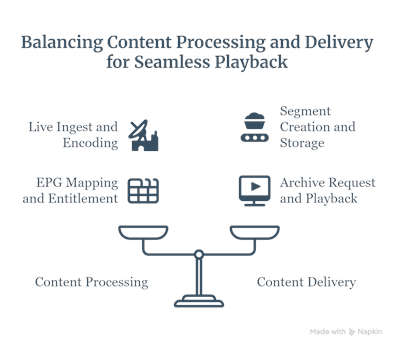
The process begins while a channel is still live. The provider receives the broadcast, encodes it into streamable formats, and divides it into short media segments. A DVR or archive system writes eligible segments to storage while the live service continues. The electronic guide separately records which programme occupied each time range.
- Live ingest: The headend receives a licensed channel feed and prepares one or more resolutions and bitrates for phones, televisions, and streaming boxes.
- Segment creation: The encoder packages video into small HLS or DASH chunks that can be delivered efficiently and changed between quality levels.
- Archive storage: Selected channel segments are retained on provider storage for a configured period rather than being discarded immediately behind the live edge.
- EPG mapping: Guide data supplies the channel identifier, programme name, UTC start time, and duration needed to locate the correct interval.
- Entitlement check: When you choose a past listing, the service verifies the account, device or connection limit, channel rights, and retention window.
- Archive request: The app or middleware builds a replay request using the channel plus the programme’s start time and duration, then opens a new stream.
- Playback: The server returns a manifest pointing to retained segments, and the player buffers, decodes, pauses, or seeks through them like on-demand video.
Technically, catch-up is therefore a bridge between live television and VOD. The material began as a linear channel, but selecting an earlier EPG event turns a fixed interval of that archive into an on-demand session.
The Four Things Catch-Up Needs to Work
A visible replay button does not guarantee successful playback. Catch-up succeeds only when the archive, account, guide, and player agree about the same channel and time period. Checking these four dependencies first is faster than clearing every app setting.
- An archived channel: The provider must record that specific channel. Sports, regional feeds, temporary event channels, and premium networks may be excluded for rights or storage reasons.
- An eligible account: The subscription must include archive access, remain active, and have a free connection when the replay session begins.
- Accurate EPG data: The guide needs a channel match plus the correct start time and duration. Missing or shifted listings can select the wrong video interval.
- A compatible player: The app must understand the provider’s Xtream, M3U, portal, or vendor-specific catch-up method and retain enough past guide data to display it.
A stable internet connection remains necessary because the archive streams from the network. Catch-up generally uses similar bandwidth to a live channel at the same resolution.
How to Watch a Programme Using IPTV Catch-Up
Menus differ between television apps, but the viewing path is usually consistent. Use the provider’s original account or playlist first; edited playlists can remove archive flags or change channel-to-EPG matching. Then allow the guide to finish updating before testing.
- Open Live TV: Enter the live-channel area rather than the separate Movies, Series, Recordings, or VOD library.
- Open the EPG: Switch to the grid or programme-guide view and choose a channel marked with a clock, replay arrow, or archive badge.
- Move backwards: Scroll left, select an earlier date, or open the player’s dedicated catch-up section depending on the interface.
- Choose the listing: Pick a completed programme inside the advertised archive window, preferably one that ended at least several minutes ago.
- Select replay: Choose Watch, Play from beginning, Catch-up, or Archive rather than the option that returns to the current live channel.
- Test controls: Pause and seek briefly. Some archive formats support full scrubbing, while others allow only larger forward or backward jumps.
If one channel works and another does not, the setup is probably correct. That pattern normally means the second channel lacks an archive or its stored interval has a gap.
How Far Back Can IPTV Catch-Up Go?
There is no universal archive length. Many services advertise a rolling period from roughly 24 hours to seven days, but the real window can differ by channel. A provider may keep news for several days, sport for a shorter time, and some premium channels not at all. The clock icon tells you that catch-up is declared; it may not prove every listed hour remains playable.
| What sets the limit | Why it changes availability |
|---|---|
| Content rights | A broadcaster may permit live carriage but restrict replay, certain events, or viewing outside an approved region. |
| Storage policy | More channels, higher bitrates, and longer retention require substantially more provider storage and delivery capacity. |
| Plan entitlement | Archive access or a longer window may exist only on particular packages, devices, or household connection tiers. |
| Guide history | The server may retain video longer than the app retains old EPG listings, making older intervals difficult to select. |
Test the exact channels you care about during a trial. A broad claim such as “seven-day catch-up” is less useful than knowing whether your preferred channel consistently keeps seven complete days.
Catch-Up vs Timeshift, Start-Over, Recording, and VOD
These features all change when you watch television, but they store different material in different places. Using the correct name makes support conversations much clearer and prevents you from looking for a provider-side archive inside a device recording menu.
| Feature | What it does | Where content is stored | Main limit |
|---|---|---|---|
| Catch-up | Replays a completed programme selected from a past EPG slot. | Provider or broadcaster server | Channel-specific retention window and replay rights |
| Timeshift | Pauses or rewinds the live channel you are currently watching. | Short server or device buffer | Buffer length and whether you changed channels |
| Start-over | Restarts the programme currently in progress from its scheduled beginning. | Usually the same rolling provider archive | Only the current programme and supported channels |
| Recording | Saves a chosen live or scheduled programme for later viewing. | Device, network DVR, or cloud account | Storage quota, tuner/connection rules, and expiry |
| VOD | Opens a curated movie or series catalogue unrelated to today’s channel schedule. | Permanent or licensed on-demand library | Catalogue rights and subscription availability |
A missed show from yesterday belongs in catch-up. Rewinding ten minutes while still on the channel is timeshift. Finding an older season by title belongs in VOD. One platform can offer all three without making them the same feature.
How EPG, Xtream, and M3U Data Enable Replay
The EPG is more than a visual schedule. It gives the player the programme boundaries required to ask for the correct archive interval. A channel ID connects the guide listing to the live stream, while the start time and duration identify the recording. UTC time is commonly used behind the scenes so devices in different regions can request the same moment consistently.
- Xtream-style login: The service API can report whether a channel has a TV archive and how many days it should retain, simplifying automatic detection.
- Extended M3U: Vendor-supported attributes can describe the catch-up mode, replay URL pattern, and retention days alongside the channel’s live address.
- Portal middleware: A managed set-top box or portal can hide URL construction and return the proper archive stream after the viewer selects an EPG event.
- XMLTV guide: Accurate programme records let the interface display past titles and calculate the start and duration parameters used for replay.
If you edit a playlist, preserve its archive attributes and channel identifiers. The M3U playlist guide explains the underlying channel-list structure without exposing your private login URL.
Why Catch-Up Opens the Wrong Programme
Wrong-programme playback usually points to time alignment rather than corrupt video. The app selects an EPG event that appears to start at 8:00 p.m., but the archive request may use 7:00 p.m. because the device, guide, or provider applied a different time zone or daylight-saving offset.
- Check device time: Set the television or box to automatic date, time, and time zone before changing any guide offset.
- Compare the live guide: Confirm that the currently airing programme title matches the real broadcast on several channels.
- Measure the error: If every replay is exactly one or two hours early, note that fixed difference before adjusting a playlist-specific server-time setting.
- Avoid double shifting: Do not change both device time and EPG offset for the same problem, because the guide can look correct while archive requests remain wrong.
A programme starting a few minutes late is different. Broadcasters often run off schedule, so the archive may include the end of the previous show or miss the final minutes even when the clock is correct.
Troubleshooting IPTV Catch-Up That Does Not Work
Start with one recently completed, ordinary HD programme on a channel displaying the archive icon. Testing a short, recent slot removes old-retention, event-rights, and 4K bandwidth variables. Then use the symptom to isolate the most likely layer.
| Symptom | Likely cause | First useful check |
|---|---|---|
| No clock or replay icon anywhere | Provider has not exposed catch-up, the plan lacks it, or the app cannot read the archive flags. | Ask the provider for one confirmed catch-up channel and test the original login in a known-compatible player. |
| Icon appears but nothing plays | Expired interval, broken archive URL, account entitlement, or unsupported catch-up mode. | Try a programme that ended within the last hour, then compare the same account in another supported app. |
| Replay starts the wrong show | EPG mapping, server-time, time-zone, or daylight-saving mismatch. | Set device time automatically and compare the error across three channels before applying one playlist offset. |
| Only some channels work | Normal channel-specific archive policy, content rights, or a recording gap. | Check the provider’s supported-channel list rather than reinstalling the player. |
| Replay buffers but live TV works | Archive storage node, routing, bitrate, or older damaged segments. | Try a newer HD replay, Ethernet, and a different time of day; record exact channel and programme details. |
| Past EPG listings disappeared | The app retained too little guide history or cleared its EPG cache. | Increase “past days to keep” within the archive limit, then refresh the guide once. |
| Playback stops before the ending | Incorrect programme duration, broadcast overrun, missing segments, or archive boundary. | Open the following EPG slot to see whether the ending continues there. |
For repeated stalls on both live and archived streams, work through the IPTV buffering checks. Give support the channel, programme, scheduled time, device, app version, and error message instead of sharing credentials.
Does Catch-Up Change Picture Quality or Data Use?
Catch-up does not inherently lower picture quality. The archive can retain the same encoded rendition used for live viewing, or the provider can store fewer bitrate versions to control storage. A replay may therefore look identical, start at a fixed quality, or adapt less smoothly than the live feed.
- Resolution: An advertised 4K live channel may keep only HD in the archive, so compare the same programme rather than the channel label.
- Bandwidth: A replay at the same bitrate uses roughly the same data per minute as live IPTV; seeking can request additional segments.
- Startup delay: Archive storage may sit on a different server or region, producing slower starts even when current live channels open quickly.
- Playback gaps: Missing source segments remain missing in the archive, and the player may freeze, jump forward, or stop at that point.
Test HD before 4K and use Ethernet where practical. That keeps a quality problem from being mistaken for missing catch-up support.
Privacy, Legality, and Sensible Catch-Up Testing
Catch-up does not make unlicensed content legitimate. A provider needs rights not only to carry a live channel but also to retain and replay programmes in the relevant country. Be cautious when a service promises every premium event forever, hides company details, or cannot explain why archive coverage changes by channel.
- Use a short trial: Test the channels, archive depth, peak-time playback, subtitles, and EPG accuracy before buying a long plan.
- Protect credentials: M3U and Xtream URLs may contain usernames and passwords; never paste them into public forums, screenshots, or untrusted playlist converters.
- Respect connection limits: A replay is another active stream and can trigger a simultaneous-device limit just like live television.
- Expect expiry: Save important lawful recordings through an authorised DVR feature when permitted; catch-up is temporary access, not permanent ownership.
The best test is mundane: replay yesterday’s news, seek through it, and repeat during the busy evening period. Consistency matters more than a long feature list.
IPTV Services to Test for Catch-Up Compatibility
Catch-up coverage can change by channel, country, app, and subscription. These services provide standard IPTV credentials for compatible players, but confirm the exact replay channels and retention window during the trial rather than assuming every live feed is archived. Test at least one news, entertainment, and sports channel because archive policies often differ between categories.
StreamingNordic IPTV
StreamingNordic IPTV suits households that want to test a broad live lineup in a player with a full EPG. I would begin with the trial, verify the clock icon on your priority channels, and replay one recent programme before checking older days. That sequence confirms real archive access rather than relying on a general feature claim.
Features
- Guide-first testing: Standard login support makes it practical to inspect past EPG listings in a compatible catch-up player without manually rebuilding channel entries.
- Broad channel choice: A varied international lineup lets households check whether replay remains consistent across news, entertainment, regional, and sports categories.
- Trial opportunity: Short test access provides time to compare live playback, completed programmes, programme boundaries, and evening archive performance before committing.
- Device flexibility: Compatible credentials can be tried on common television and mobile players, helping isolate an app issue from a provider archive problem.
- EPG verification: A populated guide makes it easier to confirm correct titles, local times, clock icons, and retention depth on supported channels.
- Quality comparison: Testing ordinary HD before 4K reveals whether a replay failure comes from archive support or simply heavier network demand.
- My take: The practical starting choice for viewers who want to compare catch-up behaviour across several channel types and household devices.
OrigineTV
OrigineTV is the replacement example for iptv catch-up because its EPG and catch-up support are relevant to explaining server-side replay windows. It publishes more than 55,000 advertised channels and roughly 270,000 on-demand titles and supports Samsung televisions, macOS, Chromecast, Fire TV, Android, MAG and standard M3U players for this use case.
FEATURES
- Relevant function: Its EPG and catch-up support are relevant to explaining server-side replay windows, which connects the provider directly to this guide.
- Channel selection: More than 55,000 advertised channels and roughly 270,000 on-demand titles, with exact iptv catch-up availability best verified before purchase.
- Playback quality: 4K and Ultra HD streams alongside lower-bandwidth options, so iptv catch-up viewers can match resolution to their screen and bandwidth.
- Compatible hardware: Samsung televisions, macOS, Chromecast, Fire TV, Android, MAG and standard M3U players cover the iptv catch-up installation routes discussed here.
- Subscription choice: Three, six and twelve-month terms, plus optional lifetime access, with one or two simultaneous connections stated for simultaneous iptv catch-up.
- Pre-purchase check: 24 hours free; test a recently completed programme because catch-up availability varies by channel before selecting a longer plan.
- My take: OrigineTV fits this iptv catch-up tutorial when its supported format is confirmed and the stream passes a real-device test.
Tellystudio
Tellystudio is worth considering when live television and a substantial on-demand catalogue both matter, because it lets you compare the two experiences directly. I would confirm that a title selected from yesterday’s EPG opens the broadcast archive, while a movie chosen from the library opens VOD. That simple check prevents confusing catalogue availability with catch-up coverage.
Features
- Live and VOD: Separate channel and catalogue areas make it easier to understand which past programmes use catch-up and which titles come from VOD.
- Guide navigation: Compatible players can present earlier programme slots beside current channels, keeping replay discovery within a familiar television schedule.
- Content breadth: Multiple programme categories provide useful opportunities to test archive consistency, subtitle behaviour, and scheduled start or finish boundaries.
- Cross-device checks: Common credential support lets households compare television and mobile playback without assuming one device reflects the entire service.
- Trial validation: A short test should cover a recent replay, the oldest visible slot, seeking controls, and busy-evening streaming performance.
- Format flexibility: Standard account delivery works with players designed to read guide metadata and request provider-controlled replay streams from supported channels.
- My take: The useful comparison pick for households that want both live replay and a separate movie or series catalogue.
Final Verdict
IPTV catch-up works because the provider continuously retains selected live channels, the EPG identifies a programme’s start and duration, and the player requests that exact archived interval when you choose a past listing. The app does not create missing recordings, and a clock icon does not override channel rights, retention limits, incorrect time zones, or gaps in the stored feed. For the best result, test a recently completed HD programme first, confirm the guide matches the live channel, and compare one known replay in a second compatible player before changing offsets. Treat catch-up as temporary server access, not a permanent personal recording.
Top 3 Recommended Services
- StreamingNordic IPTV: Best starting point for testing replay across varied channels and devices.
- OrigineTV: Best matched here for its EPG and catch-up support are relevant to explaining server-side replay windows.
- Tellystudio: Useful when comparing broadcast catch-up with a separate VOD catalogue.
FAQs
Does catch-up work on every IPTV channel?
No. Providers enable archives per channel according to rights, storage, source stability, and subscription rules. Test the exact channels you value instead of relying on a service-wide catch-up claim.
Is IPTV catch-up stored on my device?
Usually not. The provider stores a rolling channel archive, and your device streams a selected interval. A small player buffer is different from a permanent DVR recording.
Why can I see catch-up but not play it?
The interval may have expired, contain a recording gap, or require another URL format. Try a recent programme, confirm account entitlement, and compare another compatible player.
How many days of catch-up should IPTV provide?
There is no required number. Roughly one to seven days is common, but retention varies by channel and plan. Test the oldest complete programme you actually value.
Can a new IPTV app add catch-up?
A compatible app can reveal archive data another app ignored, but it cannot manufacture broadcasts. The provider must supply catch-up flags, a usable archive path, and retained video.
Does catch-up use more internet data than live IPTV?
At the same resolution and bitrate, data use is similar to live IPTV. Seeking may request extra segments, while choosing 4K instead of HD increases consumption substantially.
Why is my catch-up exactly one hour wrong?
A fixed one-hour error usually means a time-zone or daylight-saving mismatch. Set device time automatically, verify the live guide, then adjust only the playlist-specific server-time option.
Is catch-up the same as recording a programme?
No. Catch-up provides temporary access to a rolling provider archive without scheduling. A recording is selected for your account or device and may remain longer under storage and expiry rules.