Key Takeaways
- IPTV delivers television using internet protocol.
- Live TV, on-demand viewing, and catch-up are different service features.
- A usable setup needs compatible access, a player or device, and a stable network.
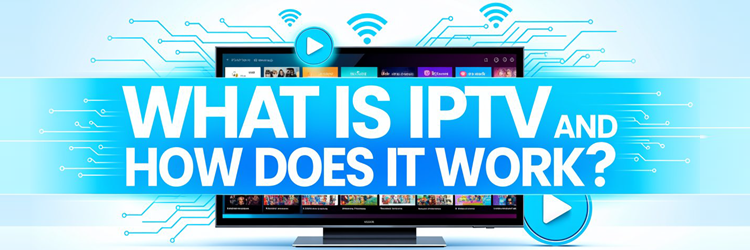
IPTV has quietly become one of the most common ways to watch television, yet plenty of people still are not sure what the term actually means. This guide explains what IPTV is, how it works behind the scenes, what you need to use it, and how it compares with cable and mainstream streaming, all in plain language.
My Quick Take on IPTV
IPTV, short for Internet Protocol Television, simply means watching TV delivered over the internet instead of through an aerial, satellite dish, or cable line. If you have used a catch-up app or streamed a live channel through a smart TV, you have already used the underlying technology. The term covers everything from big licensed platforms to smaller subscription services that bundle thousands of channels.
In my experience, the confusion comes less from the technology and more from the marketing around it. Once you understand that IPTV is just television sent as internet data, the rest — players, playlists, and pricing — tends to fall into place quickly and painlessly.
Methodology and Sources
This explainer is built from how IPTV actually works in practice rather than any single vendor’s marketing. I have drawn on widely accepted networking definitions, the way mainstream players and services behave, and hands-on experience setting up IPTV across common devices. Where a claim depends on a specific provider, I have kept it general, because features and channel counts vary widely from one service to the next.
The goal is a neutral, accurate picture that helps you understand the technology before spending anything. Nothing here certifies the legality or quality of any particular service; that always depends on licensing and your own country’s rules. Throughout, I have favoured plain explanations over technical jargon so the guide stays useful for newcomers.
What Is IPTV?
IPTV stands for Internet Protocol Television, and it means delivering television content over an internet connection using the same IP networking that carries websites and email. Instead of broadcasting one signal to everyone at once, IPTV sends each viewer a stream on demand, which is why you can pause, rewind, or pick from a huge on-demand library. It covers live channels, catch-up TV, and video on demand, all delivered as data packets rather than a traditional broadcast signal.
- Live IPTV: Real-time channels streamed over the internet, the closest equivalent to traditional live TV, used for sport, news, and event broadcasts.
- Video on demand: A library of films and shows you start whenever you like, much like a mainstream streaming service’s catalogue.
- Time-shifted TV: Catch-up and replay features that let you watch programmes after they have aired, within a set window.
- Delivered as data: Everything travels as IP packets over your broadband, which is what separates IPTV from aerial, satellite, or cable.
How Does IPTV Work?
Behind the scenes, IPTV turns television into internet data and routes it to your device through a few clear stages. A provider receives channels and video, encodes and compresses them into streamable formats, and stores or relays them on servers. When you select a channel, your player app requests that stream, and the server sends it to your device as a steady flow of IP packets that are decoded and displayed in real time. A content-delivery network often sits in between to keep playback smooth.
- Encoding: The provider compresses live channels and video into efficient streaming formats so they travel smoothly over ordinary broadband connections.
- Servers and CDNs: Content sits on servers, often backed by a content-delivery network, which places copies closer to viewers to reduce buffering.
- Your request: When you tap a channel, the player app requests that specific stream, and the server begins sending it to your device.
- Playback: Your player decodes the incoming packets and displays the picture in real time, buffering slightly to smooth out network hiccups.
Top IPTV Services to Try in 2026
If reading about IPTV has made you curious to try it, a few well-established services make a sensible starting point. Each below publishes clear terms and offers a trial or money-back window, so you can test the technology on your own devices at low risk before committing.
OrigineTV
OrigineTV is a good way to see IPTV at scale, advertising more than 55,000 live channels and 270,000-plus on-demand titles in up to 4K. It bundles a VPN and offers a free 24-hour trial, so you can test the technology before paying anything.
USA LIVE IPTV
USA LIVE IPTV suits viewers who want strong local coverage, pairing more than 20,000 channels with over 2,700 US local feeds and 136,000-plus on-demand titles. It backs that with a 30-day money-back guarantee and no IP locking across networks.
Tellystudio
Tellystudio gives first-time users a practical view of IPTV: emailed credentials open 45,000-plus live channels and 120,000-plus on-demand titles in common players. I would use the free trial to learn the setup, test navigation, and judge playback on my own connection.
What Do You Need to Watch IPTV?
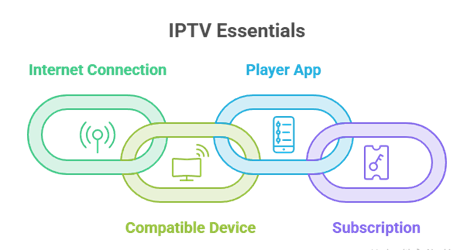
Getting started with IPTV takes surprisingly little. At a minimum you need a reasonably fast internet connection, a device to watch on, a player app, and a subscription or playlist from a provider. Most people already own everything except the subscription. The quality of your broadband matters more than anything else, because IPTV is only ever as smooth as the connection carrying it, and the player app shapes how the whole experience feels.
- A solid connection: Around 10 Mbps handles HD comfortably and 25 Mbps or more suits 4K, ideally over a wired link for stability.
- A compatible device: A smart TV, streaming stick, phone, tablet, or computer all work, so long as it can run an IPTV player app.
- A player app: Apps such as IPTV Smarters, TiviMate, or VLC turn a raw playlist into a browsable set of channels and a guide.
- A subscription: A provider supplies login credentials or an M3U playlist, which you enter into the player to load the channels.
Types of IPTV Services Explained
Not all IPTV is the same, and understanding the main types helps you judge what you are actually buying. Broadly, services fall into licensed platforms, subscription resellers, and free or ad-supported apps, each with different trade-offs around cost, reliability, and legality. The technology underneath is identical; what differs is who runs the service, whether they hold rights to the channels, and how much they charge for access.
- Licensed platforms: Official services from broadcasters and telecoms that hold rights to their channels, usually the most reliable and clearly legal option.
- Subscription services: Paid providers that bundle large channel lists, varying widely in quality and in whether they are properly licensed.
- Free and ad-supported: Apps and channels funded by advertising, which are legal when licensed but often limited in range and quality.
- Self-hosted setups: Enthusiasts who run their own playlists and servers, common with open-source players like Kodi and Jellyfin.
IPTV vs Cable and Traditional Streaming
The easiest way to place IPTV is against the two things it competes with: traditional pay-TV and mainstream streaming apps. Cable and satellite broadcast a fixed set of channels down a dedicated line, which is reliable but inflexible and often expensive. Mainstream streaming services deliver on-demand libraries and some live content over the internet, much like IPTV, but each app is a walled garden with its own catalogue.
IPTV sits between the two: it delivers live channels and on-demand content over the internet like streaming, but often aggregates far more channels in one place, the way cable once did. The trade-off is that quality and legality depend heavily on the provider. A licensed IPTV platform can be as dependable as cable, while an unlicensed reseller may be cheaper but far less stable and legally risky.
Is IPTV Legal and Safe?
IPTV as a technology is completely legal; the legal question is only ever about content rights. A service that streams channels it is licensed to carry is legal, while one that redistributes pay-TV or sports without permission is not, regardless of how professional it looks. This distinction matters because unlicensed services also tend to be less safe: they can vanish overnight, mishandle payment details, or bundle dubious apps.
Our dedicated guide to IPTV legality covers the specifics by country, but the safe approach is consistent everywhere. Favour providers that publish clear company details and licensing claims, pay with traceable methods such as a card or PayPal, and confirm the official domain before subscribing. Treat any service that only accepts gift cards, or offers implausibly complete channel lists for a token price, with real caution.
Common IPTV Problems and How to Fix Them
Most IPTV frustrations come down to a handful of recurring issues, and nearly all of them have quick fixes. Because IPTV depends entirely on your connection and your player app, the same troubleshooting steps resolve the majority of problems across every device. If you are setting up on a streaming stick, our steps to install on Firestick walk through it in detail.
- Buffering: Usually a connection or server issue; switch to a wired link, restart the router, and stream during off-peak hours.
- Channels not loading: Often expired credentials or a wrong playlist URL; re-enter the details the provider supplied carefully.
- No programme guide: Add or refresh the EPG URL in your player so channels show their schedule information.
- App crashes: Update the player app and restart the device to clear temporary glitches before contacting support.
Final Verdict
IPTV is simply television delivered over the internet, and understanding that one idea demystifies most of the jargon around it. The technology itself is neutral and legal; what varies is the provider, the licensing, and the quality of your connection. If you want to try it, start with a well-reviewed service that offers a trial, use a capable player app, and make sure your broadband is up to the job. Approached sensibly, IPTV offers more flexibility and choice than traditional TV, provided you stick to reputable, clearly licensed services and test before you commit.
Top 3 IPTV Services to Start With
- OrigineTV: A huge 55,000-channel catalogue with a bundled VPN and free trial.
- USA LIVE IPTV: Deep US local coverage and a 30-day money-back guarantee.
- Tellystudio: A broad all-rounder with a large sports lineup and quick trial.
FAQs
What does IPTV stand for?
IPTV stands for Internet Protocol Television. It means television delivered over an internet connection using standard IP networking, rather than through an aerial, satellite dish, or cable line. The same technology powers catch-up apps and live streaming on smart TVs.
Is IPTV the same as streaming?
They overlap heavily. Streaming services like Netflix are a form of IPTV, but the term IPTV is often used for services that bundle many live channels in one place. The underlying delivery method, video sent as IP data, is essentially the same.
Do I need a smart TV for IPTV?
No. IPTV runs on smart TVs, but also on streaming sticks, phones, tablets, computers, and set-top boxes. Any device that can install a player app and connect to the internet can watch IPTV, so most households already own something suitable.
Is IPTV legal?
The technology is legal everywhere. Whether a specific service is legal depends on if it holds rights to the channels it streams. Licensed services are legal; those redistributing pay-TV without permission are not. Always check a provider’s licensing and your local rules.
How much internet speed does IPTV need?
Roughly 10 Mbps is enough for HD, while 25 Mbps or more is safer for 4K. A wired connection reduces buffering. The steadier your connection, the smoother IPTV feels, since it depends entirely on the network carrying the stream.
Can I watch IPTV for free?
Yes, legally, through ad-supported services and free channels that hold proper licences. Many free IPTV apps and playlists online are unlicensed and risky, however. Sticking to reputable free platforms is safer than chasing unofficial lists that promise premium channels at no cost.
What devices support IPTV?
Smart TVs, Amazon Fire TV, Android TV boxes, Apple TV, Roku, phones, tablets, and computers all support IPTV through compatible player apps. The exact app varies by device, but nearly every modern screen can run IPTV in some form with the right software.
Do I need a VPN for IPTV?
A VPN is optional. Some people use one for privacy or to reduce ISP throttling, and a few providers include one. A VPN does not make an unlicensed service legal, so weigh your own priorities and local rules before deciding whether to add it.