Key Takeaways
- Safety depends on the apps you install and the seller you pay.
- Avoid unknown APK sources and unrealistic long-term offers.
- Check business identity, account protection, and written payment terms.
“Is IPTV safe?” is the question I get asked more than any other, and the honest answer is: it depends entirely on what you install and who you pay. IPTV itself is just a way of delivering television over the internet, and used sensibly it is no more dangerous than any streaming app. The risks come from the edges of the market, the random free APKs, the too-good-to-be-true lifetime deals, and the services that are careless with your card details. After years of testing providers, I can tell you exactly where the danger sits and how to avoid it.
This guide separates the real safety risks from the scare stories. I will cover the malware and data concerns worth taking seriously, how to spot a service that is likely to burn you, whether you need a VPN, and the handful of habits that keep my own setup safe. The goal is simple: to let you enjoy IPTV without handing your money or your data to the wrong people.
My Quick Take Before You Read On
In my experience, safe IPTV comes down to three habits, and the people who get burned almost always skipped one of them, lured by a price that was never realistic in the first place.
- Use a trusted app: Stick to reputable players rather than a random APK from a forum.
- Pay transparent services: Choose providers with a trial and clear refund terms over mystery pricing.
- Protect your payment: Never hand your card to a site that looks thrown together or accepts crypto only.
Do those three things and the vast majority of risk disappears.
Methodology and Disclaimer
I am not a lawyer, and this is general safety information rather than legal advice; if you are unsure about the rules where you live, check them or speak to a professional. What follows comes from hands-on experience testing dozens of IPTV services and apps, watching how they handle payments, permissions, and data, and noting which ones behaved responsibly. Where I flag a service as safer, I mean it was transparent about pricing and terms and gave no cause for concern during testing, not that any third party has audited it. Some links here are affiliate links, which never changes my assessment.
Is IPTV Safe to Use in 2026?
Used sensibly, yes. Streaming television over the internet is not inherently risky, and a well-run IPTV service on a mainstream app is about as safe as any streaming platform. The danger is not the technology but the ecosystem around cheap, unofficial services.
- The tech is neutral: IPTV is just internet TV delivery, no riskier than any streaming app.
- Mainstream apps are safe: Players like TiviMate and IPTV Smarters carry no inherent danger.
- The edges are risky: Sideloaded APKs, insecure checkouts, and vanishing operators cause the problems.
- Your choice decides: Picking a reputable provider and app is the biggest safety decision you make.
Choosing the right service and app is exactly what the rest of this guide helps you do.
How to Tell a Safe IPTV Service from a Risky One
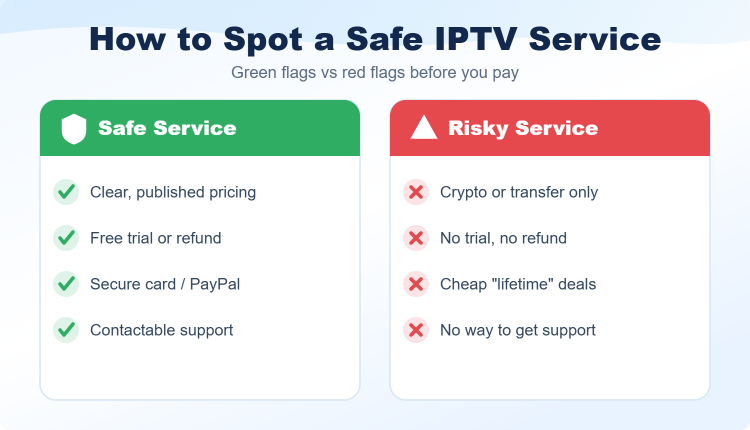
A trustworthy service shows its work, while a risky one hides it. If a service will not let you test it and will not explain its refund terms, keep your card in your pocket, because the warning signs are usually obvious once you know what to look for.
- Clear pricing: Published plans rather than a price hidden behind a chat message.
- A real trial: A free trial or money-back guarantee so you are never paying blind.
- Secure checkout: A recognised, padlocked payment page rather than crypto or transfer only.
- Contactable support: A team that answers a question before you have paid anything.
Every provider I recommend below passed these checks.
Safer IPTV Services I Recommend
If you want to skip the risk entirely, the three services below were transparent about pricing and terms, offer trials so you can test before paying, and gave no cause for concern in my testing. My full list of the best IPTV service providers has more vetted options.
IPTV Harmony
IPTV Harmony is one of the more transparent services I tested, with clear euro pricing, a refund page, and a free 24-hour trial plus an optional seven-day extended trial. Its steady streams and honest terms make it a low-risk place to start.
Mangolia IPTV
Mangolia IPTV keeps things straightforward: a genuine 24-hour free trial, a seven-day money-back guarantee, and plainly published plans from $13 a month. That combination of a real trial and a clear refund window is exactly what a safe service should offer.
OrigineTV
OrigineTV fits privacy-conscious viewers assessing subscription risk, listing 55,000+ live channels and 270,000+ VOD titles. I would use a separate player profile, avoid unnecessary personal data and verify refund terms in writing, using a 24-hour WhatsApp trial without a card.
The Real Security Risks: Malware, Data, and Scams
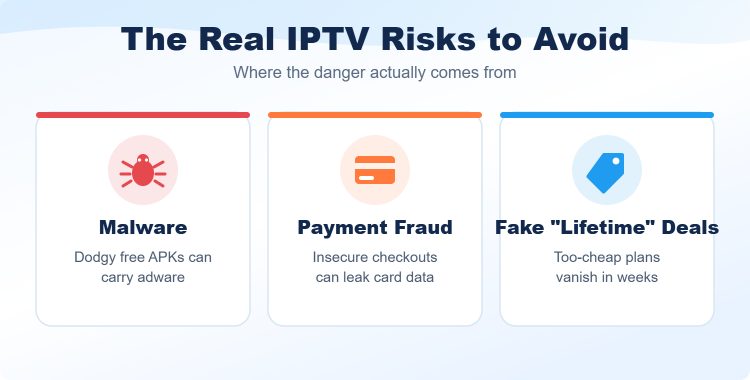
Three risks are worth taking seriously, and noticing that none of them is caused by IPTV itself is the key insight: each comes from choosing the wrong app or the wrong seller, which is entirely within your control.
- Malware: Unofficial APKs from forums can carry adware or request alarming permissions.
- Payment exposure: A shady checkout can leak your card, and some operators simply vanish with the money.
- Scam pricing: A “lifetime” deal for a few dollars cannot fund a real service and rarely lasts.
- All avoidable: Every one of these comes from the app or seller you pick, not the technology.
Get the app and the seller right, and the realistic risk drops close to zero.
Are Free IPTV Apps and APKs Safe?
This is where most people get into trouble. Established players are safe, but random free APKs promising thousands of premium channels for nothing are the single biggest source of malware in this space, and free unlicensed services tend to be the least careful with security.
- Trust the big names: TiviMate and IPTV Smarters are safe and widely used.
- Avoid mystery APKs: “Unlimited free channels” downloads are the top malware source here.
- Download from source: Get apps from the developer or a reputable store, not a forum link.
- Watch permissions: Be wary of any app requesting contacts, SMS, or admin rights.
A cheap paid service with a trial is almost always safer than a free one.
Do You Need a VPN for IPTV Safety?
A VPN is not essential for safety, but it adds a worthwhile layer of privacy by hiding your streaming traffic from your internet provider. Treat it as one tool among several rather than a cure-all, because it cannot fix everything.
- Adds privacy: It hides your streaming traffic from your ISP and can stop peak-hour throttling.
- Not a fix-all: It does not make an unsafe app safe or protect your card at a bad checkout.
- Choose paid: Pick a reputable no-logs VPN rather than a data-harvesting free one.
- Keep speeds up: Connect to a nearby server so streaming stays smooth.
For the legal side of all this, see my companion guide on whether IPTV is legal and how to stay safe.
Safe Payment Methods for IPTV
How you pay is one of your best defences. A reversible, protected method turns a potential loss into a recoverable one, which is exactly why unreliable operators push you toward payment methods you cannot claw back.
- Use a card or PayPal: Protected methods let you dispute a charge and recover money.
- Avoid crypto-only: Cryptocurrency and bank transfers are effectively irreversible once sent.
- Treat it as a flag: A provider refusing every reversible method is a warning sign.
- Keep records: Save the pricing and terms you agreed to in case of a dispute.
Paying by a protected method is the single easiest safety habit to adopt.
How I Keep My Own IPTV Setup Safe
My own routine is simple and I recommend it to everyone. None of it is difficult, and together it removes almost every realistic risk while letting me enjoy the channels I actually pay for.
- Official stores only: I install players from official stores, never random links.
- Protected payment: I pay by a method with buyer protection, not crypto or transfer.
- Trial first: I always use a service’s trial before committing real money.
- Separate email: I use a dedicated email for signups so my main inbox stays clean.
Keeping software updated and avoiding unsecured checkouts rounds out the habit.
What to Do if an IPTV Service Misuses Your Card
If a service charges you unexpectedly, will not honour a refund, or disappears after taking payment, act quickly and treat it as a cheap lesson that reinforces testing properly next time.
- Dispute the charge: Contact your bank or card provider and request a new card if needed.
- Change passwords: Update any password you reused on that site.
- Keep evidence: Screenshot the pricing and terms you agreed to.
- Move on safely: Switch to a reputable provider with a trial and clear refund terms.
Let it reinforce the habit of testing a service properly before handing over any money.
Final Verdict
So, is IPTV safe? Yes, as long as you choose the app and the seller with care. Stick to reputable players, pay only services that offer a trial and clear refund terms, and never chase an impossible price. Get those habits right and the realistic risk drops close to zero. My top three picks below are the services I trust most for a low-risk start, each transparent and well run in my testing.
Top 3 Safer IPTV Services I Trust Most
- Most transparent: IPTV Harmony for clear pricing, a refund page, and flexible trials.
- Best trial and refund: Mangolia IPTV for a real 24-hour test and a seven-day guarantee.
- Best app experience: OrigineTV for a polished, secure app with a no-card trial.
FAQs
Is IPTV safe to use?
Yes, when you use a reputable app and pay a transparent service, IPTV is about as safe as any streaming platform. The risks come from random free APKs, insecure checkouts, and scam pricing, all of which you can avoid.
Are free IPTV apps safe?
Established players like TiviMate and IPTV Smarters are safe, but random free APKs promising unlimited premium channels are the biggest source of malware in this space. Stick to well-known apps from official sources.
Can IPTV give my device a virus?
A mainstream IPTV app will not, but a malicious sideloaded APK can carry adware or malware. Only install players from official stores or the developer, and be wary of apps requesting unusual permissions.
Do I need a VPN to use IPTV safely?
A VPN is not essential but adds privacy by hiding your traffic from your ISP. It does not make an unsafe app safe or protect your card at a dodgy checkout, so use it alongside good habits, not instead of them.
Is it safe to pay for an IPTV subscription?
It is, provided you pay a transparent service through a method with buyer protection. Avoid providers that only accept crypto or bank transfer, offer no trial, or hide their refund terms.
How can I tell if an IPTV service is a scam?
Warning signs include implausibly low “lifetime” prices, no free trial, crypto-only payment, no contactable support, and a sloppy website. A safe service publishes clear pricing and lets you test before paying.
What should I do if an IPTV service takes my money?
Dispute the charge with your bank, request a new card if needed, and change any reused passwords. Keep evidence of the pricing you agreed to, then switch to a reputable provider with a trial.
Is IPTV safe on a Firestick or Android box?
Yes, as long as you install a trusted player and a reputable service. The device is not the risk; the app and the provider are, so apply the same care you would on any platform.