Key Takeaways
- Xtream-style access uses a server URL, username, and password.
- Your player and provider must support the same login format.
- Keep account credentials private and use an authorised content source.
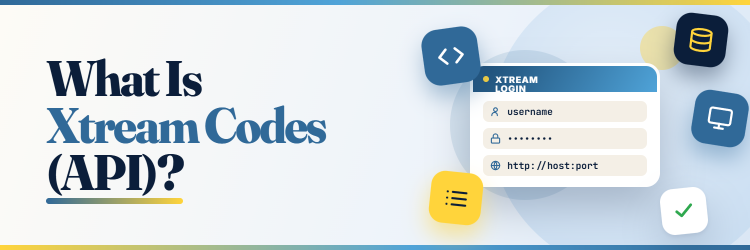
If you have bought an IPTV subscription, you have almost certainly seen the term Xtream Codes, usually presented as a username, a password and a server URL. It is the most common way to log in to an IPTV service, and understanding it makes setup far easier. This guide explains what Xtream Codes is, how the API works and how to use it on your devices, all in plain language.
Do not let the technical-sounding name put you off. For all the jargon around IPTV, Xtream Codes is one of the friendlier parts of it, and you do not need to understand the software behind it to use it well. By the end of this guide you will know exactly what those three login details are, why providers use them, and how to get them working on whatever device you own. You will also see how the same credentials behave across popular players, why login errors happen, and which security checks matter before sharing account information.
My Quick Take on Xtream Codes
Xtream Codes is simply a login system for IPTV. Instead of handling a long playlist file, you enter three details, a username, a password and a server URL, and your player pulls in every channel, the programme guide and the on-demand library automatically. It is cleaner than a raw M3U link and, for most people, the easier and safer way to connect. The name refers to the panel software many providers use behind the scenes, but for you it just means a tidy three-field login.
Methodology and Sources
This explainer draws on hands-on setup across the common IPTV players, including IPTV Smarters, TiviMate and web-based apps, plus the login details that real providers issue to customers. IPTV as a technology is legal; using it to access channels without the proper rights is not. Nothing here encourages piracy, and the services mentioned publish clear terms and trials so you can test the login process legitimately on your own devices.
What Is Xtream Codes?
Xtream Codes is a login method used by many IPTV services to deliver live channels, films, series, channel groups, logos, and programme-guide data to a compatible player. It is not a television app or a subscription by itself. The player supplies the interface, while the provider supplies the authorised account and content.
When a provider says “Xtream login,” it normally means three pieces of information. Keep them together and copy them exactly, because a missing port number, an extra space, or the wrong server protocol is enough to stop authentication.
- Server address: the provider’s domain or IP address, often followed by a port number that directs the player to the correct service.
- Username: the account identifier created for your subscription; it is usually case-sensitive and should not be replaced with your email unless instructed.
- Password: the matching account secret used with the username; it should be stored privately and never posted in screenshots or public forums.
Some providers also send a ready-made M3U URL. That URL often contains the same username and password inside it, which is why it must be protected like a normal login.
How Does the Xtream Codes API Work?
An Xtream-compatible player sends your server address, username, and password to the provider’s API. After authentication, the server returns structured data instead of one long playlist. The app can then separate live television, films, series, categories, logos, and guide entries into dedicated screens.
| API stage | What the player sends or receives | What you see |
|---|---|---|
| Authentication | Server address, username, password, and basic device request | The account is accepted or an error message appears. |
| Category request | Authorised account token and a request for live, movie, or series groups | Countries and genres appear as organised folders. |
| Stream request | Selected channel or title ID plus the authorised account | The chosen live channel, film, or episode begins playing. |
| EPG request | Channel IDs and guide time range | Now/next information and programme schedules populate the guide. |
| Refresh | A new request for account status and catalogue changes | Expired items disappear and newly added content becomes available. |
The player does not permanently own the catalogue. It requests fresh data from the provider, which is why an expired account, changed password, blocked connection, or offline server can make previously visible channels disappear.
Xtream Codes vs M3U Playlists
Xtream Codes and M3U usually access the same provider account, but they present it differently. Xtream is structured and easier for a full live-and-VOD service; M3U is a portable playlist that works in a wider range of simple players. The better choice depends on the app and the amount of metadata you need.
| Feature | Xtream Codes login | M3U playlist |
|---|---|---|
| Details entered | Server URL, username, and password | One complete playlist URL |
| Organisation | Separate live, film, series, and category sections | Usually one playlist grouped by tags |
| EPG handling | Often requested automatically through the API | May require a separate XMLTV or EPG URL |
| VOD metadata | Posters, seasons, episodes, and descriptions can load | Support varies and may be limited |
| Compatibility | Best in IPTV-focused players such as Smarters and TiviMate | Works in VLC, Kodi, and many general media players |
| Security risk | Credentials remain visible in the app profile | Username and password may be embedded directly in the URL |
Use Xtream when your player supports it and you want the full catalogue. Keep M3U as a compatibility option, but never share the URL because it may expose the same account credentials. The M3U playlist guide explains that format in more detail.
How to Log In With Xtream Codes (Smarters and TiviMate)
The field names vary slightly between apps, but the sequence is consistent. Before starting, confirm that the provider has activated the account and copy the server address exactly, including http or https and any port number.
- Open the login screen: choose Add User, Add Playlist, or Login with Xtream Codes API rather than the M3U option.
- Create a profile name: use any private label that helps you recognise the subscription; it does not affect authentication.
- Enter the server: paste the complete server address and keep the protocol and port exactly as supplied.
- Enter the credentials: type the username and password without spaces, smart quotes, or automatic capitalisation.
- Save and refresh: allow the first catalogue, VOD, logo, and EPG synchronisation to finish before closing the player.
- Test one channel: start with a familiar HD channel, then verify a film, a series episode, and the programme guide.
If the same credentials fail in two reputable players, stop retyping and ask the provider to confirm the server URL, account status, and connection limit.
Which Players and Devices Support Xtream Codes
Xtream Codes works on any device that has a compatible player; support comes from the app, not from the television or streaming box itself. Choose a player that is actively maintained, available from a trusted store or official source, and suited to the way you navigate content.
- Android TV and Fire TV: TiviMate and IPTV Smarters offer strong channel grouping, guide layouts, favourites, and remote-friendly navigation.
- Samsung and LG televisions: compatible store apps can accept Xtream credentials, although availability depends on model year and account region.
- Phones and tablets: Smarters-style players make testing credentials easy, but background restrictions can interrupt long live streams.
- Windows and macOS: dedicated IPTV players handle the structured login better than VLC, which is more naturally suited to M3U.
- Apple TV: choose a reputable tvOS player that explicitly lists Xtream or XC API support and recent maintenance.
Avoid unknown applications that request payment before showing a publisher name, privacy policy, or clear update history.
Is Xtream Codes Legal and Safe to Use?
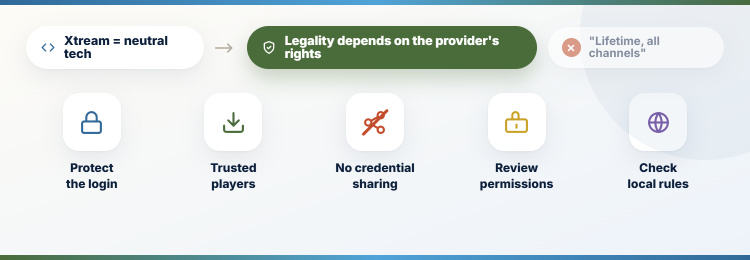
Xtream Codes is a neutral authentication technology. Using it is legal when the service has permission to distribute the channels and on-demand titles in your region. The login format does not prove that a provider is licensed, and a professional-looking app or large catalogue is not evidence of distribution rights.
Assess the provider separately from the software and review IPTV legality for the wider licensing context. Clear company details, transparent terms, realistic pricing, responsive support, and normal payment records are better signs than anonymous messaging accounts or claims of every premium channel for a tiny lifetime fee.
- Protect the login: treat the server address, username, password, and M3U URL as private account credentials.
- Use trusted players: install from an official app store or the developer’s verified site and keep the app updated.
- Avoid credential sharing: public screenshots and forwarded URLs can expose the account or exhaust its authorised connection limit.
- Review permissions: a player should not need contacts, microphone, or unrelated personal data simply to stream television.
- Check local rules: content rights and privacy requirements vary by country, so confirm the provider’s authorisation for your location.
A VPN may improve privacy or routing, but it does not make an unauthorised service legal and cannot verify the provider’s content rights.
Common Xtream Codes Problems and Fixes
Start with the exact error and test one change at a time. Most failures are caused by a typing mistake, an expired account, a changed server address, a connection limit, or a provider outage. Reinstalling the player should be the last step, not the first.
| Problem | Most likely cause | Best first check |
|---|---|---|
| Invalid username or password | Typing error, automatic capitalisation, or expired account | Retype both fields and ask the provider to confirm account status. |
| Server URL error | Missing protocol, port, or recently changed domain | Compare the complete address with the provider’s latest message. |
| Login succeeds but lists are empty | Catalogue refresh failed or provider API is temporarily unavailable | Force one refresh and test the account in another reputable player. |
| Channels stop after a few seconds | Connection limit is already in use or the account is being shared | Close other streams and confirm the authorised connection count. |
| VOD works but live TV fails | Live server group is down or ISP routing is poor | Test several live categories, another network, and a nearby VPN route. |
| EPG is blank | Guide request is still loading or the provider has no matching EPG data | Refresh the guide and ask for the correct EPG source. |
| Everything buffers | Weak Wi-Fi, overloaded feed, or bitrate above available bandwidth | Use Ethernet, test a lower-quality channel, and compare at another time. |
When contacting support, include the player name, device, exact error, test time, and one failing channel. Never send credentials in a public group or forum.
Top IPTV Services That Support Xtream Codes
Almost every reputable IPTV provider issues Xtream Codes logins. If you want to see how the process works in practice, these three are good, well-documented places to start, each with a trial so you can test the login on your own device at low risk.
OrigineTV
OrigineTV is a useful Xtream Codes example because it supplies the three standard details—server address, username, and password—in a format that drops directly into popular players. I found the account structure clear enough for a beginner to recognise and enter without conversion.
The service combines that simple login with a large live and on-demand catalogue, so you can confirm how channel groups, guide data, films, and series appear after authentication. Its free 24-hour trial also lets you practise the complete process before committing to a paid term.
Features
- Clean credentials: The server address, username, and password arrive in a standard format that popular Xtream-compatible players recognise immediately.
- Player compatibility: The login works across IPTV Smarters, TiviMate, and other apps that include an Xtream Codes API option.
- Live catalogue: A broad channel lineup helps beginners see how countries, categories, favourites, and guide data are organised after login.
- VOD support: Films and series populate separate player sections, demonstrating the main usability advantage Xtream logins have over basic playlists.
- Trial access: A free 24-hour test provides time to enter the account, refresh content, and confirm streams on your device.
- Account flexibility: Standard credentials make it easier to move the same authorised subscription between compatible televisions, phones, and streaming boxes.
- My take: The clearest practical example for beginners who want to understand an Xtream login while testing a complete IPTV catalogue.
Tellystudio
Tellystudio is a practical match for users entering server, username and password credentials in an IPTV player. Its published catalogue covers 45,000+ live channels and 120,000+ on-demand titles; published picture options include 4K, FHD and HD streams with adaptive playback.
For Xtream login, I would focus first on a printable setup card. I would refresh the account in the intended player and verify live, VOD and EPG data, then judge clean authentication, organised channel groups and reliable guide import in normal use on my own connection.
Features
- Live channels: The listed 45,000+ live channels cover a wide mix for users entering server, username and password credentials in an IPTV player. For Xtream login, I would still verify every must-have feed and 24/7 English chat support.
- On-demand library: 120,000+ on-demand titles add a substantial film-and-series library for Xtream login.
- Picture quality: Picture options for Xtream login include 4K, FHD and HD streams with adaptive playback.
- Device support: Compatible setups for Xtream login include Fire Stick, Android TV, Smart TVs, MAG, iOS and Windows.
- Trial check: A free trial available on request provides a sensible first check for Xtream login.
- Useful extra: For Xtream login, the inclusion of a printable setup card adds useful depth beyond the catalogue totals.
- My take: I would refresh the account in the intended player and verify live, VOD and EPG data; 24/7 English chat support would help decide whether I kept the service.
USA LIVE IPTV
USA LIVE IPTV is a practical Xtream Codes choice for North American viewers because its login opens a large wall of US, Canadian, Latin American, and international channels. The standard server, username, and password work in the familiar Xtream login screen used by major players.
The account is particularly helpful for testing category loading, favourites, guide data, and search across a very large catalogue. Multi-connection options also show how authorised simultaneous streams are controlled at account level, while the refund window gives households time to verify their required channels.
Features
- North American focus: Strong US, Canadian, and Spanish-language groups make the service useful for testing region-specific channel categories after login.
- Standard credentials: The server address, username, and password enter directly into supported players without converting the account into another format.
- Large catalogue: Extensive live groups demonstrate how Xtream-compatible apps organise countries, genres, favourites, and recently viewed channels during everyday home viewing.
- EPG delivery: Guide information arrives with the authenticated account, avoiding the separate guide URL often needed with a basic M3U playlist.
- Multi-connection plans: Optional simultaneous streams illustrate how an Xtream account can authorise more than one household device at a time.
- Device coverage: Compatible apps run on televisions, streaming sticks, phones, tablets, and computers using the same authorised login structure.
- My take: The practical choice for North American households that want familiar channel groups and broad device support from one Xtream account.
Final Verdict
Xtream Codes is the easiest way to connect an IPTV subscription, turning a fiddly playlist into a tidy three-field login that pulls in your channels, guide and on-demand library automatically. Enter the server URL, username and password your provider gives you into a good player like IPTV Smarters or TiviMate, keep those details private, and you are set. If a provider only offers an M3U link that still works, but where you have the choice, the Xtream login is almost always the smoother, more reliable route.
Once it is set up, an Xtream login is genuinely a set-and-forget affair. Your channels and guide refresh on their own, new content appears without any effort, and the only time you will touch the details again is if you change device or renew on a new server. For most people that is exactly what you want from a TV setup: a couple of minutes of work, then years of simply pressing play.
FAQs
What is Xtream Codes?
It is a login system for IPTV that uses a server URL, a username and a password to pull your channels, programme guide and on-demand library into a player automatically.
Is Xtream Codes an app?
No. It is a login format, or API, that you use inside players such as IPTV Smarters, TiviMate or XCIPTV rather than an app you install on its own.
What are the three Xtream Codes details?
A server URL, which includes the host and port, a username and a password. Your provider emails all three when you buy a plan or start a trial.
Xtream Codes vs M3U, which is better?
Xtream is usually better because it delivers a full guide and updates automatically. An M3U link is a simpler fallback for players that do not support the API.
Is Xtream Codes legal?
The login method itself is legal. Whether the service is legal depends on whether the provider holds the rights to the channels it streams to you.
Why won’t my Xtream login work?
Most often a wrong server URL or port, an expired subscription, or streaming on more devices than your plan allows. Check those three first.
Which apps support Xtream Codes?
IPTV Smarters Pro, TiviMate, XCIPTV, Purple Player and most modern IPTV apps support the Xtream Codes API across phones, sticks and smart TVs.
Is it safe to share my Xtream login?
No. Anyone with your server URL, username and password can use your subscription, so keep the details private just as you would a password.