Key Takeaways
- TiviMate is a player and needs a separate authorised channel source.
- Confirm installation requirements and save your account details securely.
- Check playlist loading, guide data, and playback before adjusting settings.
Top IPTV Services I Recommend Before You Install TiviMate
TiviMate is a player, not a subscription. It installs perfectly and then sits there doing nothing until you feed it Xtream credentials from an IPTV provider. So before you sideload anything, have a service ready — two of these three let you watch free before paying.
- Stream IPTV 4K: Best free trial — 36 hours free, 20,000+ channels; the one I test new players with.
- OrigineTV: Best value — 55,000 channels and 4K streams for €67.99 a year; my own everyday pick.
- iScreenHD IPTV: Best for US viewers — 35,000 channels; I would buy it for a two-device home.
Methodology and Disclaimer
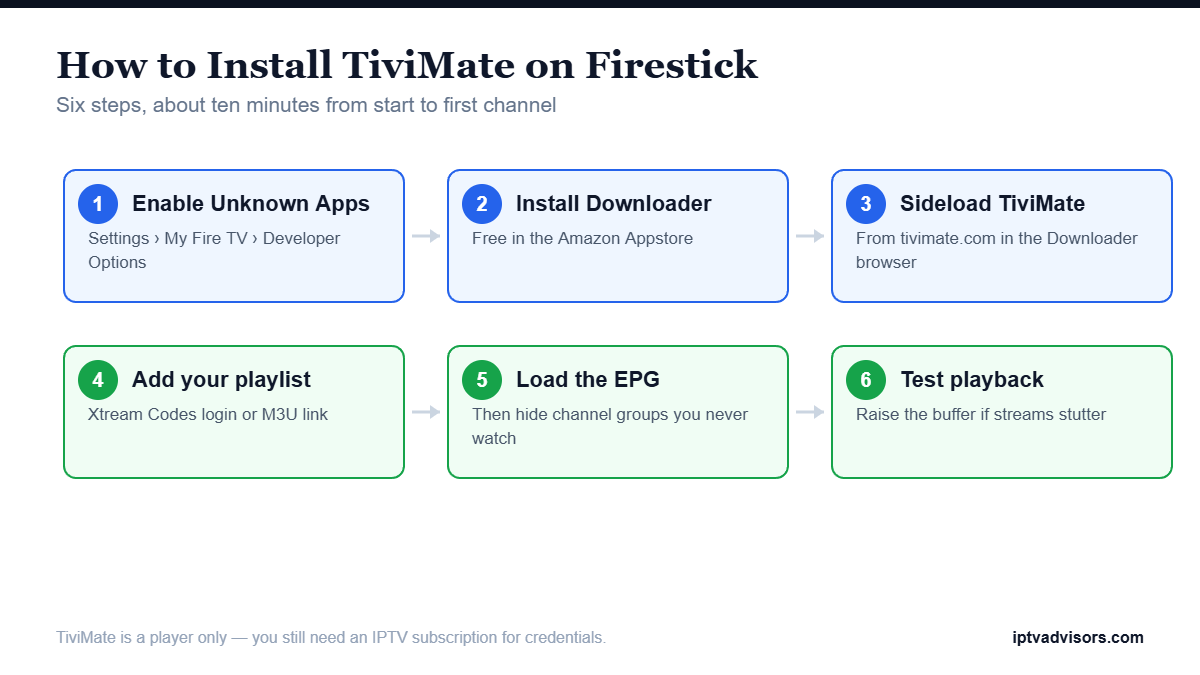
I ran every step on a Fire Stick 4K Max with the current Fire OS build, using Downloader to sideload TiviMate and a live Xtream account to test playback. Screens shift slightly between Fire OS versions and Fire Stick generations, so a menu may sit a row higher or lower than it does on mine. The sequence itself has not changed in years. Timings below are what actually happened rather than a best case: about ten minutes in total, most of it spent typing a download code and waiting for a playlist to import.
Disclaimer: IPTV is a delivery technology and is entirely legal. What matters is whether your provider licenses the channels it sells. This article may contain affiliate links, meaning we could earn a commission at no extra cost to you. Prices were checked on 14 July 2026.
What You Need Before You Start
Gather four things and the install becomes trivial. None of them is expensive, and only one of them — the subscription — is something TiviMate cannot supply for you no matter how carefully you follow the steps below.
| What you need | Why it matters | Typical cost |
|---|---|---|
| Fire Stick (Lite to 4K Max) | Any generation runs TiviMate; 4K models handle big channel lists better | $30–$60 |
| IPTV subscription | Supplies the Xtream credentials or M3U link — TiviMate has no channels | $13–$15 a month |
| Downloader app | Sideloads TiviMate, which is not listed on the Amazon Appstore | Free |
| Stable internet | About 25 Mbps spare for 4K, 10 Mbps for FHD; Ethernet beats Wi-Fi | Existing line |
Set aside ten minutes, and keep your provider’s email open on a phone so you can copy the credentials without typos. If you have not bought a subscription yet, start with a trial account rather than a year — the install is identical either way, and a trial costs you nothing if the streams disappoint.
Step 1: Turn On Developer Options and Allow Unknown Apps
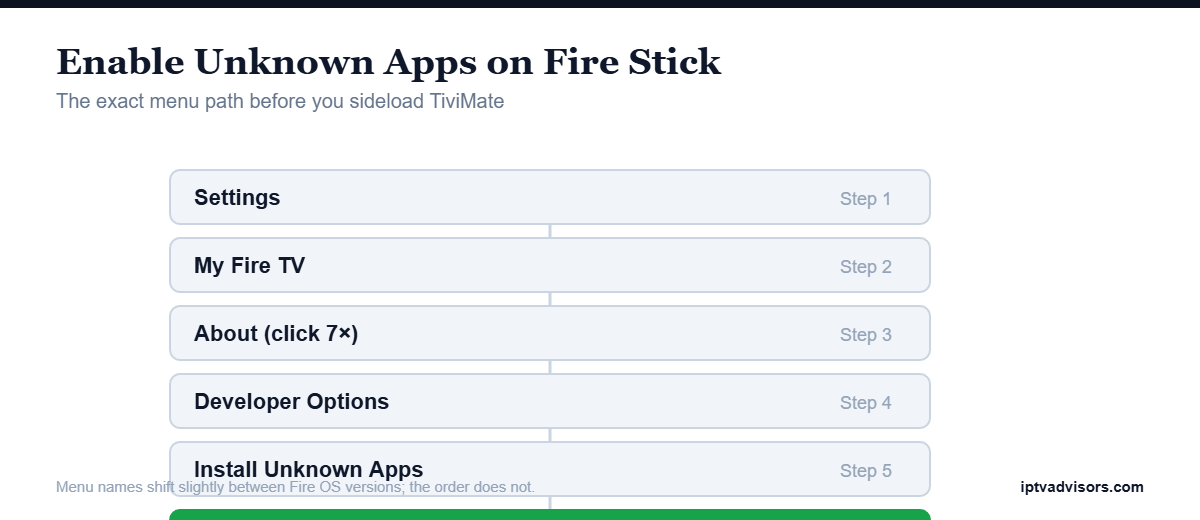
From the home screen, open Settings › My Fire TV › About, and click your device name seven times until it says you are now a developer. Go back, open Developer Options, switch on Install Unknown Apps, and toggle Downloader to on. Skip this and the Fire Stick silently refuses to install TiviMate.
Step 2: Install the Downloader App
Open the search icon at the top left, type “Downloader”, and select the orange app by AFTVnews. Click Get and wait — it installs in under a minute. Open it once, accept the storage permission, and dismiss the startup notice. You will use its Browser tab next, not the Home tab.
Step 3: Sideload the TiviMate APK
In Downloader, select the Browser tab, go to tivimate.com, and follow the link to the current APK. Taking the file from the developer’s own site rather than a random mirror is the single most important safety step here. When it downloads, choose Install, then Done, then Delete to free up space.
Step 4: Add Your IPTV Playlist to TiviMate
Open TiviMate from Your Apps & Channels and choose Add playlist. Pick Xtream Codes if your provider sent a username, password, and server URL, or M3U playlist if you got a single long link. Type the details exactly — a stray space is the most common cause of a failed login. Then let the channel list import.
Step 5: Load the EPG and Sort Your Channels
When the playlist imports, TiviMate offers to download the EPG. Accept it and let the guide populate — on a 40,000-channel account this is the slowest part of the setup. Afterwards open Settings › Channels and hide the groups you will never watch. Trimming the list makes the guide dramatically faster to open.
Step 6: Test Playback and Adjust the Buffer
Open a live channel and let it run for two or three minutes rather than flicking straight on. If it stutters, go to Settings › Playback and raise the buffer size one step. Then try a 4K channel and an SD one: if only 4K stalls, the problem is bandwidth, not TiviMate.
That is the whole install. If every step went cleanly, you now have a working guide, a channel list you can navigate, and playback that holds steady on a live feed. Before you settle in, spend two minutes hiding channel groups you will never open — it is the single change that makes TiviMate feel fast on older Fire Stick hardware.
Fixing the Install Problems People Actually Hit
Four failures cover almost every support message I see about TiviMate on a Fire Stick, and none of them needs a factory reset or a new stick. Work through the table below in order and you will usually be watching again within a couple of minutes.
| Symptom | Most likely cause | Fix |
|---|---|---|
| APK will not install | Unknown Apps is off for Downloader | Developer Options › Install Unknown Apps › Downloader ON |
| App opens, no channels | Wrong credentials or expired plan | Retype the login exactly; check the expiry date in Playlists |
| Guide is empty | EPG download failed or none supplied | Force an EPG refresh from Settings › Playlists |
| Channels stutter | Buffer too small or Wi-Fi congestion | Raise the buffer, switch to Ethernet, test a lower resolution |
If all four checks fail on two different players, the fault is upstream at the provider rather than on your Fire Stick, and our guide on IPTV not working covers what to try next.
One habit worth building: check the expiry date on your subscription inside TiviMate under Settings › Playlists. An empty channel list is far more often an expired account than a broken install, and it takes five seconds to rule out before you start reinstalling anything.
Do You Need a VPN for TiviMate on Firestick?
TiviMate works perfectly without one. A VPN does not make an unlicensed stream legal, and it will not fix buffering — a slow VPN server is a common cause of it. Some viewers run one for privacy on shared networks, which is a reasonable personal choice.
If you do use one, install it on the Fire Stick itself, pick a nearby server, and test playback before and after so you can see exactly what it costs you in speed.
TiviMate Free vs Premium, and the Alternatives
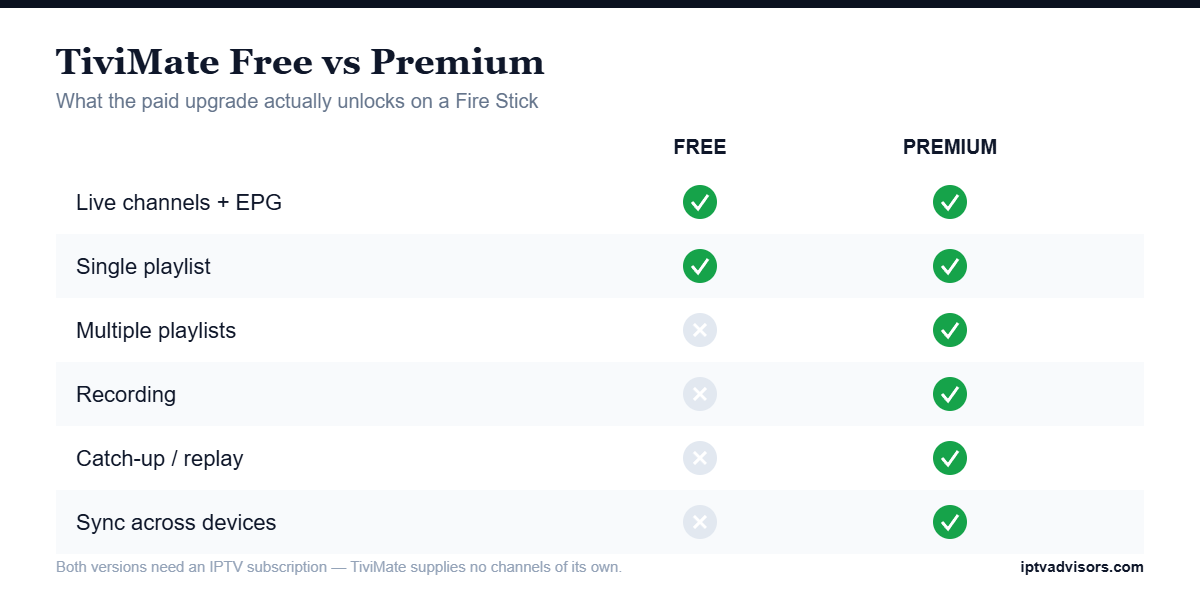
TiviMate’s free version plays channels, shows the guide, and is enough for most people. Premium earns its money only if you run more than one subscription or want to record live sport, and two strong alternatives accept exactly the same credentials if TiviMate does not suit you.
- Free version: Live channels with a working EPG, which covers most single-subscription households.
- Premium: Multiple playlists, recording, catch-up, and device sync for heavier users.
- IPTV Smarters Pro: The easiest alternative for beginners, with a simpler layout and quicker setup.
- Other players: OTT Navigator suits tinkerers; our best IPTV apps guide compares them.
All of them take the same Xtream logins, so you can test a second player without touching your subscription.
Final Verdict
Installing TiviMate on a Fire Stick takes about ten minutes: enable Unknown Apps, sideload the APK through Downloader from the official site, add your Xtream credentials, and let the EPG load. The player is excellent, but it is only as good as the subscription behind it — so start with a service that lets you test before paying.
Top 3 IPTV Services to Pair With TiviMate
- Stream IPTV 4K: A 36-hour free trial and 20,000+ channels — the safest way to test TiviMate before spending anything.
- OrigineTV: 55,000 channels, 270,000 VOD titles, and native 4K streams for €67.99 a year.
- iScreenHD IPTV: 35,000 channels with strong US coverage and open one-to-five device pricing, from $14.99.
FAQs
How long does it take to install TiviMate on Firestick?
About ten minutes end to end. Enabling Unknown Apps and installing Downloader takes three or four minutes, sideloading the APK another two, and the rest is spent importing your playlist and waiting for the EPG.
Is TiviMate free on Firestick?
The base version is free and plays channels with a working guide. Premium adds multiple playlists, recording, catch-up, and device sync, which is worth paying for only if you run more than one subscription.
Do I need to jailbreak my Firestick for TiviMate?
No. Nothing here is a jailbreak. You are enabling Developer Options and allowing Downloader to install an app, which is a standard Fire OS feature that Amazon supports.
Why does TiviMate show no channels after install?
Almost always the credentials. Retype the username, password, and server URL exactly as your provider sent them, watching for capital letters and stray spaces. If they are correct, your subscription may have expired.
Where should I download the TiviMate APK from?
Use the developer’s own site, tivimate.com, through the Downloader browser. Random mirrors and file-sharing sites are where modified or unsafe builds circulate, and the official APK costs nothing.
Can TiviMate work without an IPTV subscription?
No. TiviMate is only a player. It needs Xtream Codes credentials or an M3U link from an IPTV provider before it can display a single channel.
Why is TiviMate buffering on my Firestick?
Raise the buffer size in Playback settings, move the Fire Stick to Ethernet, and test a lower-resolution feed. If only 4K channels stutter, the constraint is your bandwidth rather than the app.
Does TiviMate work on every Firestick model?
Yes, from the Lite through to the 4K Max. Older models handle very large channel lists more slowly, so hiding unused channel groups matters more on those devices.