
Key Takeaways
An IPTV encoder turns a source signal into compressed audio and video for an IP network. It differs from transcoding and decoding, and it is not a provider, player, set-top box, or content license. Choose by checking inputs, codec support, protocol support, latency, monitoring, and decoder compatibility.
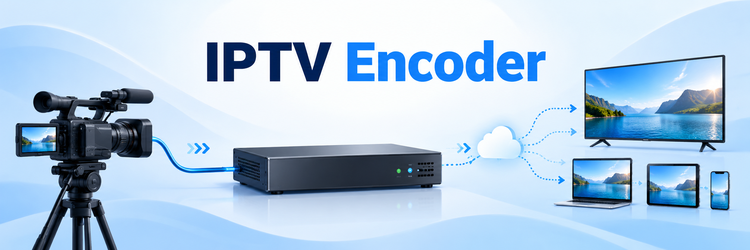
An IPTV encoder sits near the beginning of a live-video chain. It accepts picture and sound from a camera, satellite receiver, cable box, production switcher, or playout system, compresses that signal, and produces a stream that an IP network can carry. It does not sell subscriptions or display the channel for viewers.
The challenge is not finding a box labeled “encoder.” It is matching the source, codec, bitrate, protocol, network, and receiving devices without adding avoidable delay or compatibility problems. This guide explains that chain, then turns the technical terms into a setup and selection checklist.
IPTV Encoder: The Short Answer
An IPTV encoder is hardware or software that turns incoming video and audio into compressed digital streams for an IP network. I think of it as a source-side translator: it reduces media to a manageable bitrate, uses a codec receivers understand, and may package or send the result. It is not a channel provider, middleware platform, player app, or set-top box.
Methodology and Sources
I checked the ITU codec toolbox, Apple HLS documentation, IETF RTP standard, FFmpeg transcoding documentation, SRT protocol documentation, and WIPO retransmission rules. No encoder was physically tested, so product-specific performance, compatibility, price, and reliability claims are deliberately excluded.
How a Live Signal Becomes an IPTV Stream
A working stream is a chain. The source supplies the program, capture presents frames and audio, the encoder compresses them, packaging organizes the tracks, and a protocol moves the result to a headend, server, CDN, multicast network, or viewer.
- Source and ingest: A camera, server, receiver, or switcher supplies HDMI, SDI, IP, and embedded or separate audio.
- Compression: The encoder applies video and audio codecs with chosen resolution, frame rate, and bitrate settings.
- Packaging: A container or transport stream organizes timing, video, audio, captions, and metadata.
- Distribution: Unicast or multicast moves the stream directly or through an origin, middleware platform, web server, or CDN.
- Decoding: A player, set-top box, smart TV, or decoder reconstructs picture and sound for display.
One appliance may combine these functions, but separating them helps locate faults in capture, compression, packaging, transport, authorization, decoding, or display.
Encoding vs Transcoding vs Decoding
These terms describe direction, not product quality. Encoding starts with uncompressed or baseband media and creates a compressed stream. Decoding reverses that process for playback. Transcoding starts with an already encoded stream, decodes it, and encodes it again with a changed codec, resolution, bitrate, frame rate, or other property.
| Process | Typical input | Typical output | Common reason |
|---|---|---|---|
| Encoding | Camera, HDMI, SDI, raw frames | First compressed stream | Put a live source onto the network |
| Transcoding | Existing compressed stream | New compressed rendition | Create a smaller, compatible, or adaptive version |
| Decoding | Compressed IP stream | Video/audio for playback | Display the channel on a screen |
| Transmuxing | Existing encoded tracks | Different container or package | Change delivery format without re-encoding the media |
Transcoding costs processing time and can add generation loss because media is compressed again. Streamcopy or transmuxing avoids re-encoding when the existing codec is suitable. A player mainly receives and decodes; a server may perform several roles.
Hardware and Software Encoders Compared
Dedicated hardware encoders use fixed inputs, encoding engines, and network outputs. They suit stable channels that need predictable startup, simple cabling, and continuous service. Verify redundancy, input failover, monitoring, and remote management instead of assuming every appliance is broadcast-grade.
Software encoders run on workstations, servers, virtual machines, or cloud instances. They are flexible for multiple inputs, overlays, scaling, automation, and several outputs, but performance depends on processors, accelerators, drivers, the operating system, and competing workloads.
| Decision factor | Hardware encoder | Software encoder |
|---|---|---|
| Best fit | Stable fixed-source channels and appliances | Flexible production, cloud, or multi-output workflows |
| Expansion | Limited by installed ports and licensed features | Limited by host resources, interfaces, and software support |
| Maintenance | Firmware, appliance health, spares | OS, drivers, application versions, and host security |
| Failure planning | Spare unit or redundant appliance | Redundant host, image, configuration, and workload capacity |
Neither type always wins. Compare the operating model, not one demonstration stream.
Codecs, Containers, and Protocols Without the Jargon
A codec defines compression, a container organizes encoded tracks and timing, and a protocol moves data between endpoints. Mixing these layers leaves delivery and receiver requirements unclear.
- H.264/AVC: A mature codec with wide decoder support and often the safer choice for older televisions, boxes, browsers, or hardware decoders.
- H.265/HEVC: Recommended for IPTV use by the ITU, but the workflow must support its profiles, levels, licensing, packaging, and decoding requirements.
- MPEG-TS and fragmented MP4: Packaging choices with different delivery uses; neither determines the codec by itself.
- UDP/RTP multicast: Efficient when many receivers join one channel. RTP adds timing, sequence, payload identification, and monitoring, but does not guarantee quality of service (QoS).
- SRT contribution: Supports protected, recoverable delivery across unpredictable paths. Its recovery and latency settings must match real round-trip conditions.
- HLS or DASH: HTTP adaptive delivery using manifests and segmented renditions. It scales through web servers and CDNs but adds packaging and buffering.
The receiver decides compatibility. Record its codec profile, resolution, frame rate, audio, container, protocol, and encryption requirements before buying.
Bitrate, Resolution, Frame Rate, and GOP Choices
Bitrate is encoded data per second, not a direct quality score. Sport, water, smoke, crowds, and camera noise are harder to compress than a static presenter, so one table cannot fit every program.
- Match the source: Avoid cosmetic upscaling and preserve native frame cadence unless a downstream requirement justifies conversion.
- Leave network headroom: Include audio, captions, protocol overhead, peaks, and concurrent channels rather than sizing a link from nominal video bitrate alone.
- Choose rate control deliberately: Constant, capped variable, and quality-based modes suit different bandwidth constraints.
- Plan the GOP: Keyframe interval affects channel changes, recovery, compression, seeking, and segment alignment.
- Align renditions: Compatible timing and segment boundaries let players switch cleanly as bandwidth changes.
Start with the destination’s limits, then test representative motion and monitor average and peak output. Diagnose presets, scaling, source noise, packet loss, and decoder limits before simply raising bandwidth.
Latency, Network Capacity, and Reliability
End-to-end latency is the sum of capture, frame processing, encoding, packaging, transport, buffering, decoding, and display. An “ultra-low-latency encoder” cannot eliminate delay added by long segments, a distant distribution path, retransmission windows, player buffers, or television processing. Measure from a visible source event to its displayed result instead of quoting one component’s specification.
On a managed LAN, multicast is efficient, but switches and routers need correct configuration. Across the internet, contribution protocols may recover loss within a latency budget. HTTP adaptive delivery trades more packaging and buffering for reach and scale.
Build capacity from the output matrix, including renditions, unicast viewers, failover, overhead, and peak rates. Track packet loss, jitter, retransmissions, encoder load, dropped frames, sync, and recovery time.
A Practical IPTV Encoder Setup Workflow
Begin with a written signal path. List the source format, audio, destinations, decoder limits, acceptable latency, network ownership, security controls, and monitoring point. This prevents a good preview from hiding an incompatible distribution design.
- Verify the input: Confirm resolution, frame rate, scan type, color, audio, source restrictions, and stable signal lock.
- Create one output: Use a supported codec and destination; confirm video, audio, timing, captions, and sustained operation.
- Set the network path: Assign addresses, ports, multicast groups, or endpoints; check routing, firewalls, IGMP, VLANs, and capacity.
- Validate reception: Test the intended decoder for channel changes, lip-sync, recovery, and compatibility after reboot.
- Add redundancy: Introduce renditions, protocols, backup inputs, or redundant encoders one change at a time.
- Document and monitor: Back up configurations, record versions, set alert thresholds, and schedule recovery tests.
The site’s IPTV guide explains how a managed service differs from one encoded feed.
Common Encoder Faults and What They Usually Mean
Compare the same source and output at several points. A blank preview suggests ingest; a good preview with no packets suggests output configuration; correct packets failing on one receiver suggest compatibility or decoder settings.
| Symptom | Likely layer | First useful check |
|---|---|---|
| No input or black preview | Source, cable, format, or protection | Test a known-good source and accepted format |
| Frozen or blocky output | Overload, bitrate, source errors, or loss | Compare preview, output counters, load, and receiver statistics |
| Audio missing or drifting | Mapping, sample rate, clock, or support | Verify input, codec, timestamps, and a second decoder |
| Local works; remote fails | Routing, firewall, NAT, or protocol mode | Confirm endpoints, ports, return traffic, and packet arrival |
| One device fails | Profile, resolution, audio, container, or encryption | Compare decode limits with exact stream properties |
| Delay grows | Timestamp, buffer, congestion, or clock | Monitor queues, loss, drift, segments, and decoder buffering |
Change one variable at a time. Rebooting everything together can erase evidence from the failing layer.
Security, Licensing, and Content Rights
An encoder can protect transport, but it cannot grant rights to the source. Before redistributing television, sport, films, music, or private events, confirm the licenses for capture, retransmission, territory, audience, device, and on-demand retention. Copyright and broadcasting rules vary by country, so a lawful source subscription is not automatically permission to retransmit it.
Protect the control plane separately. Change default credentials, restrict management to trusted networks, use supported software, disable unused services, log access, and back up configurations. Keep encryption keys and passphrases outside public URLs or screenshots. Encryption without access control, rotation, and monitoring is incomplete.
For internet contribution, verify authentication, firewall direction, allowed peers, recovery settings, and reconnect behavior. For multicast, limit group reach and monitor unexpected joins. Never expose management ports to make a stream work.
How to Choose an IPTV Encoder
Start with mandatory requirements. A feature-rich encoder still fails if it lacks one required input, codec profile, protocol mode, or management control. Test the complete chain with real programs.
- Inputs: Count sources and confirm connectors, resolution, frame rate, audio mapping, redundancy, and protected-source limits.
- Outputs: Match codec profiles, audio, containers, protocols, encryption, and decoder limits at every destination.
- Quality: Compare real motion at equal bitrates, then measure glass-to-glass delay and recovery.
- Reliability: Check watchdogs, failover, backups, logs, alarms, APIs, and rollback procedures.
- Cost: Include licenses, support, spares, compute, power, bandwidth, monitoring, and staff time.
- Evidence: Request current manuals, release notes, interoperability references, and a security-update policy.
For adaptive delivery, confirm whether the encoder creates and packages every rendition or sends one contribution feed to a separate transcoder. The OTT comparison explains open-internet versus managed delivery.
Final Verdict
An IPTV encoder turns a source into compressed media for an IP workflow. It is not a provider, player, decoder, set-top box, middleware service, or content license. Choose from receiving requirements: inputs, codecs, bitrate, packaging, protocol, latency, capacity, security, monitoring, and recovery. Document the path, test one conservative output on the intended decoder, then add renditions and redundancy. Reliable encoding comes from compatible components and measured operation, not one headline specification.
FAQs
Is an IPTV encoder the same as an IPTV box?
No. An encoder compresses and sends a source. A consumer IPTV box normally receives, decodes, and displays streams. Some professional appliances combine both roles, but the directions remain different.
Do I need an encoder just to watch IPTV?
Usually not. Viewers use a player, smart TV, box, or decoder. A broadcaster, operator, venue, or service performs encoding upstream before the stream reaches them.
Is H.265 always better than H.264 for IPTV?
No. HEVC can improve efficiency, but every encoder, packager, decoder, license, and device must support the chosen profile and level. H.264 may remain safer for compatibility.
What bitrate should an IPTV encoder use?
There is no universal bitrate. Start with destination limits, resolution, frame rate, codec, and capacity, then test real motion. Leave headroom for audio, peaks, overhead, and concurrent channels.
Can one encoder send to several destinations?
Many can create multiple outputs, but channel count, bitrate, codec engines, ports, licenses, and capacity impose limits. Verify simultaneous-output specifications and test all destinations together under load.
What causes an encoder stream to buffer?
Buffering can start with overload, bitrate peaks, loss, congestion, servers, long routes, or receiver buffers. Compare local output and downstream metrics before blaming the encoder alone.
Does an IPTV encoder include channels or an EPG?
Not necessarily. An encoder processes media. Rights, program sources, EPG data, middleware, subscriber accounts, storage, apps, and distribution may come from separate systems and contracts.
Is it legal to encode a TV channel for IPTV?
The technology is legal, but redistribution depends on copyright, broadcasting, territory, and retransmission rights. Obtain authorization for the intended audience and use; a viewing subscription may not permit restreaming.