Key Takeaways
- An EPG supplies channel schedules, programme titles, times, and descriptions.
- Guide data must match the playlist channels and the correct time zone.
- An EPG provides programme information, not the stream itself.
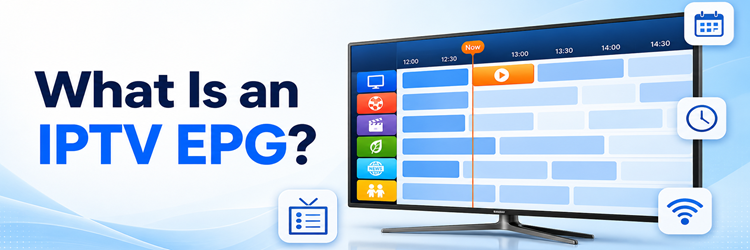
An IPTV EPG is the on-screen television schedule that tells you what is playing now, what starts next, and what is available later across a live channel lineup. EPG stands for Electronic Program Guide. It supplies the titles, times, descriptions, categories, episode details, and other metadata that turn a long IPTV channel list into a usable TV experience.
The important detail is that the guide and the video are normally separate. Your playlist or account provides the live streams, while an EPG source provides schedule data. The player downloads both, matches each guide channel to the correct stream, adjusts the times for your location, and draws the familiar grid. I will explain that complete chain in plain language, show where XMLTV, M3U, and Xtream Codes fit, and give you a practical way to diagnose blank, incorrect, or time-shifted listings. A guide works well only when its data, mapping, clock, and refresh cycle all agree.
My Quick Take on IPTV EPGs
An EPG is a schedule database displayed as a TV guide; it is not the channel stream itself. A provider or guide service supplies programme records, usually through XMLTV or an account API. Your IPTV player imports those records and maps them to channels using identifiers. When the IDs, times, and cached data are correct, you see an accurate grid. When they are not, channels may still play perfectly while the guide remains blank, shows the wrong programme, or appears several hours early or late.
Methodology and Sources
This guide combines hands-on IPTV player behaviour with the XMLTV project format, Jellyfin Live TV documentation, and the DVB Service Information specification. I checked how schedule records identify channels, store programme times, import into a player, refresh, and support browsing or recording. The focus is the common Internet-delivered EPG workflow used with M3U playlists and Xtream-style accounts, while noting how broadcast EPG data differs.
What Is an IPTV EPG?
An IPTV EPG is structured schedule information that an app turns into an interactive programme guide. Each record connects a channel identifier with a programme title, start time, end time, and optional details. Those details can include a synopsis, episode number, genre, age rating, language, cast, artwork, subtitles, and whether the show is new or previously aired.
- Now and next: The player compares programme times with the current clock to highlight what is live and what follows.
- Grid browsing: Channel rows and time columns let you scan many schedules without opening every stream.
- Programme discovery: Search, categories, favourites, reminders, and recommendations depend on clean titles and descriptive metadata.
- DVR planning: Compatible systems use guide start and stop times to schedule recordings instead of requiring manual timers.
- Catch-up navigation: Some services connect past guide entries to archived streams, but the EPG does not create catch-up content by itself.
A guide can therefore be accurate even when a stream fails, or empty when the stream plays. They are related in the interface but technically independent.
How an IPTV EPG Works From Data Feed to TV Screen
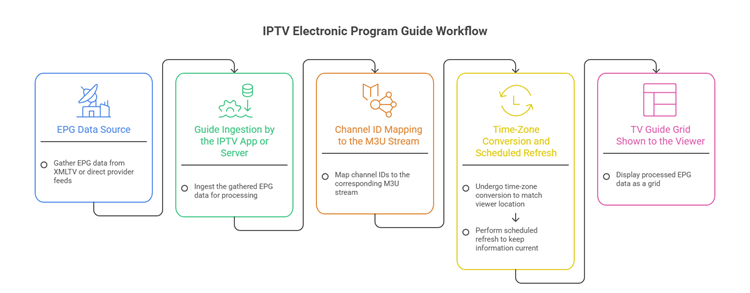
The process begins before you open the player. Broadcasters, listing suppliers, or a provider’s own system collect schedules and metadata. The provider normalises channel names, programme times, languages, and identifiers, then publishes a guide feed. Your app downloads that feed, parses its records, maps them to the live lineup, caches the result, and renders a timeline.
| EPG stage | What happens | What you see |
|---|---|---|
| Schedule collection | Programme data arrives from broadcasters, aggregators, or provider systems. | Titles, times, descriptions, and episode metadata. |
| Normalisation | Names, time zones, categories, and channel IDs are cleaned or merged. | A consistent guide across different countries and sources. |
| Delivery | The provider publishes XMLTV data or exposes guide records through an account API. | An EPG URL or automatic guide import after login. |
| Channel mapping | The player connects every guide ID with the matching live stream. | Programmes appear beside the correct channel row. |
| Cache and display | The app stores several days of data and redraws it around the current time. | A fast grid with now, next, search, and reminders. |
Refreshing repeats the delivery, mapping, and cache steps. It does not repair inaccurate source data, but it can replace an expired local copy.
XMLTV, M3U, and Xtream Codes: What Each One Does
These terms often appear together because each handles a different part of IPTV setup. M3U describes the channel lineup and stream locations. XMLTV describes schedules. An Xtream-style login can deliver channels, on-demand categories, and guide data through one account connection, although the player still treats video and metadata as different resources internally.
| Format or method | Main job | Typical details | EPG role |
|---|---|---|---|
| M3U / M3U8 | Defines playable channel entries. | Stream URL, channel name, logo, group, and often a tvg-id. | Supplies the identifier used to match a schedule. |
| XMLTV | Describes channels and programme listings. | Channel IDs, start and stop times, titles, descriptions, categories, and icons. | Provides the guide records displayed in the grid. |
| Xtream-style login | Authenticates an account and requests structured catalogues. | Server address, username, password, live groups, VOD, series, and EPG data. | Usually imports the guide automatically through the account. |
| DVB service information | Carries broadcast service and event metadata inside digital TV systems. | Services, event names, start times, durations, running status, and time offsets. | Can form the basis of a broadcast receiver’s guide. |
In XMLTV, a channel record defines an ID and display information. Each programme record refers to that ID. If the playlist says tvg-id="NewsHD.uk" but the guide uses another identifier, the player cannot join them, even when the visible channel names look alike.
What Information an IPTV Guide Can Show
A basic EPG only needs a channel, title, and time range. A richer guide can make a large lineup far easier to explore, but every extra feature depends on metadata supplied by the source and supported by the player. Two apps using the same EPG may therefore show different levels of detail.
- Schedule details: Start time, end time, duration, current progress, and upcoming programmes form the core grid.
- Editorial metadata: Descriptions, genres, seasons, episode numbers, credits, ratings, and artwork help distinguish similar titles.
- Viewer controls: Search, filters, favourites, reminders, parental controls, and personalised rows depend on how the app indexes guide records.
- Recording actions: A compatible DVR can schedule a programme, extend the end time, or organise recordings by series metadata.
- Catch-up links: Past entries may open archived playback when the provider retains the stream and the app understands the catch-up format.
The EPG describes content; it does not grant streaming rights, improve video quality, or guarantee that recording and catch-up are available.
How to Add or Refresh an EPG in an IPTV Player
Menu names vary, but the sequence is consistent. Use the EPG source supplied with an authorised subscription or legitimate listings service. Treat a private guide URL like an account credential because it may contain a username or token.
- Add the channel source: Enter the provider’s Xtream login or import the M3U playlist so the player can build the live lineup.
- Open EPG settings: Find TV Guide, Programme Guide, EPG Sources, or Playlist Settings inside the app.
- Enter the guide source: Paste the XMLTV URL when using M3U, or confirm that the account login has added one automatically.
- Assign it to the playlist: Multi-playlist apps may require you to choose which EPG source belongs to which channel list.
- Run an update: Select Refresh or Update EPG and allow the download and parsing process to finish.
- Check mapping: Open several familiar channels. Manually assign unmatched guide channels if the app supports channel mapping.
- Verify the clock: Compare one live programme with an official schedule before applying any time offset.
After the first import, most players refresh automatically. Manual updates are useful after a provider change or an obvious cache failure.
Why IPTV EPG Data Goes Missing or Shows the Wrong Time
Start with the symptom instead of reinstalling the player. A blank guide, partial grid, incorrect programmes, and fixed time shift point to different causes. Change one setting at a time, refresh, and check the same channels after each step.
| Symptom | Most likely cause | Best first check |
|---|---|---|
| Every guide row is blank | The EPG URL is missing, expired, blocked, or not assigned to the playlist. | Open EPG sources, confirm the assignment, and run one update. |
| Only some channels have listings | Playlist tvg-id values do not match XMLTV channel IDs. | Map one missing channel manually or request a corrected lineup. |
| Programmes are several hours early or late | The player, device, or source is applying the wrong time zone or duplicate offset. | Set the device region correctly and return manual EPG offset to zero. |
| The guide shows old schedules | A stale cache remains after the source stopped updating. | Clear only EPG data, then download a fresh copy. |
| Titles appear on the wrong channels | Duplicate names or incorrect automatic matching joined the wrong records. | Review channel assignments instead of changing the stream URL. |
| The update never finishes | The file is large, the device has little storage, or the server is slow. | Free space, shorten retained guide days, and retry on a stable network. |
| Guide works but a channel does not play | The schedule data is healthy, but the video stream or account has failed. | Test another stream and follow the broader IPTV fixes. |
If multiple players show the same missing listings, the source is probably incomplete. Send support the channel name, country group, device time zone, player, and test time. Never post a private EPG URL publicly.
How to Judge EPG Quality Before Choosing a Service
A provider saying “full EPG” proves very little. Test the guide during a trial on the player and device you intend to use. I would check familiar news, sport, film, children’s, and regional channels because a guide can look complete in one country group while remaining patchy elsewhere.
- Coverage: Sample channels across every language and region you watch, not only the first page of the lineup.
- Accuracy: Compare current titles and start times with an official broadcaster schedule during live viewing.
- Depth: Look for several future days, useful descriptions, episode data, genres, and consistent channel logos.
- Freshness: Refresh on two different days and confirm that future schedules continue moving forward.
- Mapping quality: Watch for blank rows, duplicated channels, generic labels, and titles assigned to the wrong regional feed.
- Player behaviour: Confirm that guide loading, search, reminders, catch-up markers, and remote navigation work smoothly on your hardware.
An accurate five-day guide is more useful than a claimed fourteen-day guide filled with gaps, placeholders, or yesterday’s data.
Top IPTV Services With Useful EPG Support
A good provider should supply guide data in a format your chosen player can import, keep channel mapping maintained, and offer a short test period. These three examples use standard account formats and make it practical to check EPG coverage on your own device before choosing a longer term.
OrigineTV
OrigineTV is a useful EPG test case because its standard account details load channels, groups, logos, and schedule data into compatible players without requiring a separate manual mapping project. I found that structure easier for a beginner to verify than a bare playlist with an unrelated guide URL.
The broad international lineup also lets you inspect guide coverage across several regions rather than judging one familiar channel. Use the trial to compare programme titles and times with official broadcaster schedules, refresh the guide twice, and confirm that the channels you actually watch remain populated.
Features
- Automatic import: Standard account credentials let compatible players request channel groups and programme data through one guided setup.
- International test range: A large regional lineup helps expose mapping gaps that a small single-country sample could hide.
- Guide verification: Familiar news, sport, and entertainment channels make schedule accuracy easier to compare with broadcaster listings.
- Device flexibility: The same authorised account format works across televisions, streaming boxes, phones, tablets, and desktop players.
- Refresh testing: A short trial gives enough time to download guide data more than once and check future listings.
- Structured categories: Organised channel groups reduce manual browsing while the EPG adds programme-level discovery inside each group.
- My take: A practical first choice for learning how automatic guide delivery should look across a broad IPTV catalogue.
Tellystudio
Tellystudio combines 45,000+ live channels and 120,000+ on-demand titles for viewers who rely on an electronic programme guide for daily navigation. Picture options reach 4K, FHD and HD streams with adaptive playback, although I find selected catch-up television more relevant to EPG accuracy.
I would compare guide entries with live broadcasts and check the next several days, using a free trial available on request. Before choosing a longer term for EPG accuracy, I would ask support one routine question, verify the cancellation wording and confirm whether the monthly price is above some budget competitors.
Features
- Live channels: 45,000+ live channels give EPG accuracy broad coverage, with selected catch-up television worth checking during the trial.
- On-demand library: 120,000+ on-demand titles add a substantial film-and-series library for EPG accuracy.
- Picture quality: Picture options for EPG accuracy include 4K, FHD and HD streams with adaptive playback.
- Device support: Compatible setups for EPG accuracy include Fire Stick, Android TV, Smart TVs, MAG, iOS and Windows.
- Trial check: A free trial available on request provides a sensible first check for EPG accuracy.
- Useful extra: For EPG accuracy, the inclusion of 24/7 English chat support adds useful depth beyond the catalogue totals.
- My take: My first step would be to compare guide entries with live broadcasts and check the next several days. I would then confirm selected catch-up television before choosing a longer term.
USA LIVE IPTV
USA LIVE IPTV provides a useful North American EPG sample because its lineup includes US, Canadian, Spanish-language, and international channel groups. That range helps reveal whether regional feeds are mapped individually or whether similar channel names have been joined to one incorrect schedule.
The service’s standard login format also makes it practical to compare the same authorised account in two compatible players. In my test plan, matching results across both apps would indicate healthy source data, while a problem in only one app would point toward local cache, mapping, or time-zone settings.
Features
- Regional coverage: US, Canadian, Latin American, and international groups provide a demanding test for channel-to-guide matching.
- Standard credentials: Compatible players can import channels and EPG data without converting the account into another format.
- Mapping checks: Similar network names across regions help identify whether each local feed carries the correct programme schedule.
- Player comparison: One authorised login can be tested in compatible apps to separate source problems from player-specific behaviour.
- Guide organisation: Categories, favourites, and programme rows make a large North American lineup easier to navigate during daily viewing.
- Household testing: Supported connection options help confirm whether guide and channel behaviour remains consistent across authorised devices.
- My take: The practical EPG test for North American households that need accurate regional mapping across a broad lineup.
Final Verdict
An IPTV EPG is the schedule layer that makes live television understandable. The video source supplies the channel; the guide source supplies programme records; and the player joins them through channel identifiers before drawing the timeline. XMLTV is the common open guide format, M3U commonly describes the streams, and an Xtream-style account can deliver both resources through one login. Once you understand that separation, most guide faults become easier to classify: blank rows usually suggest a source or mapping issue, exact hour shifts suggest time settings, and old listings suggest a stale cache.
A good guide should cover the channels you actually watch, match official schedules, refresh reliably, and remain easy to navigate on your chosen device. Test it during a trial, compare several regions and genres, and protect private guide URLs. Do not judge EPG quality by the number of future days alone. Accurate identifiers, current schedules, useful descriptions, and dependable refreshes matter far more than a long but incomplete grid.
FAQs
What does EPG mean in IPTV?
EPG means Electronic Program Guide. It is the schedule interface showing current and upcoming programmes, start times, descriptions, categories, and other metadata beside IPTV channels.
Is an EPG included inside an IPTV stream?
Usually no. The live video and guide are separate resources. A player imports both, matches guide identifiers to channels, and presents them together in one interface.
What is an XMLTV EPG?
It is guide data stored in the XMLTV format, using channel and programme records with identifiers, start and stop times, titles, descriptions, and optional metadata.
Why is my IPTV EPG blank?
The EPG source may be missing, expired, unassigned, or unable to match its channel IDs with the playlist. Confirm the source, refresh, then inspect channel mapping.
Why is my EPG showing the wrong time?
A wrong device time zone, app region, source offset, or unnecessary manual adjustment can shift every programme. Correct the device clock and reset EPG offset first.
How often should an IPTV EPG update?
Most players refresh automatically at least daily or according to app settings. Update manually after changing sources, correcting mappings, or noticing schedules that no longer advance.
Can I add my own EPG to an M3U playlist?
Yes. Add a legitimate XMLTV source in the player, assign it to your M3U playlist, refresh, and map unmatched channels where the app supports manual assignment.
Does an EPG provide catch-up TV?
No. The guide can display and open past programmes only when the provider retains authorised archive streams and the player supports that catch-up method.